Enthusiast I
May 9, 2025

Why Does Sonos Desktop Duplicate Apple Playlists?

  • May 9, 2025
  • 17 replies
  • 273 views

Hi All,

Sonos Desktop - v17.0

Sonos - S2 Build 85064200

Windows 10, Version    10.0.19045 Build 19045

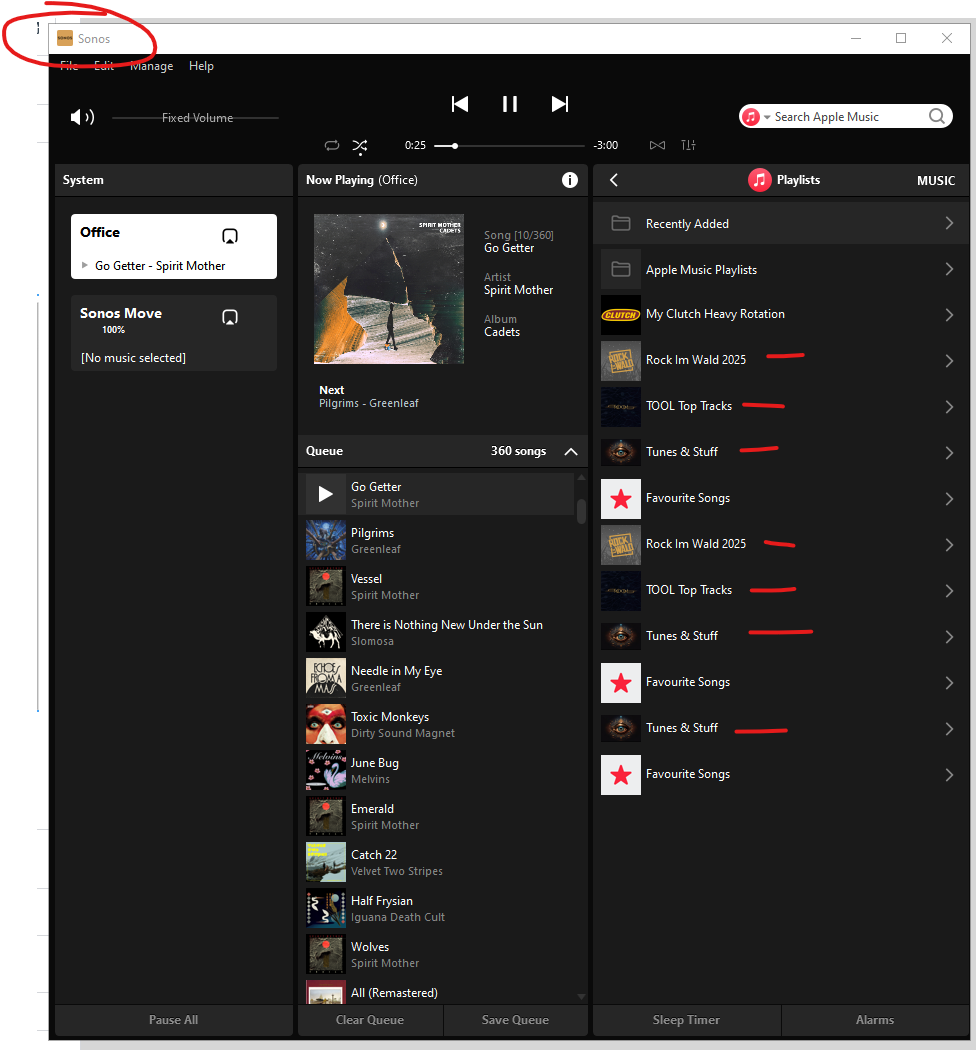
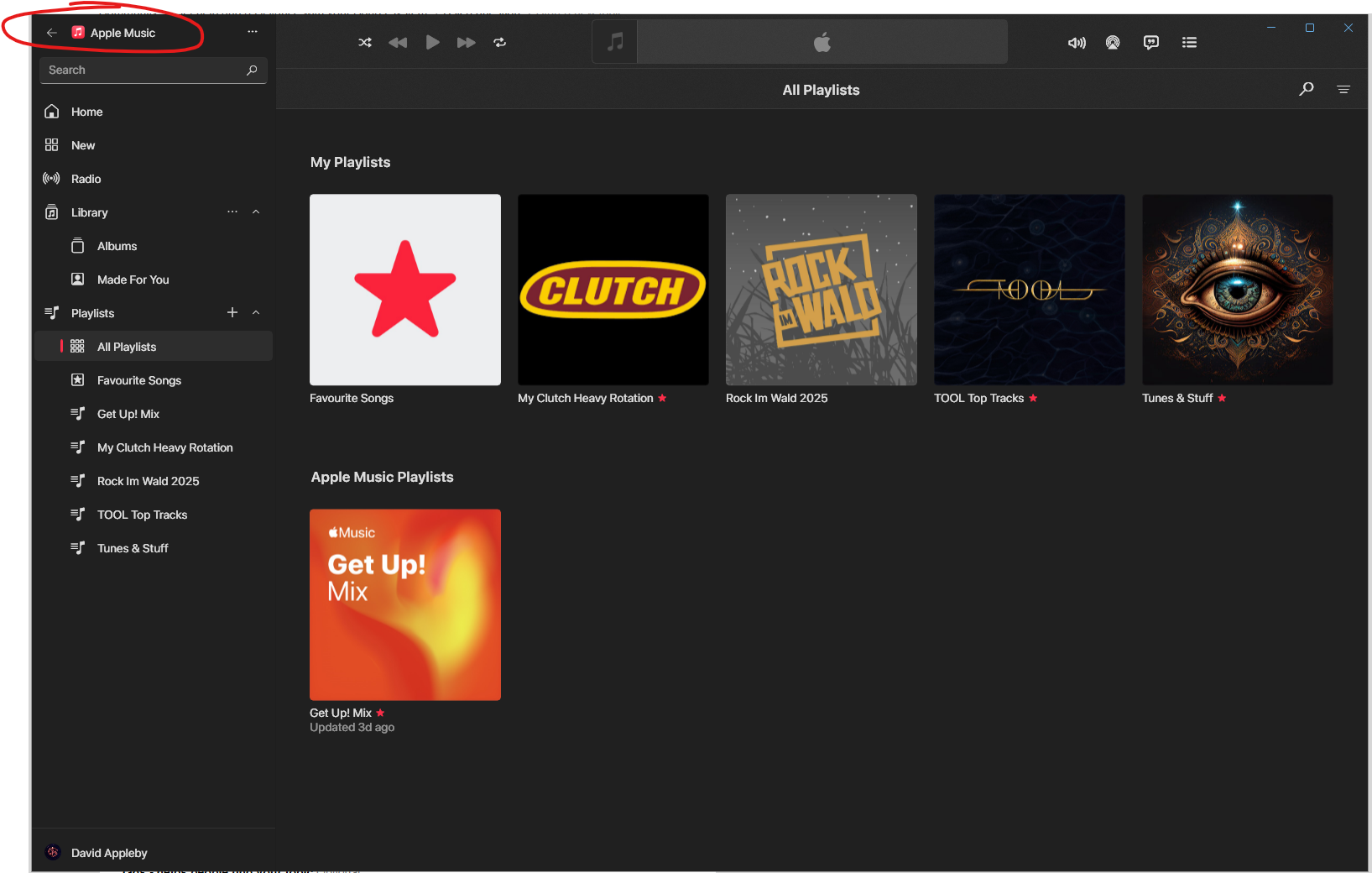
For a while now the desktop app has been duplicating playlists. All duplicates have the same content and are playable. I have tried previously to remove and re-add the playlists in Apple Music. I have deleted the service from Sonos and reconnected it also. This only happens with playlists, Apple Music albums are not duplicated. Also, the Apple own playlists do not duplcate, on the user created playlists. I have reset the controller as well as uninstalling it and reinstalling it.

Has anyone else seen this and found a fix?

Thanks


Moderator edit: Diagnostic number recorded and removed

This topic has been closed for further comments. You can use the search bar to find a similar topic, or create a new one by clicking Create Topic at the top of the page.

17 replies

controlav
Lead Maestro
May 9, 2025

The Sonos Desktop app has no actual way to create an Apple Music playlist, deliberately or accidentally. There is no API to do that.

Maybe it is displaying them twice? (Looks like it based on the screenshots).

Maybe the itunes xml file is someone duplicating them?

What do my Windows apps (see profile) show for the same items?

Author of the leading independent Sonos apps for Android, MacOS, iOS, Windows and Xbox.
Enthusiast I
May 9, 2025

The Sonos Desktop app has no actual way to create an Apple Music playlist, deliberately or accidentally. There is no API to do that. - I know.

Maybe it is displaying them twice? (Looks like it based on the screenshots). - It Is.

Maybe the itunes xml file is someone duplicating them? - Playlists are from Apple Music app, Windows and IOS Only.

What do my Windows apps (see profile) show for the same items? - There is a screenshot for the Windows Apple Music app also, no duplicates.


It’s pretty clear there is some duplication happening in the desktop app but I am unable to locate where, why and how.

Local Superstar
May 9, 2025

You probably have another copy of the iTunes playlist somewhere else that Sonos can access.

Often it is in a Recycle Bin.

Try renaming it and seeing if one is renamed or both….

Enthusiast I
May 9, 2025

You probably have another copy of the iTunes playlist somewhere else that Sonos can access.

Often it is in a Recycle Bin.

Try renaming it and seeing if one is renamed or both….


I’ve not touched iTunes in years, I only use Apple Music. When a service is added to Sonos, it is auth’d to the same account as Apple Music, which only has the individual playlists, not duplicates. That is the same email I sign in to Sonos with and is my only and primary Apple Music email address. There’s nothing in my iTunes library anyway, almost forgot how to even use it 🙂

Enthusiast I
May 9, 2025

No duplicates in iOS Apple Music either. Also, the playlist duplicates only happen in the Playlist sub menu on Sonos IOS, on the Sonos Home page (pinned collection), there are no duplicates.


Local Superstar
May 9, 2025

None of the above addresses what I've mentioned though.  Where is the library? On a PC or NAS? Maybe there's a backup folder or similar being indexed by Sonos.  Wherever Sonos is looking for the library, do a manual search on there for the library file (xml still?).

Enthusiast I
May 9, 2025

It’s not a local library, it’s simply playlists created directly on Apple Music and adding Apple Music as a service.


Local Superstar
May 9, 2025

Aah, OK, apologies. Is the ‘Music Library’ option empty?

But also, as above, if you temporarily rename a Playlist do both versions change name?

I'm not an Apple user, could there be some other Syncing going on to somewhere that contains the same content - i.e. the duplicates?

Also, if you add a track to a Playlist, does it instantly show up in the duplicate?

Enthusiast I
May 9, 2025

Music library is mapped to a local NAS but rarely used. In answer to the question, do they all update, yes, they do:


Enthusiast I
May 9, 2025

I am wondering if this has something to do with sharing the Apple playlists with other users. Does Apple Music reflect that to Sonos as a duplicate instance, to be honest that may well be the $64,000 question. I am going to delete the playlists from my other half’s phone later and see if that removes the duplicates.