Enthusiast I
May 9, 2025

Why Does Sonos Desktop Duplicate Apple Playlists?

  • May 9, 2025
  • 17 replies
  • 277 views

Hi All,

Sonos Desktop - v17.0

Sonos - S2 Build 85064200

Windows 10, Version    10.0.19045 Build 19045

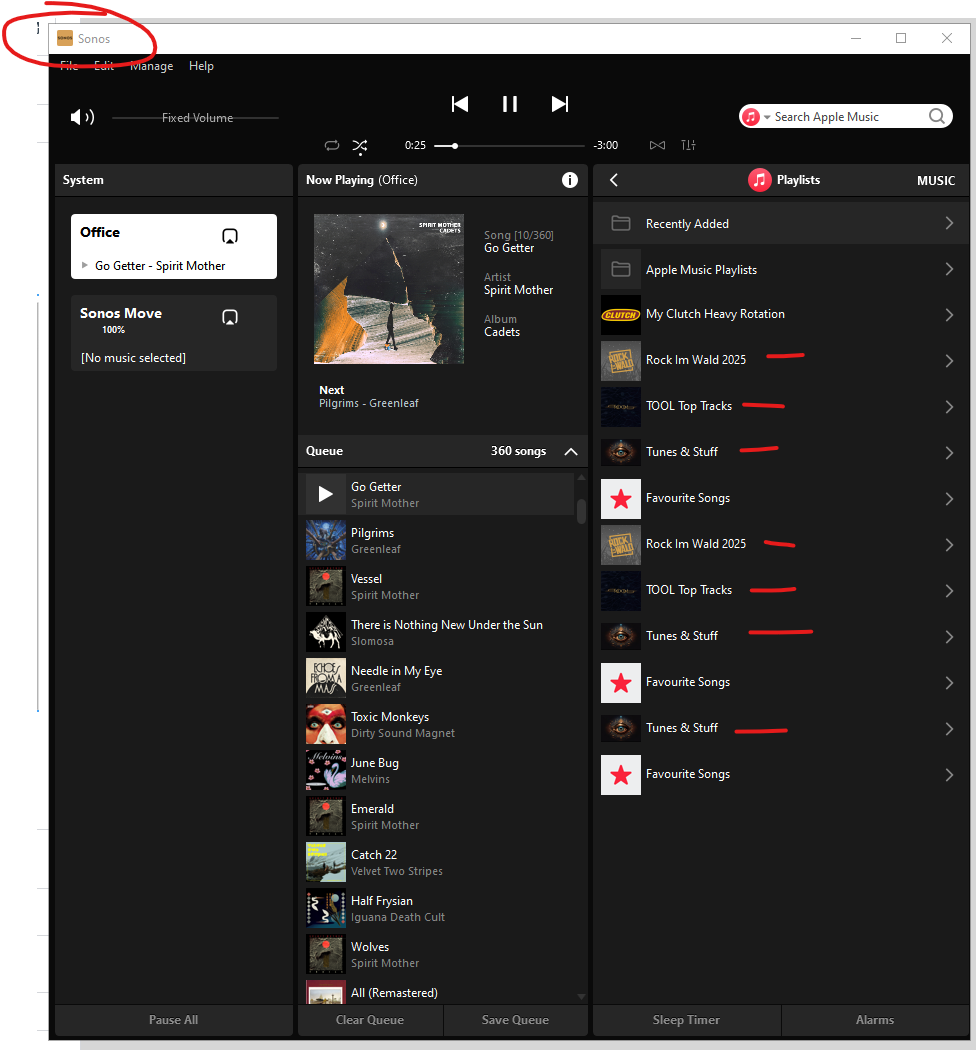
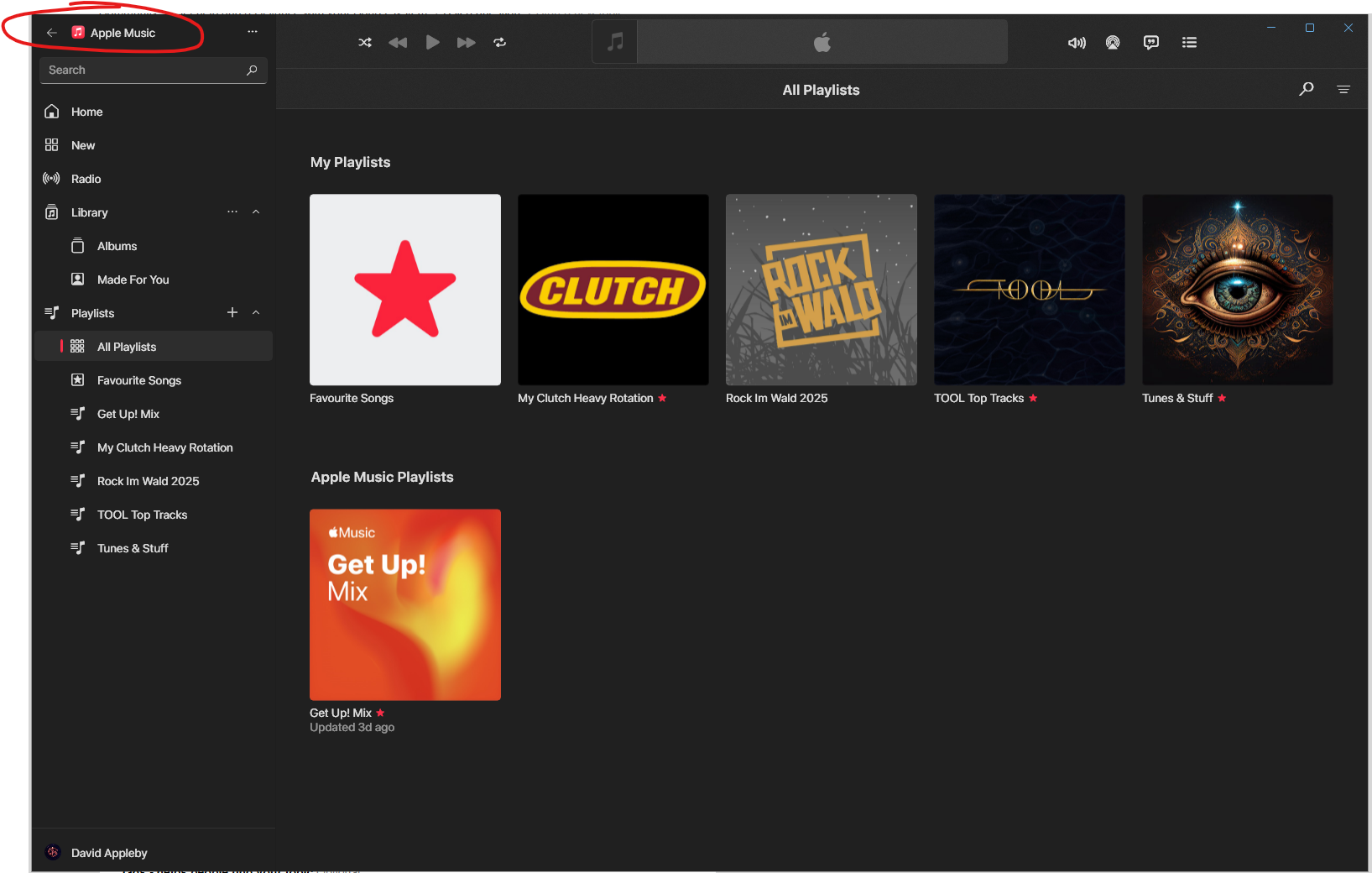
For a while now the desktop app has been duplicating playlists. All duplicates have the same content and are playable. I have tried previously to remove and re-add the playlists in Apple Music. I have deleted the service from Sonos and reconnected it also. This only happens with playlists, Apple Music albums are not duplicated. Also, the Apple own playlists do not duplcate, on the user created playlists. I have reset the controller as well as uninstalling it and reinstalling it.

Has anyone else seen this and found a fix?

Thanks


Moderator edit: Diagnostic number recorded and removed

This topic has been closed for further comments. You can use the search bar to find a similar topic, or create a new one by clicking Create Topic at the top of the page.

17 replies

controlav
Lead Maestro
May 10, 2025

As I said before, try either of my Windows apps for Sonos and see if they show there. (Not the Apple Music app). If they do, its an Apple Music service problem. If they do not, its a Sonos Desktop app bug.

Author of the leading independent Sonos apps for Android, MacOS, iOS, Windows and Xbox.
Enthusiast I
May 10, 2025

As I said before, try either of my Windows apps for Sonos and see if they show there. (Not the Apple Music app). If they do, its an Apple Music service problem. If they do not, its a Sonos Desktop app bug.


I am not sure what you mean by “my Windows apps”, I have shown above that the Windows Sonos Desktop App clearly shows the duplication that does not exist in the Windows Desktop Apple Music App. Moreover, I have shown the same duplication exists in the IOS Sonos App but does not exist in the IOS Apple Music app, so everything points to a Sonos bug or misinterpretation of information from Apple Music.

Having said that, I believe you may also be referring to the Sonos browser app (https://play.sonos.com/en-us/web-app) so also had a look there and the duplication does not exist:


So it must just be an issue wiht the Sonos Desktop App and Sonos IOS App..

I removed it, deleted the x86 program files folder and reinstalled, duplcates still come back. Deleting shares from another users phone had no effect.

controlav
Lead Maestro
May 10, 2025


I am not sure what you mean by “my Windows apps”,


I write Sonos apps - see my profile. Two of them run on Windows.

Author of the leading independent Sonos apps for Android, MacOS, iOS, Windows and Xbox.
Enthusiast I
May 11, 2025

I think I’ll stick with OEM free apps, thanks. I can see you pitched in on this Reddit thread also a year back, seems that was never resolved.

https://www.reddit.com/r/sonos/comments/1axcvln/anyone_know_why_my_sonos_app_is_doing_this_with/

Local Superstar
May 11, 2025

He isn't pushing his Apps, he's using it to try to Troubleshoot where the issue is.

Although OEM apps are still lacking in functions that they could do 12 months ago that are still supported in non-OEM apps.

Have you always had duplicates or have they appeared after a recent Update?

Enthusiast I
May 11, 2025

These duplicate playlists have been there a long time, I cannot recall when they started, I’ve just never found a fix for the issue.

Enthusiast I
May 11, 2025

I tried something else, I’m not sure what this proves / disproves but it had an interesting result. I created a playlist folder in Apple Music and moved my playlists in question into that folder. Then I re-added the Apple Music service via IOS. In IOS, the playlists are not duplicated within the playlist folder. Previously they were, see above.

In Sonos desktop, the ‘top level’ playlist section has changed but again, duplcating. However if I then go into the ‘Sonos Share’ folder, the next level down, the playlists are not duplicated.

As I said, I am not sure what this proves, but perhaps a new URL has been created and updated into the Sonos rest API (I assume that is how this works, I don’t know). No duplicates in Web app also.