This topic has been closed for further comments. You can use the search bar to find a similar topic, or create a new one by clicking Create Topic at the top of the page.
Best answer by 106rallye

Maybe call Sonos?

11 replies

Stanley_4
Grand Maestro
April 18, 2026

Is your system fully updated?

How many tracks?

What speaker are you using for the update? Do you have a more capable one available?

Is that from a desktop controller? Have you tried doing it from an app?

Have you tried refreshing your network and starting the process over?

JINN_SUNNAuthor
Contributor I
April 18, 2026

yes my system is fully updated

i have close to 1000 tracks 

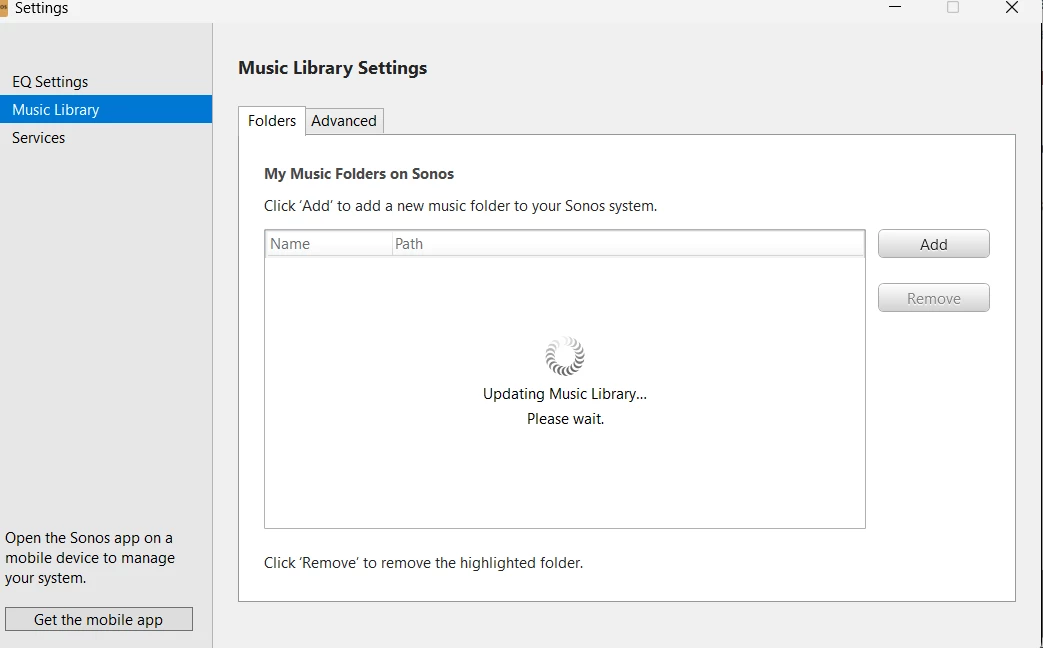
i am using desktop controller. on the app, add shared folders is grayed out 


i have always used desktop controller to add my folders 


yes i did refresh but the when i go to the app i still updating music library


i also restarted and reinstalled sonos 

JINN_SUNNAuthor
Contributor I
April 18, 2026

also i just reset my pc 

i had backed up my files on google drive and downloaded them once my reset was complete

JINN_SUNNAuthor
Contributor I
April 18, 2026

fixed i factoery reset all my speakers and reconnected them

106rallye
April 19, 2026

Good that you are okay now. Since you reset everything (resetting Sonos should only be needed when Sonos explicitly asks you to) it will forever be unclear what the real problem was.

JINN_SUNNAuthor
Contributor I
April 24, 2026

Its still happening 

106rallye
106rallyeAnswer
April 24, 2026

Maybe call Sonos?

Stanley_4
Grand Maestro
April 24, 2026

fixed i factoery reset all my speakers and reconnected them

Its still happening 

And there is why Sonos and most users here (but not idiot AI bots) tell you not to Factory Reset.

It usually makes things worse and rarely fixes anything.


When it is approriate or necessary to use it is called out as such in the Sonos documentation.

JINN_SUNNAuthor
Contributor I
April 24, 2026

Maybe call Sonos?

I will try that next

MoPac
Headliner III
April 24, 2026

yes my system is fully updated

i have close to 1000 tracks 

i am using desktop controller. on the app, add shared folders is grayed out 


i have always used desktop controller to add my folders 


yes i did refresh but the when i go to the app i still updating music library


i also restarted and reinstalled sonos 

What do you mean “add shared folder is grayed out”?