Chromatic Producer I
Aug 31, 2025 10:21 PM UTC
Answered

Unable to find radio stations I've added in Windows app

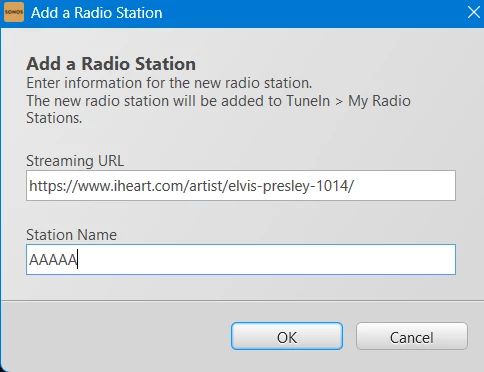
When I select Manage → Add Radio Station, I enter the radio station’s URL and give it a name.  I’ve done this several times and I cannot find the radio station afterwards!  I’ve read elsewhere that it should be in “My Radio Stations”.  Unable to find My Radio Stations.  Also unable to find radio stations after adding by searching.  I just added one and gave it a unique name AAAAA, and still cannot find it!

Where are these radio stations?


This topic has been closed for further comments. You can use the search bar to find a similar topic, or create a new one by clicking Create Topic at the top of the page.
106rallye
106rallyeAnswer
Sep 1, 2025 5:47 AM UTC

I’m not sure this still works. Since the new mobile app you need to ad stations to (new) TuneIn (after having registered for a free account).

6 replies

106rallye
106rallyeAnswer
Sep 1, 2025 5:47 AM UTC

I’m not sure this still works. Since the new mobile app you need to ad stations to (new) TuneIn (after having registered for a free account).

Translate
Chromatic Producer I
Sep 1, 2025 12:14 PM UTC

I’m not sure this still works. Since the new mobile app you need to ad stations to (new) TuneIn (after having registered for a free account).


How can a company that makes such great speakers make such crappy software!

Translate
controlav
Lead Maestro
Sep 1, 2025 12:38 PM UTC

Stations added this way are only visible in TuneIn (Classic), but Sonos hide that service on their S2 apps these days. HOWEVER, if you use a third party app, many still offer TuneIn (Classic) and you can still play your custom stations. All of my player apps (see profile) do this, for example.

Translate
Author of the leading independent Sonos apps for Android, MacOS, iOS, Windows and Xbox.
Chromatic Producer I
Sep 1, 2025 12:41 PM UTC

Stations added this way are only visible in TuneIn (Classic), but Sonos hide that service on their S2 apps these days. HOWEVER, if you use a third party app, many still offer TuneIn (Classic) and you can still play your custom stations. All of my player apps (see profile) do this, for example.


Thanks, but I was trying to get a radio station working with the Hubitat Sonos integration.

Translate
controlav
Lead Maestro
Sep 2, 2025 1:35 PM UTC

Stations added this way are only visible in TuneIn (Classic), but Sonos hide that service on their S2 apps these days. HOWEVER, if you use a third party app, many still offer TuneIn (Classic) and you can still play your custom stations. All of my player apps (see profile) do this, for example.


Thanks, but I was trying to get a radio station working with the Hubitat Sonos integration.

I was going to say use my app to turn the newly-created radio station into a Favorite, so that simpler integrations could use it, but I seem to have a bug and I don’t allow stations to be Favorited. Oops.

Translate
Author of the leading independent Sonos apps for Android, MacOS, iOS, Windows and Xbox.
Chromatic Producer I
Sep 2, 2025 1:38 PM UTC

Stations added this way are only visible in TuneIn (Classic), but Sonos hide that service on their S2 apps these days. HOWEVER, if you use a third party app, many still offer TuneIn (Classic) and you can still play your custom stations. All of my player apps (see profile) do this, for example.


Thanks, but I was trying to get a radio station working with the Hubitat Sonos integration.

I was going to say use my app to turn the newly-created radio station into a Favorite, so that simpler integrations could use it, but I seem to have a bug and I don’t allow stations to be Favorited. Oops.


Thanks.  I ultimately found that Sonos no longer supports manually adding URL’s.  There’s an option to do it, but others have told me it is no longer supported.  I found I can add a radio station such as a Pandora station to favorites, then add it to the Hubitat favorites.

Sonos is almost as bad as Microsoft!

Translate