
Contributor I
December 5, 2020
Answered

Sonos won't or can't add my NAS music library (WD MyCloud)

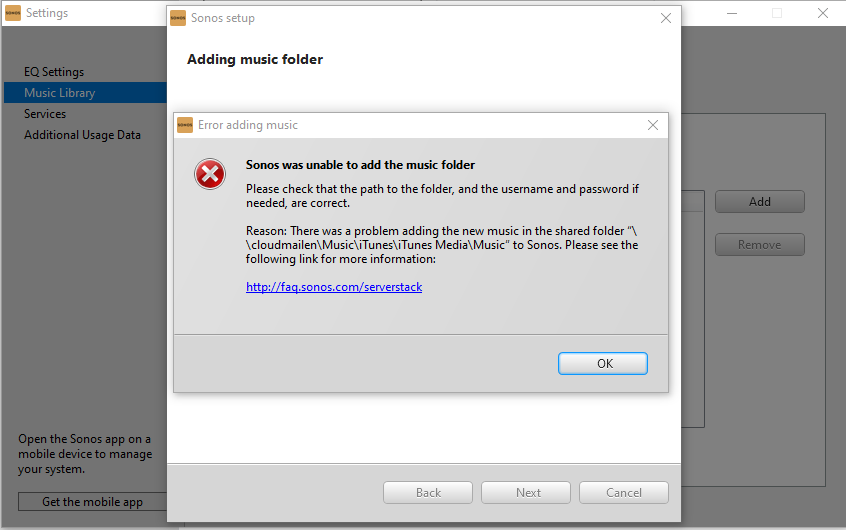
Sonos had my Music Library added for years off my WD MyCloud NAS drive and now (either after the Sonos update or an update to MyCloud; they both happened at the same time) Sonos won’t add the library. it gives me an error.

I’ve tried following instructions on the link but it has no impact.


This was working and now it isn't with no affect from me
 

This topic has been closed for further comments. You can use the search bar to find a similar topic, or create a new one by clicking Create Topic at the top of the page.
Airgetlam
AirgetlamAnswer
December 13, 2020

In the new interface, choose settings. Then, choose network on the left, and scroll down to Windows Services, and use the SMB protocol to pull down and choose SMB 1 SMB 2 SMB 3. 

I’ve attached pictures to show my settings. They work for me, I continue to have access to the music files stored on my WD NAS. 

Bruce

14 replies

December 5, 2020

The update for WD MyCloud disabled SMBv1 sharing protocol, which Sonos still requires.  You need to re-enable it to use your Sonos Music Library.

PhsytAuthor
Contributor I
December 5, 2020

The update for WD MyCloud disabled SMBv1 sharing protocol, which Sonos still requires.  You need to re-enable it to use your Sonos Music Library.

Thanks for your quick reply John. That is what i feared, but was hoping for a more favorable answer.

Sonos either need to update their security protocols to a more current one, or WD need to allow the SMBv1. i’ll check with WD


thanks again!

December 5, 2020

I am sure you can re-enable yourself, but I can’t remember how (sorry).  I think it is just a setting that has been reset, not a fundamental removal.  And as you say, it isn’t an ideal choice to have to make.

Lyricist I
December 13, 2020

I believe that I have exactly the same issue.

I have no issues with the combination of sonos app and WD my cloud in years. Recently WD my cloud updated its firmware to version 5.0, and then the original setting between sonos app and old WD my cloud was disabled and I cannot add my music folder on WD my cloud NAS to sonos as the source of sonos music library anymore. Error code is 900. 

I am re-setting that via both Mac OS X and Windows10. However it does not work either. 

I hope someone could share his experience or hint about the issue.


Airgetlam
December 13, 2020

I had the update to the WD firmware as well. All that I needed to do was reenable SMB v1 and it worked perfectly.

Bruce
Lyricist I
December 13, 2020

HI Airgetlam,

Thank you very much for sharing your idea. I tried to change to SMB v1 from SMB 3 which is an initial setting of WD firmware 5.0. I did not re-boot WD my cloud though, is re-boot is needed? Also, even with Mac OS X, setting to SMB v1 is required? 

If you could share me a little more what you exactly did, that would be very much appreciated. 

Contributor I
December 13, 2020

Hi all, it would seem that I've got the same issue. I have looked through the My Cloud settings and i cannot see anything referring to SMB. What is it and how do I make this change back to v1? Regards 

Airgetlam
AirgetlamAnswer
December 13, 2020

In the new interface, choose settings. Then, choose network on the left, and scroll down to Windows Services, and use the SMB protocol to pull down and choose SMB 1 SMB 2 SMB 3. 

I’ve attached pictures to show my settings. They work for me, I continue to have access to the music files stored on my WD NAS. 

Bruce
Contributor I
December 13, 2020

Hi Airgetlam,

That seems to have worked. Thanks you so much. I thought it was an issue with sonos S1. 

Thanks again 

Lyricist II
March 22, 2021

In the new interface, choose settings. Then, choose network on the left, and scroll down to Windows Services, and use the SMB protocol to pull down and choose SMB 1 SMB 2 SMB 3. 

I’ve attached pictures to show my settings. They work for me, I continue to have access to the music files stored on my WD NAS. 

Hi Airgetlam

You are a legend!! After 2 hours on the phone with Sonos support this afternoon, I have applied your fix and all is back working again!!

Many, many thanks!