Trending Lyricist I
September 16, 2021
Answered

Sonos S1 has suddenly lost my music "The computer [name] cannot be found" whilst in use

Out of the blue my Sonos S1 controller has lost my music.

Nothing changed, the computer hadn’t been changed in any way, no settings changed, no software installed, I simply chose a different album to play and it’s all gone.

I tried adding the music folders again and still get the “computer cannot be found” error despite it being the computer that’s running the Sonos app!

I’ve had a look on the forum and there’s lots about people making changes then losing their music but I haven’t found one like mine where nothing changed, it was running then it simply lost everything.

I uninstalled and reinstalled the Sonos S1 app, rebooted the router and the Sonos Bridge, checked the firewall settings before I uninstalled it and it set the firewall settings again for the fresh install so I know that’s not the problem.

Windows 10 hasn’t updated, so I can see no reason at all for this to have happened.

I’d appreciate any help I can get with this before I chuck the lot on eBay and get blue tooth speakers instead, thanking my lucky stars I didn’t spend more money on upgrading my Sonos kit!

This topic has been closed for further comments. You can use the search bar to find a similar topic, or create a new one by clicking Create Topic at the top of the page.
Corry P
Corry PAnswer
Sonos Staff
September 22, 2021

Hi @MDN2020 

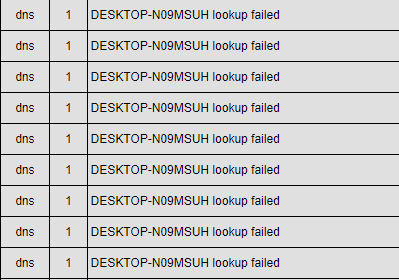
Thanks for sharing another diagnostic. In fact, I’m going to share part of this one back to you:

As you can see, the speakers are unable to find DESKTOP-N09MSUH on the network. While I appreciate that this must be annoying for you, the fix is not going to be with us. Which is to say, there is no option or configuration on the Sonos system to make a PC on the network respond when it doesn’t “want” to, or doesn’t broadcast it’s presence the way it should. 

One possibility is that the log messages I would normally see reporting a DNS highjack performed by your ISP TalkTalk have been erased to make room for further messaging. If this is the case, just clicking on this link once will fix the issue permanently: http://www.talktalk.co.uk/optout

If this doesn’t help, and if you have a second computer in the house, I recommend testing having the music library stored on that other computer instead. If the issue still arises, then it’s likely something is wrong with your network. A router replacement may be needed, or just some settings adjusted (though I can’t think which settings). Or, it could be third-party software that the two computers share. If the second computer works without issue, then it’s again clear where the issue lies.

"Common sense is the collection of prejudices acquired by age eighteen." - Albert Einstein

30 replies

Corry P
Sonos Staff
September 20, 2021

Hi @MDN2020 

Ironically, Windows 10 works the other way round - Shutdown actually hibernates the PC after closing applications (saves the memory state and turns off, only to reload the memory state later to improve boot times), whereas Restart will make the PC close down the Windows session and restart the next from scratch. So, on a Windows 10 PC, Shutdown only resets the hardware, whereas Restart resets the Operating System.

Sleep mode does none of this, of course.

"Common sense is the collection of prejudices acquired by age eighteen." - Albert Einstein
MDN2020Author
Trending Lyricist I
September 22, 2021

@Corry P 

It’s done it again. All I did was press play.

Diagnostics are here: 1788140190

There has to be a better solution than me having to reboot everything as this would appear to be an issue that’s going to keep on happening, i.e. Sonos need to come up with a solution.

Corry P
Corry PAnswer
Sonos Staff
September 22, 2021

Hi @MDN2020 

Thanks for sharing another diagnostic. In fact, I’m going to share part of this one back to you:

As you can see, the speakers are unable to find DESKTOP-N09MSUH on the network. While I appreciate that this must be annoying for you, the fix is not going to be with us. Which is to say, there is no option or configuration on the Sonos system to make a PC on the network respond when it doesn’t “want” to, or doesn’t broadcast it’s presence the way it should. 

One possibility is that the log messages I would normally see reporting a DNS highjack performed by your ISP TalkTalk have been erased to make room for further messaging. If this is the case, just clicking on this link once will fix the issue permanently: http://www.talktalk.co.uk/optout

If this doesn’t help, and if you have a second computer in the house, I recommend testing having the music library stored on that other computer instead. If the issue still arises, then it’s likely something is wrong with your network. A router replacement may be needed, or just some settings adjusted (though I can’t think which settings). Or, it could be third-party software that the two computers share. If the second computer works without issue, then it’s again clear where the issue lies.

"Common sense is the collection of prejudices acquired by age eighteen." - Albert Einstein
MDN2020Author
Trending Lyricist I
September 22, 2021

@Corry P 

As I had washing to hang out (I’m soooo Rock n’ Roll) I thought I’d try turning the router off and back on when I’d finished… normal service has been resumed.

I’ve also followed the link and opted out of the TalkTalk error replacement service, so we’ll see how it goes.

I’m still baffled as to why this has happened. I’ve had the same set-up for several years having bought the PC in 2018 and already had. TalkTalk although the current router was part of an upgrade in 2019 but that’s still over 2 years ago. The Play:5s are more recent, Dec-19, but still a long time ago.

I did take the precaution of creating a new Windows Recovery drive yesterday, whilst everything was working, so I can revert back to whatever the settings were that worked.


Airgetlam
September 22, 2021

Note that manufacturers of routers (and frankly, many other devices) tend to update the software without notifying you. So while you may have owned that router for years, the chances that it has been running the same software all the time is slim, albeit not zero. It’s entirely possible that they pushed an update that ‘broke’ the way the Sonos was using for connection. Something I’ve dealt with on my Netgear router, my Vizio TV, and my WD MyCloud NAS at various times….

Bruce
MDN2020Author
Trending Lyricist I
September 22, 2021

@Airgetlam 

Fingers crossed it’s not going to be a regular occurrence as there’re multiple software updates involved between the speakers, controller, Windows and router.

As it hasn’t happened before, I’m hoping it’s now stable. We’ll see.

Thanks for all the info. Better informed is never a bad thing.

MDN2020Author
Trending Lyricist I
September 25, 2021

@Corry P 

It’s happening every day.

Last night I left the PC on so there was no change from when it was working yesterday. This morning, it can’t find music on the PC the software’s running on, again, until the router is rebooted.

Nothing changed, it wasn’t turned off, didn’t go to sleep and still can’t find it, so it was nothing to do with TalkTalk’s settings.

Diagnostic report is: 449025794


Corry P
Sonos Staff
September 27, 2021

Hi @MDN2020 

I think at this point I’d want to remotely connect to your computer to investigate. It’s not an option for me, but I think your getting in touch with our technical support team might be the way to go.

I’m still seeing local name resolution failing - can you try removing the path from Sonos’ Music Library and adding the PC as a network location instead, using the PC’s IP address instead of it’s network name? That might make the whole name resolution issue immaterial.

As the speakers are reporting non-local DNS resolution issues too, I’m inclined to blame your router for all of this - it might be misconfigured, but I think it also might just be defective. Certainly a swap would let us know one way or the other.

"Common sense is the collection of prejudices acquired by age eighteen." - Albert Einstein
MDN2020Author
Trending Lyricist I
September 27, 2021

@Corry P 

I pretty quickly worked out I have no idea how to add the PC and drive via its IP address…

Today, it’s behaved itself. I don’t know if this is because I connected another pair of speakers that I don’t often use Friday evening, and disconnected them Saturday evening? It was happily playing my music through them on Friday evening but not Saturday morning, although the streaming services were working.

I guess I need to wait for it to lose my music again and then get hold of your technical support team?


Corry P
Sonos Staff
September 27, 2021

Hi @MDN2020 

Apologies - I should have provided more detail.

First, remove the existing path for your music share from the Sonos app. Then, please open Windows’ File Explorer and navigate to “Network” then DESKTOP-N09MSUH, then find the music folder and enter it. Click on the path in the address bar between the main window and the tool/menu bar and copy the full path.

Now, follow the steps on our Add your music library to Sonos page, but at step 4 choose to add a network folder and paste the path in. Replace DESKTOP-N09MSUH with the IP address of the computer (here’s how to find it).

If this doesn’t work, there are a few reasons why this could be and it would be best for one of our agents to explore why. And yes, please wait until you can no longer access your music and then call (not chat with) our technical support team.

"Common sense is the collection of prejudices acquired by age eighteen." - Albert Einstein