Trending Lyricist I
September 16, 2021
Answered

Sonos S1 has suddenly lost my music "The computer [name] cannot be found" whilst in use

Out of the blue my Sonos S1 controller has lost my music.

Nothing changed, the computer hadn’t been changed in any way, no settings changed, no software installed, I simply chose a different album to play and it’s all gone.

I tried adding the music folders again and still get the “computer cannot be found” error despite it being the computer that’s running the Sonos app!

I’ve had a look on the forum and there’s lots about people making changes then losing their music but I haven’t found one like mine where nothing changed, it was running then it simply lost everything.

I uninstalled and reinstalled the Sonos S1 app, rebooted the router and the Sonos Bridge, checked the firewall settings before I uninstalled it and it set the firewall settings again for the fresh install so I know that’s not the problem.

Windows 10 hasn’t updated, so I can see no reason at all for this to have happened.

I’d appreciate any help I can get with this before I chuck the lot on eBay and get blue tooth speakers instead, thanking my lucky stars I didn’t spend more money on upgrading my Sonos kit!

This topic has been closed for further comments. You can use the search bar to find a similar topic, or create a new one by clicking Create Topic at the top of the page.
Corry P
Corry PAnswer
Sonos Staff
September 22, 2021

Hi @MDN2020 

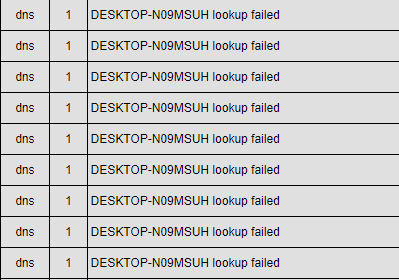
Thanks for sharing another diagnostic. In fact, I’m going to share part of this one back to you:

As you can see, the speakers are unable to find DESKTOP-N09MSUH on the network. While I appreciate that this must be annoying for you, the fix is not going to be with us. Which is to say, there is no option or configuration on the Sonos system to make a PC on the network respond when it doesn’t “want” to, or doesn’t broadcast it’s presence the way it should. 

One possibility is that the log messages I would normally see reporting a DNS highjack performed by your ISP TalkTalk have been erased to make room for further messaging. If this is the case, just clicking on this link once will fix the issue permanently: http://www.talktalk.co.uk/optout

If this doesn’t help, and if you have a second computer in the house, I recommend testing having the music library stored on that other computer instead. If the issue still arises, then it’s likely something is wrong with your network. A router replacement may be needed, or just some settings adjusted (though I can’t think which settings). Or, it could be third-party software that the two computers share. If the second computer works without issue, then it’s again clear where the issue lies.

"Common sense is the collection of prejudices acquired by age eighteen." - Albert Einstein

30 replies

MDN2020Author
Trending Lyricist I
September 16, 2021

@Airgetlam 


By “client files” I’m talking about actual clients - I’m an independent Asset Management consultant (physical assets, not financial assets) - so they’re in the cloud as I cannot have them affected by a PC crash/dying.

MDN2020Author
Trending Lyricist I
September 16, 2021

@Airgetlam 

Thanks for that.

I haven’t had any issues up until now, but this is about as bad an issue as you can get, so haven’t had to seek support before.

I wondered how to get Sonos to take a look. Seems I just have to wait til they pick this up.

Airgetlam
September 16, 2021

Indeed you will, although I’d expect not longer than 24 hours. I think (not 100% sure) that most of the forum moderators are in the EU, so it may be past the end of their day at this point, in which case they’ll catch it in the morning.

I think there’s other moderators that have ability to moderate only, just don’t have access to diagnostics, who work more around the clock, so we’re not inundated by spam posts in the forum. :)

Bruce
Corry P
Sonos Staff
September 17, 2021

Hi @MDN2020

Welcome to the Sonos Community!

Your Sonos speaker is attempting to resolve the IP address of your computer and is failing to do so.

I recommend you reboot your router, then reboot the computer, then reboot the Sonos system.

Try updating the music library again, and if it doesn’t work then I recommend you get in touch with our technical support team directly, who will assist you.


"Common sense is the collection of prejudices acquired by age eighteen." - Albert Einstein
MDN2020Author
Trending Lyricist I
September 17, 2021

@Corry P 

Thanks for the information. Hopefully that will work.

Any idea why this happened?

I’ll have to try this out later as I can’t reboot my PC in the middle of my working day but my concern is this happened without any changes being made at all, just selecting a different album, so will this now happen every time I select a different album or song? That’s clearly not a desirable outcome.

Corry P
Sonos Staff
September 17, 2021

Hi @MDN2020 

At a guess, I would say either the computer isn’t responding to a NetBIOS query, or the router isn’t passing the query along to the computer. Rebooting everything should help.

It has nothing to do with your selection of music (other that it being from the Music Library) - the issue is actually first happening when the Sonos device currently associated with your controller app (Office) attempts to mount the network path to your music folder prior to scanning it. You only see the error when attempting to play from the Music Library, when it tries again to mount the path and fails. This time, however, it reports the issue to you. Once the issue is cleared, if one track plays they all will (assuming the format is supported, of course).

As to why this has happened, it could be a memory leak or similar issue in the router software, Windows software, or our own Linux kernel. It could even be the result of a supernova in a distant part of the universe. No, really:


"Common sense is the collection of prejudices acquired by age eighteen." - Albert Einstein
MDN2020Author
Trending Lyricist I
September 17, 2021

@Corry P 

Awesome response :grinning:

I’m so glad I asked.

Fingers crossed the series of reboots works and there are no more glitches or significant cosmic events...

MDN2020Author
Trending Lyricist I
September 20, 2021

@Corry P 

Well… I didn’t do all the rebooting as I had a rather busy weekend, so used my Mixcloud/ Soundcloud/ Spotify/ Amazon etc. playlists, until this morning.

As I’d connected and used different speakers over the weekend and rebooted the router - which I’d tried last week to no effect - I thought I’d have one last try at getting it to see my own music library.

It worked. So it stopped for no apparent reason and it’s started working again for no apparent reason.

This does not leave me with a warm and fuzzy feeling that it’s going to remain that way, as I have no idea why it stopped working or why it started again, but it’s OK for now and, as a wise man once said, “If it ain’t broke, don’t fix it,” so I’m going to leave it alone.

Perhaps the volcano erupting in the Canary Isles fixed it vs. a cosmic event? 

Corry P
Sonos Staff
September 20, 2021

Hi @MDN2020 

Volcanos are known for it :grin:

I’m glad to hear you’ve got it working again. At a guess, maybe you didn’t turn off the router for long enough last time? It sounds weird to say so, I know, but the capacitors found in power supplies for electronic equipment can actually hold enough charge to keep some of the internal components powered for many seconds after the mains power is removed.

"Common sense is the collection of prejudices acquired by age eighteen." - Albert Einstein
MDN2020Author
Trending Lyricist I
September 20, 2021

@Corry P 

My PC was in sleep mode over the weekend, not off, so I’m not sure any of it would have fully powered down - I don’t use “restart” for exactly the reason you mentioned, I shutdown, make a coffee, then start-up.

I used my mobile to access the playlists over the weekend.

At least it’s back up and running, for now...