Trending Lyricist I
September 16, 2021
Answered

Sonos S1 has suddenly lost my music "The computer [name] cannot be found" whilst in use

Out of the blue my Sonos S1 controller has lost my music.

Nothing changed, the computer hadn’t been changed in any way, no settings changed, no software installed, I simply chose a different album to play and it’s all gone.

I tried adding the music folders again and still get the “computer cannot be found” error despite it being the computer that’s running the Sonos app!

I’ve had a look on the forum and there’s lots about people making changes then losing their music but I haven’t found one like mine where nothing changed, it was running then it simply lost everything.

I uninstalled and reinstalled the Sonos S1 app, rebooted the router and the Sonos Bridge, checked the firewall settings before I uninstalled it and it set the firewall settings again for the fresh install so I know that’s not the problem.

Windows 10 hasn’t updated, so I can see no reason at all for this to have happened.

I’d appreciate any help I can get with this before I chuck the lot on eBay and get blue tooth speakers instead, thanking my lucky stars I didn’t spend more money on upgrading my Sonos kit!

This topic has been closed for further comments. You can use the search bar to find a similar topic, or create a new one by clicking Create Topic at the top of the page.
Corry P
Corry PAnswer
Sonos Staff
September 22, 2021

Hi @MDN2020 

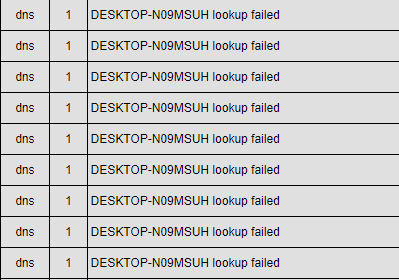
Thanks for sharing another diagnostic. In fact, I’m going to share part of this one back to you:

As you can see, the speakers are unable to find DESKTOP-N09MSUH on the network. While I appreciate that this must be annoying for you, the fix is not going to be with us. Which is to say, there is no option or configuration on the Sonos system to make a PC on the network respond when it doesn’t “want” to, or doesn’t broadcast it’s presence the way it should. 

One possibility is that the log messages I would normally see reporting a DNS highjack performed by your ISP TalkTalk have been erased to make room for further messaging. If this is the case, just clicking on this link once will fix the issue permanently: http://www.talktalk.co.uk/optout

If this doesn’t help, and if you have a second computer in the house, I recommend testing having the music library stored on that other computer instead. If the issue still arises, then it’s likely something is wrong with your network. A router replacement may be needed, or just some settings adjusted (though I can’t think which settings). Or, it could be third-party software that the two computers share. If the second computer works without issue, then it’s again clear where the issue lies.

"Common sense is the collection of prejudices acquired by age eighteen." - Albert Einstein

30 replies

controlav
Lead Maestro
September 16, 2021

Are you running the S1 app on the same PC that contains your music?

If not: if something changed with your WiFi it could be considered “public” by Windows, and it needs to be marked “private” by Windows in order for other devices to see it.

If same PC: we’ll need some more information about your network configuration. What devices, how they are connected, etc. Also what firewall is on the file-hosting PC.


Author of the leading independent Sonos apps for Android, MacOS, iOS, Windows and Xbox.
MDN2020Author
Trending Lyricist I
September 16, 2021

Yes. Sonos S1 is running on the same PC that my music is plugged into.


Absolutely nothing has changed, I just wanted to play a different album and now I can’t play anything other than streaming services which eliminates any WiFi issues.


I submitted a diagnostic report: 1691941597


From other posts on this forum this is far from an isolated incident, loads of people are having the same problem. Nothing changes yet Sonos loses all your music and refuses to recognise the computer it’s actually running on!


Device name    DESKTOP-N09MSUH
Processor    Intel(R) Core(TM) i5-4310M CPU @ 2.70GHz   2.70 GHz
Installed RAM    16.0 GB
System type    64-bit operating system, x64-based processor

Edition    Windows 10 Pro
Version    21H1
Installed on    ‎29/‎05/‎2020
OS build    19043.1165
Experience    Windows Feature Experience Pack 120.2212.3530.0
 

Network is and always has been set to private.

The firewall wasn’t changed and was correctly set-up again by the Sonos app itself when I reinstalled it.

All the Sonos devices (Play:1, 3, 5 & bridge) were plugged in and connected. Sonos didn’t lose their connections. I’m running the S1 controller because neither the Play:5s nor bridge are compatible with S2.


Nothing changed with the WiFi. I work from home and all my Google Drive and One Drive connections, Teams etc. remain logged in.

Ken_Griffiths
September 16, 2021

@MDN2020,

Perhaps see if these Support links help you to resolve the issue:

https://support.sonos.com/s/article/813

https://support.sonos.com/s/article/688


Removing & Re-Adding Music Library:

https://support.sonos.com/s/article/3206

https://support.sonos.com/s/article/257
 

Airgetlam
September 16, 2021

“ same PC that my music is plugged into” leads me to think we’re dealing with an NAS of some type, which certainly might have had an OS update to it that turned off SMB v1 and NTML v1.

Where, precisely, is your music stored?

Bruce
MDN2020Author
Trending Lyricist I
September 16, 2021

@Ken_Griffiths 

Thanks chap but I tried those:

https://support.sonos.com/s/article/813 - I already did that, despite the fact that nothing had changed and nothing had changed, all the settings were exactly as they should have been and still are.

https://support.sonos.com/s/article/688 - that’s the same as the link above.

https://support.sonos.com/s/article/3206 - already tried that. The S1 controller just says the computer that it’s running on isn’t there…

https://support.sonos.com/s/article/257 - that was the first thing I tried that but it says the computer that it’s running on can’t be found…


I have no idea what’s going on. If I’d changed something, I could try to reset it or something but I rebooted the PC, reinstalled Sonos S1 and it did exactly the same thing.

It will happily play any of the streams from Amazon Music, Spotify, Mixcloud, Soundcloud, internet radio etc. but it point blank refuses to play my music, most of which is FLAC, far superior sound quality to streaming services, which is why I got Sonos kit in the first place rather than bluetooth.


MDN2020Author
Trending Lyricist I
September 16, 2021

@Airgetlam 

OK. That went way over my head but you clearly know more about the drivers and hardware than I do, so keep asking baffling questions and we might get somewhere :slight_smile:

Is that something that could have happened without me doing anything to allow it to happen? If windows updates, it does it in the wee small hours, not the middle of my working day.

My music is on an external SSD - I had a hard disc drive in my old Mac fail on me when I was in the midst of reorganising, so everything but my music was on external drives. After that, I got an external SSD as they’re far more robust and I can take my tunes with me if I’m away - which hasn’t happened since Jan-20, so it’s been plugged into the same USB 3.0 port for 21 months.

All my client files are backed up to Google Drive, One Drive and a MicroSD card, with a 256Gb SSD as the PC memory - after learning a harsh lesson when that HDD failed, everything is solid state.

Airgetlam
September 16, 2021

No worries, I agree if we all keep talking, we’ll get to an understanding.

NAS drives frequently (as do many other electronic devices) update themselves without significant notification to you. I’ve had the case where my Western Digital “MyCloud” device updated itself, and wiped out the settings I’d done in order to have it work with Sonos...and had my TV once do a similar reset, again without my express knowedge/consent.

But if this is merely an SSD, seen as a named drive on your windows machine, and not, say, a “Buffalo/Western Digital/Synology/other manufacturer of NAS equipment”, it’s unlikely to be that issue. Which is unfortunate, as it certainly shows all the hallmarks of that particular issue, and might be an easy fix.

Where your client files exist, if I understand what you mean by “client” doesn’t make any difference. We’re worried only about the Sonos.exe and the location of the music files that the Sonos speakers are trying to get access to. As long as they’re on the SSD, and not in the One drive, we should be able to figure this out. 

I feel your pain with HDD failure, too. It’s one of those things I’m fairly, but not enough, careful with. The more SSDs I can have (although they’re also susceptible to failure, just not as much) , the better. There’s a lot of pain when data is lost. 


Bruce
MDN2020Author
Trending Lyricist I
September 16, 2021

@Airgetlam 


I don’t know if this has any bearing on it but I can still play music stored on my phone’s 128Gb MicroSD (Galaxy S7) through the S1 app.

MDN2020Author
Trending Lyricist I
September 16, 2021

@Airgetlam 


I also tried accessing the Music folder on the PC’s internal SSD, as it’s the default option in the Sonos app, but it still returned the same error message that it couldn’t find the PC.

Airgetlam
September 16, 2021

Unfortunately, no, there’s no real relationship. In that particular use case, Sonos is using the Galaxy as an NAS, and accessing the music that way. Just gives us confirmation that the Sonos software is working, but not much as to why the speaker is not able to ‘see’ the music on your SSD.  Hopefully, a Sonos rep will be along to look at your diagnostic, and give us more data about exactly why it’s failing. We just need some patience :)

Bruce