
Contributor II
May 1, 2023
Answered

Sonos cannot index USB drive on TP-Link Router

  • May 1, 2023
  • 32 replies
  • 1283 views

Is this problem still on the SONOS software team’s bug list to be resolved?  Has any progress been made?


Prior thread below.

Sonos cannot connect to USB drive on TP-Link router

 
Cannot share USB audio files with SONOS v2 system
Model: TP-Link Archer C8  
Hardware Version: V3
Firmware Version: 1.1.3 Build 20220510 rel.32759(5553)

The USB drive plugged into the Archer C8 shows it is active in the Archer C8 advanced USB settings.  All files are shared with no login required.

The network address is:  \\192.168.1.1\sda1\USB_Music

Windows explorer can find the music files OK and can play them,  but the SONOS v2 system cannot access the music library.

Sonos initially connects to the USB drive at the network address entered, but gives the error message below after about 10 seconds.

I have worked extensively with SONOS customer support, but they were unable to resolve this problem.  SONOS suspects a problem with the TP-Link Archer C8's implementation of SMB1 and/or SMB2 protocols.

I have tried sharing the USB drive with and without user login and password, but neither works.

I just updated this router to the latest version firmware, but that did not resolve this problem.

Any suggestions from other users would be welcomed.

SONOS Error messge below:
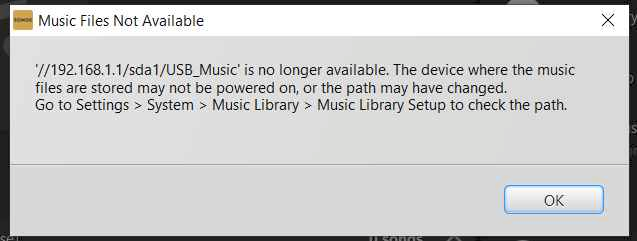
 

This topic has been closed for further comments. You can use the search bar to find a similar topic, or create a new one by clicking Create Topic at the top of the page.
Best answer by Corry P

Hi @gmendenh 

Thanks for your post!

This issue has not yet been addressed. There is still no ETA to share, unfortunately.

32 replies

Lyricist III
July 7, 2024


Well I spoke too soon.  My music server disappeared. Tried to add and indexing failed part way in and got the same old error message about no longer being available.


I tried my previous solution - a single Play One connected to the router.  It failed to index.  I broke down my music into sub folders - A-C, D-F etc and tried to add a share for each.  1/3 of them added, the others failed.  For those that failed I added album folders one by one until the indexing failed.  Then went  file by file.  I couldn't find any obvious reason .  I looked at the meta data but all the CDs were ripped using dB Power amp at a similar time,

Out of desperation I converted one of the albums that stopped the share indexing from FLAC to mp3 and guess what - the indexing ran…

So Ive spent the afternoon batch converting 15000 tracks from FLAC to mp3.  
 

I can now index everything except files for  artists that begin with R or V - no Idea why. 
 

The Diagnostics /error message is useless.


Ken_Griffiths
July 7, 2024


Well I spoke too soon.  My music server disappeared. Tried to add and indexing failed part way in and got the same old error message about no longer being available.


I tried my previous solution - a single Play One connected to the router.  It failed to index.  I broke down my music into sub folders - A-C, D-F etc and tried to add a share for each.  1/3 of them added, the others failed.  For those that failed I added album folders one by one until the indexing failed.  Then went  file by file.  I couldn't find any obvious reason .  I looked at the meta data but all the CDs were ripped using dB Power amp at a similar time,

Out of desperation I converted one of the albums that stopped the share indexing from FLAC to mp3 and guess what - the indexing ran…

So Ive spent the afternoon batch converting 15000 tracks from FLAC to mp3.  
 

I can now index everything except files for  artists that begin with R or V - no Idea why. 
 

The Diagnostics /error message is useless.


I seem to think this issue appeared a while back, with the older S2 App too, with no solution. Maybe it is a bug in the indexing with some USB shared libraries attached to some routers.

I would perhaps wait until the new library features are added to the new Sonos App, reportedly due some time this month and if things then still do not work for you, go onto reproduce the indexing issues, then immediately submit a Sonos system diagnostic report from within the Sonos App, note it’s reference and then contact/chat with Sonos Support via this LINK to discuss the matter in detail and see what the Staff can perhaps then suggest to resolve the matter, or of course, you could just go ahead and report this now.