It’s a couple months that I can’t use Sonos on my iPhone and my wife’s one. Before I could use the app on my phone, listen to music with Spotify and control the same song on my wife’s phone. My wife could use the same app on her phone, without any problem. Now, if both apps are installed on both phones, I have ‘no connection to Sonos’, then follow the procedure using bluetooth and position, but at last I have no connection at all. If I deinstall the app on one phone, the app on the other one is working again. I hope I explained what happens. Is anybody able to help me? Thanks
This topic has been closed for further comments. You can use the search bar to find a similar topic, or create a new one by clicking Create Topic at the top of the page.
Best answer by AjTrek1
@francic46
Disclaimer:I don’t use Spotify but I do use Apple Music and a few others. Therefore, what I’m posting is somewhat speculation regarding Spotify.
I’ve re-read your posts and now think the issue is not Sonos but possibly a “device authorization” problem with your Spotify account. Let me explain….
Apple will only allow me five (5) devices authorized to download music to. I was able to forego a family plan by providing my credentials to my wife on her iPhone (as one of five devices) for music. Since our music tastes are identical (for Apple Music) she can’t authorize purchases as she doesn’t know the password and of course her FaceID won’t work. That was probably TMI and thankfully my wife doesn’t participate in this community. 😂🤣😂
@Airgetlam is correct in his analysis of the Sonos app behavior. Although IMO contacting Sonos support will not help (although I may be wrong). 🤔
I inquired about your network configuration. You mentioned that your network repeater was installed long before this issue. That makes sense as network issues typically involve Sonos components disappearing from the app and/or the Sonos app not being able to find your system. None of that was mentioned as an issue. There are other possible network concerns but I’ll assume they are null based upon your explanation.
As I mentioned I don’t use Spotify. However, you stated that if you delete the Sonos app from your iPhone everything thing returns to normal (so to speak). You also stated that using the Sonos app with your iPad (and I’ll have t assume the Sonos app is still deleted off your iPhone) everything works as normal. What I’m getting at here is the number of device authorizations allowed to use the Spotify service.
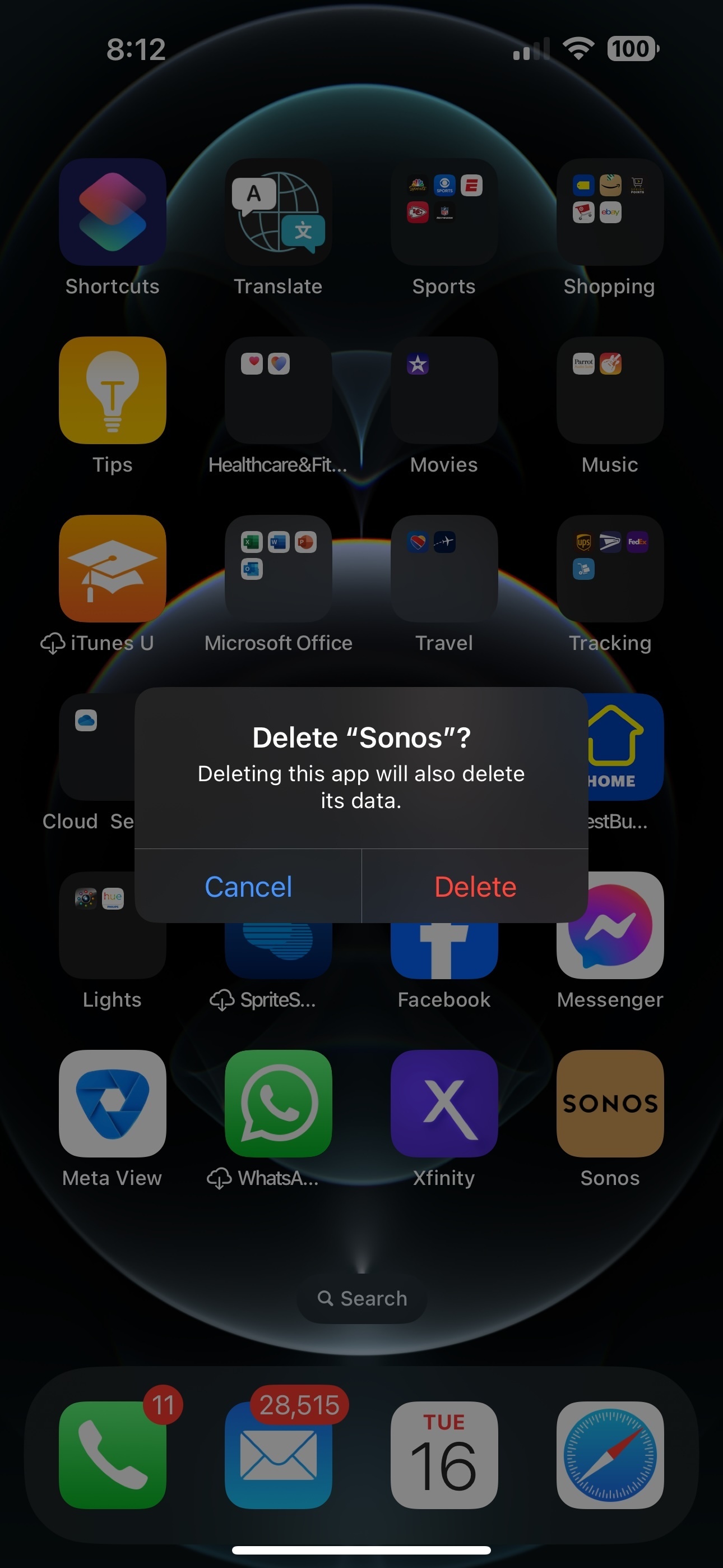
Since you are streaming Spotify through the Sonos app the Spotify server sees it as a device which in reality is your iPhone. When you delete the Sonos app from your iPhone (as shown below) it will delete its data.The Spotify service is part of the deleted Sonos app data which in turn (IMO) no longer registers your iPhone as an authorized device.
I’m suggesting that Spotify may have changed its end-user streaming policy on authorized devices which is no longer three (3) in certain situations/accounts; previously being your iPhone, your wife's and the iPad.
I may be completely wrong in my analysis. However, I recommend contacting Spotify to explain the situation as well. They may have culpability/insight regarding the issue.
BTW: I understand that you are in Italy and I in the US; so Spotify policy may differ by country. HoweverIf what I have presented is not the case please educate me on how Spotify account/device authorization works. Always willing to learn something new. 😊
Sonos could see the WiFi connection on the repeater as a separate network.
Sure, but going on the router page Sonos results connected to the 5 GHz network, that’s the same as for the iPhones, iPad and other devices. And the repeater is at the other end of my apartment. I don’t know if there’s a repeater which connects to 5GHz, I’ll investigate. Thank you anyway, at this point everything is possible. I’ll try disconnecting the repeater, if the problem comes up again.
Should be fairly simple to just unplug the repeater, temporarily, and see if that changes the situation. Sonos does need to be on the same subnet, and many repeaters set up separate subnets, which is why they aren’t unsupported items on the Sonos Network Requirements FAQ.
Should be fairly simple to just unplug the repeater, temporarily, and see if that changes the situation. Sonos does need to be on the same subnet, and many repeaters set up separate subnets, which is why they aren’t unsupported items on the Sonos Network Requirements FAQ.
Thank you. I was just thinking the same, just in case the problem is repeated, as I suspect. Infact I added the last sentence to my previous reply. If so, I’ll have to replace the repeater with one supporting 5GHz or at least 2,4/5. Anyway the conditions you quoted say that WiFi mesh repeaters (my case) are supported.
There is a difference in a repeater and a mesh node, not all manufacturers bother to make that distinction clear and it causes many unneeded aggravation.
There are even differences in repeaters, some do odd things, some drop some traffic and as said some make a new network.
I detached my mesh repeater, but the problem still showed itself with the same diagnosis: ‘Sonos and device (iPhones and iPad) must be on the same net’ (and they were). But, instead of repeating the procedure (connection with the Sonos wifi, opened Bluetooth andGPS) that brings to nothing, I tried installing as a new speaker my Sonos 3. This time the speaker was recognized and after 4-5 days all is working. I’m crossing my fingers: maybe I ended my problems. Let’s wait and see, but I thank you all for your useful suggestions!