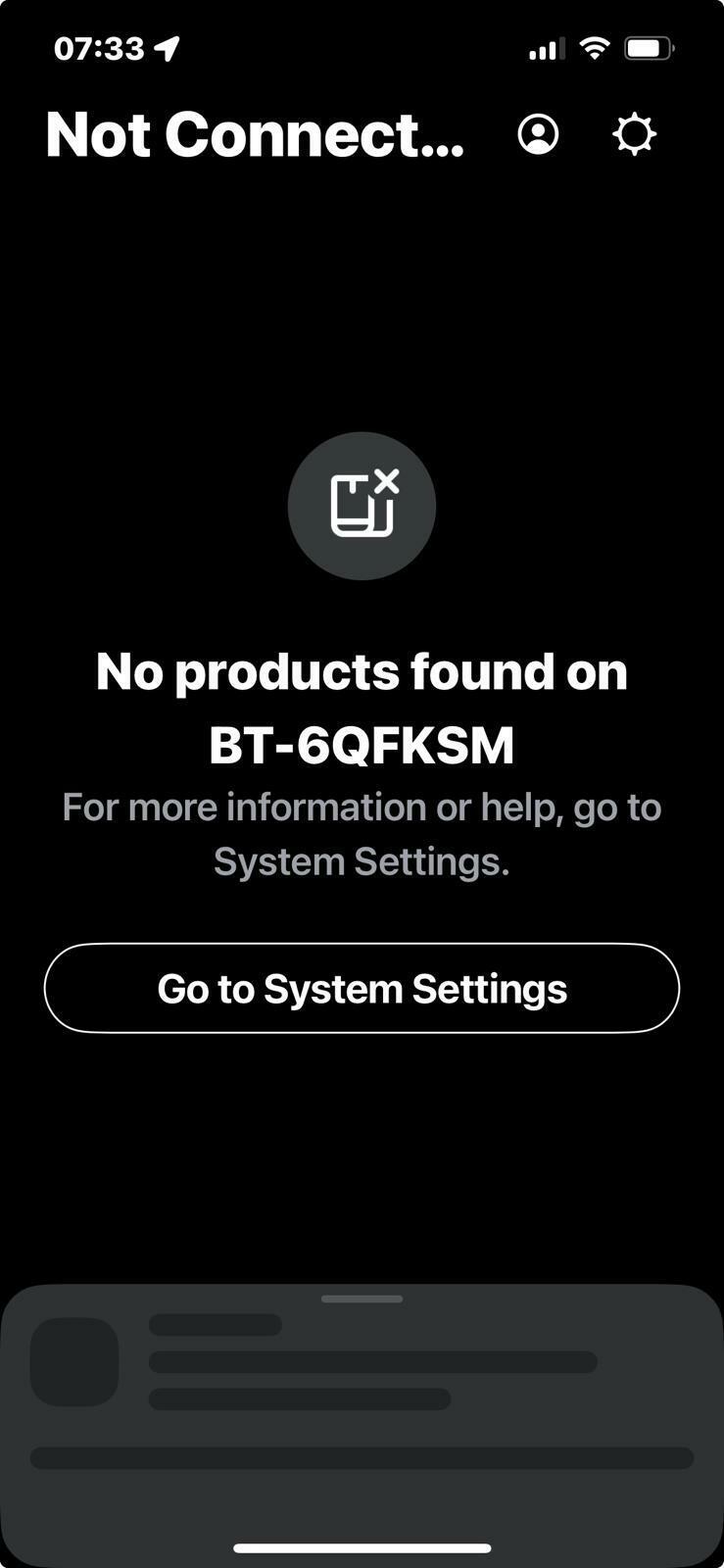
Starting to lose my patience with this now. I’ve had numerous phone calls and chats, read up on the site forums. Is it just me or does sonos and BT not work?
I’ve tried disabling all security on all devices 🙄
Any help before I stick this lot on ebay and buy something that actually works?
This topic has been closed for further comments. You can use the search bar to find a similar topic, or create a new one by clicking Create Topic at the top of the page.
Pinned Reply By Corry P
Hi @schnawl
Welcome back to the Sonos Community!
I’m sorry to hear of the issues you have had with connecting to your Sonos system on your BT Smart Hub 2.
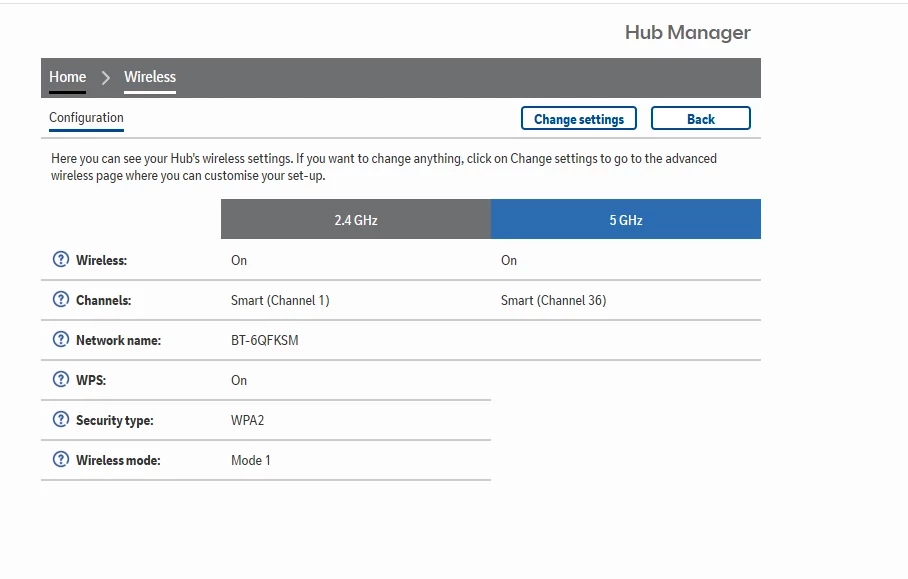
The ”wireless mode” setting at the bottom of your router settings screenshot needs to be changed to Mode 2:
I also recommend that you turn off “Smart” channel selection for both 2.4 and 5GHz bands, if possible.
But, for the record, your router is old. Really old. You should either call BT and ask for an updated model or simply buy your own replacement (I recommend the latter, as you get what you pay for, and any BT router will be free). If you buy your own, I recommend not spending less than about £50-£60, but a mesh system will likely cost above £150 for much better coverage of your space (and with better reliability than with extenders).
Incidentally, most devices that connect to WiFi are only interested in talking to the internet - it is not fair to compare the connection of one of these with a Sonos system of multiple devices and controllers that are all trying to talk to each other as much as with the internet. The network requirements are different.
I have just deleted half of the posts on this thread without affecting the readability of the thread one iota. For the sanity of the other users involved in this thread, I will soon close it to further discourse. If you have anything further to say, I recommend that you put it all in one post, rather than in 7 or more disjointed ones.
Actually no, I unsubscribed from the thread when you started commenting every 2mins.
It still appears that your inferior ISP router is preventing devices on the 5GHz band from communicating with devices on the 2.4GHz band, and vice versa.
This is emphasised by your following comment
‘So, it would appear the apple app for sonos does not like 5ghz…? I have now changed it to 2.4 ghz and will see how it goes. The connection issues persisted.”
Something BT apparently fixed with a firmware update in 2021 but probably broke again. Maybe ask your Dad about that.
Smart Wireless on your router to automatically switch channel is also a possible factor that is doing you no favours.
The devices you own (Era, Move, Roam) all work on 5GHz. Previously, older Sonos devices were restricted to 2.4GHz so the recommendation in older threads was to connect to 2.4GHz only.
As you don’t own a Sonos soundbar which requires a 2.4GHz connection, do you see where I’m going here, then there’s no need to limit Sonos to 2.4GHz because your router can’t pass data between bands. Therefore, it makes more sense to connect Sonos to 5GHz. Your phone would also benefit rather than being stuck on 2.4GHz.
But hey, you do you. Maybe see you in another 3mths. Unsubscribed again.
That’s amazing that Mr T, apologies for my snide comments earlier…
I do know this router that BT brought out was tweaked due to the wireless hotspot capabilities...It’s quite clear and apparent your IT knowledge far exceeds mine. I will try doing on of two things above.
Thank you for clarifying my suspicions about the roams, always knew it was them!
I will fix this, even if it means buying a new and perhaps proper router…
I still see your posts, I just don’t get the email notification each time.
Amuse me, as a test, disable the 2.4GHz band on your router, reboot your Sonos devices so they join the 5GHz band and see if you still experience connection issues.
Obviously, if you have any non-Sonos device that requires a 2.4GHz connection, attempt the test for as long as possible that you can keep that device unconnected.
Edit: our posts crossed. I know how frustrating it can be when something doesn’t work as intended, so I get your frustration.
Honestly you don’t need to post multiple times. The frequent users of the community will view Recently Active Topics so they see all posts made. Plus, my last post subscribed me back to the thread, so I did get your email notifications too.
Ha, I bet you were hoping each time you opened the app that it would show a connection error!
Happy to hear that works for you. You will know how often you had connection issues, but hopefully over a prolonged period your system is more stable in this setup.
Next issue to troubleshoot is if you need to enable 2.4GHz for other devices, and/or the 5GHz isn’t giving good coverage in your household.
i was not hoping for a non connection issue no, I promise you . I just want it to come on so i can play my music when I want to from where i want to in the house. I’ve had enough non connection issues - thank you.
I was so excited when I purchase this years ago and I’ll be honest it’s a great sound. (And that’s coming from someone that spends £3.5k for Rockford fosgate for his car)
it has been frustrating at times and perhaps I’ve vented a bit in here too (oops) my bad
point is, it’s doing what it says on the tin now thanks to you.
the only thing I see connected to 2.4 is my watch so will need to see what that’s all about
thanks pal, I’ll be sure to leave a glowing review kn here with thanks to you and your team.