

rosswells127
Prodigy I
July 16, 2024
Answered

Music Library Compilation Issue under new 16.3 Firmware

  • July 16, 2024
  • 240 replies
  • 12063 views

Today I successfully updated to the latest 16.3 Firmware and Windows Desktop Controller.
I subsequently performed an “Update Music Library Now” from the 16.3 Windows Desktop Controller.
Now any Sonos Controller (including SonoPhone, SonoPad) show multiple entries for each compilation album when viewing Albums.
Just an example shown below...
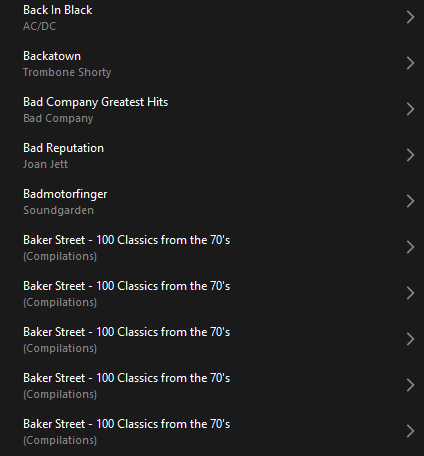
 

Does anyone else have this issue?
Ross.

This topic has been closed for further comments. You can use the search bar to find a similar topic, or create a new one by clicking Create Topic at the top of the page.
Best answer by Corry P

Hi ​@rosswells127 et al

I have an update regarding this behaviour.

It is (now) expected behaviour that if you have a compilation album with no Album Artist metadata tagged on an S2 system, it will appear in the album list multiple times. To resolve this issue, please tag all tracks in the album with an Album Artist - if there is no single artist, please tag each track in the album with “Various Artists”. Once an album has a Album Artist tag, it will no longer appear as duplicates in the Album container list.

I hope this helps.

Edit: This thread was automatically closed due to inactivity. I have reopened it.

240 replies

Renowned Enthusiast II
July 27, 2024

Hi @SlamDesi 

I have Android and Windows, yes, and I’m not a Mac user. As I understand it, some 913 errors coming from macOS shares may be erroneous and not relating to SMBv1 - we’re looking into this right now. I don’t see how SMB relates to the USB bus - one is software, one is hardware, and they have nothing to do with each other in any way, shape or form. Not even vaguely.

Are you just talking about the issue which is the topic of this thread? I’m still not sure. Yes, the issue is with the mobile app, so any other controller (even third party ones) will not produce the same issue. The speakers handle the indexing of the music library, so the fact that other controllers view it without issue highlights that it’s just the app having display issues.

I think it’s a safe bet to say we will not be offering two versions of the S2 app (the new app is still an S2 app - S2 is firmware for speakers) at the same time.

Oh, and about streaming, I can’t access my Amazon Purchased music library either.  I get the “Something went wrong” banner and, believe me, something has gone wrong.

We’re not aware of an issue where you can see none of your Amazon library. I recommend removing the service from your system and adding it again.

Remove a music service account from Sonos

Add a music service to Sonos

I hope this helps.
 

Corry P… Thank you for the links for removing and adding a music service. Since I’m a non-streamer who’d trying to learn something, I wanted to get a quick clarification.

I have two desktop controllers (one on each iMac) and my iOS iPhone controller.  Does one need to Remove them from all devices and then add them back into the controllers and iPhone?  I’m uncertain as to which device is the top dog.  I hope I’m making sense.  If I only remove it from the iPhone, will it still exist because it’s on the two S2 apps?  My apology for such a remedial question.

Lyricist III
July 28, 2024

I will do that - can I test it after I have reinstalled the app on just one device (like my laptop), to see if it solves the problem by checking it on the laptop, or will I need to reinstall on all devices before seeing if it worked?  Thank you very much, Chris D

HI @cdiani I can confirm that Android V80.05.06 of 20240717 (the latest) works fine as long as, like me, you stay with Firmware V79.1-54060 on your speakers. 

By all means go with the controller upgrade - it lets you search your Library and other minor tweaks, which is good - but keep away from the Firmware upgrade until the compilation album problem gets fixed. 

Good luck

John


Pretty sure Sonos force the firmware upgrade if you want to use the latest app that allows library searching.

I certainly would if I was Sonos. You can’t have two parallel systems for those who want to update their app and those who don’t.

HI @cdiani, @dpg50000  and @Rhonny my experience, as detailed above with the latest firmware (S2 16.2 build 79154060) on my speakers and Android controllers on both V16.1 and V80.05.06 of 20240717 is that the library search function works fine.

It is definitely NOT the case that Sonos force the upgrade, as my experience when using the latest (Android) app proves.

Well yes and no - depends on what “force” means - the fact that windows desktop controller functionality is disabled until you carry out an upgrade .. then at the very least upgrade is being “encouraged”

rosswells127
Prodigy I
July 28, 2024

Hi @SlamDesi 

I have Android and Windows, yes, and I’m not a Mac user. As I understand it, some 913 errors coming from macOS shares may be erroneous and not relating to SMBv1 - we’re looking into this right now. I don’t see how SMB relates to the USB bus - one is software, one is hardware, and they have nothing to do with each other in any way, shape or form. Not even vaguely.

Are you just talking about the issue which is the topic of this thread? I’m still not sure. Yes, the issue is with the mobile app, so any other controller (even third party ones) will not produce the same issue. The speakers handle the indexing of the music library, so the fact that other controllers view it without issue highlights that it’s just the app having display issues.

I think it’s a safe bet to say we will not be offering two versions of the S2 app (the new app is still an S2 app - S2 is firmware for speakers) at the same time.

Oh, and about streaming, I can’t access my Amazon Purchased music library either.  I get the “Something went wrong” banner and, believe me, something has gone wrong.

We’re not aware of an issue where you can see none of your Amazon library. I recommend removing the service from your system and adding it again.

Remove a music service account from Sonos

Add a music service to Sonos

I hope this helps.
 

@Corry P 
FYI. At least on my system, the duplicate compilations albums issue appears on all controllers including the desktop app and 3rd party ones such as SonoPhone.
It happened when firmware updated to 16.3.

Ross.

Lyricist II
July 28, 2024

Adding my experience so I can keep up to date with this issue.

On my apps any compilation is duplicated, but I’ve also noted that any album with a ‘featured’ artist is also duplicated. For example Imelda May’s “11 Past The Hour” has four tracks (tracks 3, 6, 7 & 9) that have feature artist tracks, this has resulted in five instances of the album. Also tracks 3, 6, 7, & 9 are not in the correct order, they appear at the end of the track list in the reverse order.

It really is poor software management and testing.

Enthusiast I
July 29, 2024

Realise it’s not helpful just to say “I have the same issue” but … well, I do.

I would add that I added the music library back into my system using the Windows app, so I do not think it is anything to do with which mobile app you are using.

Many, but not all, albums split into tracks.  Even classical ones: Beethoven’s 9th Symphony split into 5, one for each movement.  Another album by “various artists” has a long list of tracks which, when selected, say “No selections are available”.

Same issue here, and probably everywhere… I started another thread before I found this one. The more complaints the merrier. Let’s see what new bugs are introduced with each update. Whoever finds more, gets less SONOS:(

Enthusiast I
July 29, 2024

Hi @Eejay60 

We are aware and are investigating. I have no ETA for a resolution, however.

I paid for my speakers. I do not want to be a beta tester for every update that has new bugs. Why can’t you test first on your side? It is beyond my comprehension how each update introduces new errors, instead of providing reliable use. It’s even senseless updating now (after months and months) and communicating any errors (after years and years)… “innovation never pauses” at SONOS, “stay connected”, etc. I suggest to change your slogans to “errors never end”, “we know how to lose you”, sorry, I am simply lost, no matter what your CEO and company promises.

Corry P
Sonos Staff
July 29, 2024

Hi @rosswells127 

Thanks - that was all my mistake. I have edited my previous post, as it does indeed seem to be an issue that lies in the speaker’s firmware, not with the app.

"Common sense is the collection of prejudices acquired by age eighteen." - Albert Einstein
Corry P
Sonos Staff
July 29, 2024

Hi @SlamDesi 

No apologies needed - if you don’t already know the answer, it’s not a “remedial” question. In addition, I don’t think it’s mentioned in any of our documentation.

Basically, there is no “top dog” - all controllers simply show what the speakers are telling them to show. When you add or remove a service, you are in fact adding/removing it to/from the speakers, and not the app. Any app you open at any time should show the same (barring preferences for favoured music service and a few other app-specific settings) as any other app.

In short, no - when you remove a service with any controller, it is gone from them all.

I hope this helps.

"Common sense is the collection of prejudices acquired by age eighteen." - Albert Einstein
Renowned Enthusiast II
July 29, 2024

Hi @SlamDesi 

No apologies needed - if you don’t already know the answer, it’s not a “remedial” question. In addition, I don’t think it’s mentioned in any of our documentation.

Basically, there is no “top dog” - all controllers simply show what the speakers are telling them to show. When you add or remove a service, you are in fact adding/removing it to/from the speakers, and not the app. Any app you open at any time should show the same (barring preferences for favoured music service and a few other app-specific settings) as any other app.

In short, no - when you remove a service with any controller, it is gone from them all.

I hope this helps.

Thanks, Corry, that’s exactly what I needed to know.  I appreciate the prompt reply.  Brad

rosswells127
Prodigy I
July 29, 2024

Hi @rosswells127 

Thanks - that was all my mistake. I have edited my previous post, as it does indeed seem to be an issue that lies in the speaker’s firmware, not with the app.


@Corry P . All good. No apologies needed.
Ross.