

rosswells127
Prodigy I
Jul 16, 2024 10:21 PM UTC
Answered

Music Library Compilation Issue under new 16.3 Firmware

Today I successfully updated to the latest 16.3 Firmware and Windows Desktop Controller.
I subsequently performed an “Update Music Library Now” from the 16.3 Windows Desktop Controller.
Now any Sonos Controller (including SonoPhone, SonoPad) show multiple entries for each compilation album when viewing Albums.
Just an example shown below...
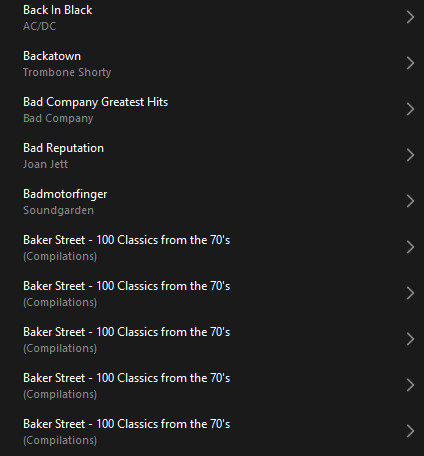
 

Does anyone else have this issue?
Ross.

This topic has been closed for further comments. You can use the search bar to find a similar topic, or create a new one by clicking Create Topic at the top of the page.
Corry P
Corry PAnswer
Sonos Staff
Dec 23, 2024 1:06 PM UTC

Hi ​@rosswells127 et al

I have an update regarding this behaviour.

It is (now) expected behaviour that if you have a compilation album with no Album Artist metadata tagged on an S2 system, it will appear in the album list multiple times. To resolve this issue, please tag all tracks in the album with an Album Artist - if there is no single artist, please tag each track in the album with “Various Artists”. Once an album has a Album Artist tag, it will no longer appear as duplicates in the Album container list.

I hope this helps.

Edit: This thread was automatically closed due to inactivity. I have reopened it.

"Common sense is the collection of prejudices acquired by age eighteen." - Albert Einstein

240 replies

Renowned Enthusiast I
Jul 21, 2024 11:40 AM UTC

I seem to be lucky in that I have not come across this problem.  

Some background details so we may be able to identify what’s causing it:-

I am using the Android controller, V16.1 build 78151030 on a Sony phone and v80.04.05, release+20240702.edb3233 on a Samsung tablet.  I also run Windows 10 controller (S2, V16.2 build 79154060) on my PC.

My system firmware shows up as V79.1-54060 on the tablet and V16.2 (build 79154060) on the phone.  That little inconsistency has been noted in another thread, so no further comment….

I have 160 or so compilation albums, all of which are tagged using “Various Artists” as the Album Artist and the relevant Artist name in each Song file, all of which are FLAC.  Each Song file has its own Album Art embedded in it and each Album folder has the album cover art present as a Folder.jpg file.

Trying to reproduce the findings in this thread, I ran a re-index this morning from my PC (neither of the Android apps has this “feature”).  

I found that, in all cases, the albums and tracks indexed correctly with none of the anomalies reported above, which would indicate to me that the problem is almost certainly down to the recent Firmware update.  Where firmware is mentioned above, it is because the poster has done the upgrade.  I have studiously avoided doing it.  Perhaps this is the difference, but maybe it’s nothing to worry about because the App Upgrade promised for tomorrow (July 22nd) is doubtless going to fix all our problems.

Here’s good luck to all of us with that….


PS Here are a few screenshots which go some of the way to illustrate the differences between the three Controllers.  The Album was chosen because it was the first Compilation in my library, so no apologies for taste:-

S2, V16.2 build 79154060 on the PC, library listing on the right, Now Playing & Q in the middle.  Nice.

V16.1 Library Listing.  Nice.


V16.1 Q.  Nice.


S2, V16.1 Now Playing.  Nice


V80.04.05 Library Listing.  Not so nice.


V80.04.05 Q.  Not so nice either.


V80.04.05 Now Playing.  Oh, Please!


Translate
Renowned Enthusiast I
Jul 21, 2024 12:11 PM UTC

I have the same - e.g. this ‘Album’, which has 41 tracks on it, is correctly tagged (using MP3TAG), and has always worked until now, shows only 4 tracks (see 1st attached). The workaround for me at least is to play my music by folders (as my music is on a NAS - see 2nd attached).


Hi @Markster , and also @rosswells127 , @press250 , @Belly M , @RJSUK , @RayBob , @Eejay60.  I  think what’s happening here is down to your tagging.

In your second screenshot, coming at it through the Folders view, the title at the top is taken from the folder name in your filing system and the Song names are the contents of the FileName tag in full, which you don’t see elsewhere. If you send this listing to play, the Now Playing screen will show the Song details from the relevant tags and the whole thing will look “normal”

In the first one, taken from the Albums entry in the Music Library, the title at the top is taken from the Album tag in each Song record in the folder.  My guess is that the four tracks in screenshot 1 have “A State of Trance 2003” as their Album entry and that the other 37 Songs in the Folder have a different name in their Album tag and will show up as an “Album” under that name.  If more than one Song has the same Album entry they would show up grouped into an “Album” as in your Screenshot 2.

A quick look at your tags through MP3Tag or MediaMonkey (my preference) or whatever editor you use will, I think, allow you to sort this out.  Select all the files in the folder, change the Album name to be the same for all of them and you will, I think, have “A State of Trance 2003” back after a re-index.


Good luck

John

Translate
Lyricist III
Jul 21, 2024 3:49 PM UTC

Thank you @jreddaway 

I do not think this is a tagging issue for me. I routinely use MP3Tag so am familiar with how that works. I am fastidious about how I manage my library which is also why this is so aggravating. I dislike the mess! This problem occurred immediately after I installed the 16.3 update. It has affected every compilation album that I possess in my library, and was never a problem before the update. 

However, I will have a play and see

Translate
Enthusiast I
Jul 21, 2024 3:59 PM UTC

Likewise. Used MediaMonkey to ensure ALL albums are named consistently, and had never had this problem until updating two days ago. Now seeing multiple compilation albums on both my Desktop controller (Mac) and iPhone (running 80.04.04).

I’ll add that many of the albums that are now being shown by Sonos are phantoms, with nothing in them; including ALL FOUR of the Christmas Gift for You Phil Spector album that it’s created.

Translate
Belly M
Jul 21, 2024 3:59 PM UTC

@Eejay60 

It’s 100% a firmware issue, not tagging, it no longer takes into consideration the “group albums using” which is still available on the desktop app.

Translate
Renowned Enthusiast I
Jul 21, 2024 6:47 PM UTC

Well, @Eejay60 , @Captain Biggles , @Belly M , I think we are all agreed that the latest firmware update is defective when indexing local libraries for the latest Android controller software. 

Yet another example of poor management, but let's see if tomorrow's Big Update irons all the issues out. 


Myself, I doubt it.  I'll hold off any upgrades till there's some feedback on here. 

Good luck. 

Translate
Collaborator I
Jul 21, 2024 9:01 PM UTC

Loving your playlist jreddaway👍 , as has been mentioned this is a new phenomenon with compilations, I may take the time to group them into individual playlists and then delete from albums?

Translate
Belly M
Jul 21, 2024 9:14 PM UTC

If you have the Sonos app on a desktop, delete the library then add it back again. You will need the path and credentials handy.


Edit this supposedly worked for other users but not me 😞

Translate
Renowned Enthusiast I
Jul 22, 2024 9:13 AM UTC

Loving your playlist jreddaway👍 , as has been mentioned this is a new phenomenon with compilations, I may take the time to group them into individual playlists and then delete from albums?

Yeah, I'm really proud of that one 😂 

What I'm prouder of is that I've managed to avoid the firmware update and am still able to enjoy a properly indexed library on both versions of the the Android  S2 app.  Here's hoping that today's promised app update won't wreck that. 

Fingers crossed 🔀 


Translate
Lyricist I
Jul 22, 2024 11:14 AM UTC

I have had the same problem…  Updated the controller software on Friday, re-indexed and now I have multiple copies of albums, each containing one or two tracks (or none) and in a seemingly random order..  I spent an hour with a member of the Support Team this morning who remoted into my machine in order to try to sort it, but in the end told me that there was nothing he could do.  It is so frustrating and disappointing and I must admit that I am about to throw in the towel with the whole thing...

Translate