

rosswells127
Prodigy I
July 16, 2024
Answered

Music Library Compilation Issue under new 16.3 Firmware

  • July 16, 2024
  • 240 replies
  • 12063 views

Today I successfully updated to the latest 16.3 Firmware and Windows Desktop Controller.
I subsequently performed an “Update Music Library Now” from the 16.3 Windows Desktop Controller.
Now any Sonos Controller (including SonoPhone, SonoPad) show multiple entries for each compilation album when viewing Albums.
Just an example shown below...
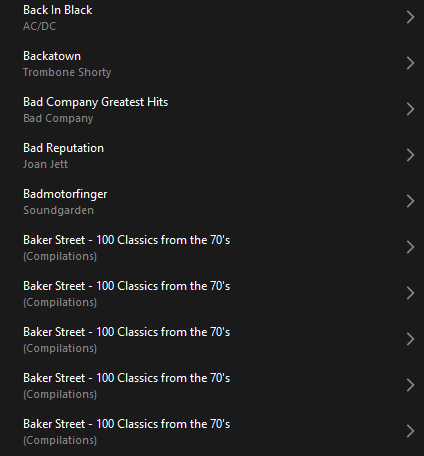
 

Does anyone else have this issue?
Ross.

This topic has been closed for further comments. You can use the search bar to find a similar topic, or create a new one by clicking Create Topic at the top of the page.
Best answer by Corry P

Hi ​@rosswells127 et al

I have an update regarding this behaviour.

It is (now) expected behaviour that if you have a compilation album with no Album Artist metadata tagged on an S2 system, it will appear in the album list multiple times. To resolve this issue, please tag all tracks in the album with an Album Artist - if there is no single artist, please tag each track in the album with “Various Artists”. Once an album has a Album Artist tag, it will no longer appear as duplicates in the Album container list.

I hope this helps.

Edit: This thread was automatically closed due to inactivity. I have reopened it.

240 replies

press250
Prodigy III
July 16, 2024

I pride myself on collaboration @rosswells127, but there is no way I’m gonna re-index my local library and risk the ‘discovery’ you outline. I sincerely appreciate the heads-up, though.

This morning I did the same silly things as you: updated the Windows desktop app and device firmware. The firmware update immediately borked my Android tablet: the app crashes two seconds after the Sonos logo appears. Tried re-booting the tablet, re-installing the app … no joy.

rosswells127
Prodigy I
July 16, 2024

@press250 Good call re not doing the re-index 😉. I added a couple of albums this morning so in my case I blindly did the re-index assuming all would be good.
The plus side is that with this update it “appears” as though Sonos are prepping the firmware for upcoming controller changes for local music library support/search.
Sorry to hear about the Android borking! Hopefully pending new controller update will sort it for you.
Ross.

Belly M
July 17, 2024

This new Sonos feature is a firmware issue, you don’t even have to update your music library to enjoy this enhancement!


In advanced settings there is an option “Group Albums Using” no matter what option you choose it makes no difference.

Tagging:

@Corry P 

Enthusiast II
July 17, 2024

Running the latest version of everything and the same is happening here on Android and PC. Unbelievable! 


Contributor I
July 18, 2024

Ditto, here.
Just burned a new compilation CD to iTunes, then “Update(d) music library now” only to see 12 “albums” of THAT ONE CD in my Sonos desktop app.

I see that there are 12 artists/songs on that one CD, and I note that the tracks are listed in alphabetical order of the artist’s first name.

If anyone finds a solution, let us know --


Lyricist III
July 18, 2024

I have the same thing happening, only when I select any of the multiple iterations of a compilation album to play it, there is no music to play. I hope a quick fix is applied to this slip up because it is maddening. It feels as though the people at Sonos are having a lot of difficulty wrestling control over this new creation of theirs. They make changes and reap unintended and unwanted consequences. Chaos theory in action, no? 

Lyricist I
July 20, 2024

I have the same - e.g. this ‘Album’, which has 41 tracks on it, is correctly tagged (using MP3TAG), and has always worked until now, shows only 4 tracks (see 1st attached). The workaround for me at least is to play my music by folders (as my music is on a NAS - see 2nd attached).


Lyricist III
July 20, 2024

I have the same - e.g. this ‘Album’, which has 41 tracks on it, is correctly tagged (using MP3TAG), and has always worked until now, shows only 4 tracks (see 1st attached). The workaround for me at least is to play my music by folders (as my music is on a NAS - see 2nd attached).


Good thinking! As a workaround that does the job, but it is still an aggravating new bug

Contributor I
July 20, 2024

I have just applied this update and have the same problem. Do Sonos do any testing on their updates, it makes the Library very difficult to use. Does anyone know if Sonos are planning to fix this?

Collaborator I
July 20, 2024

Same problem here with compilations, I added a couple yesterday and after updating the library I had a long list of individual songs as opposed to just the album title.