Contributor I
February 3, 2022
Answered

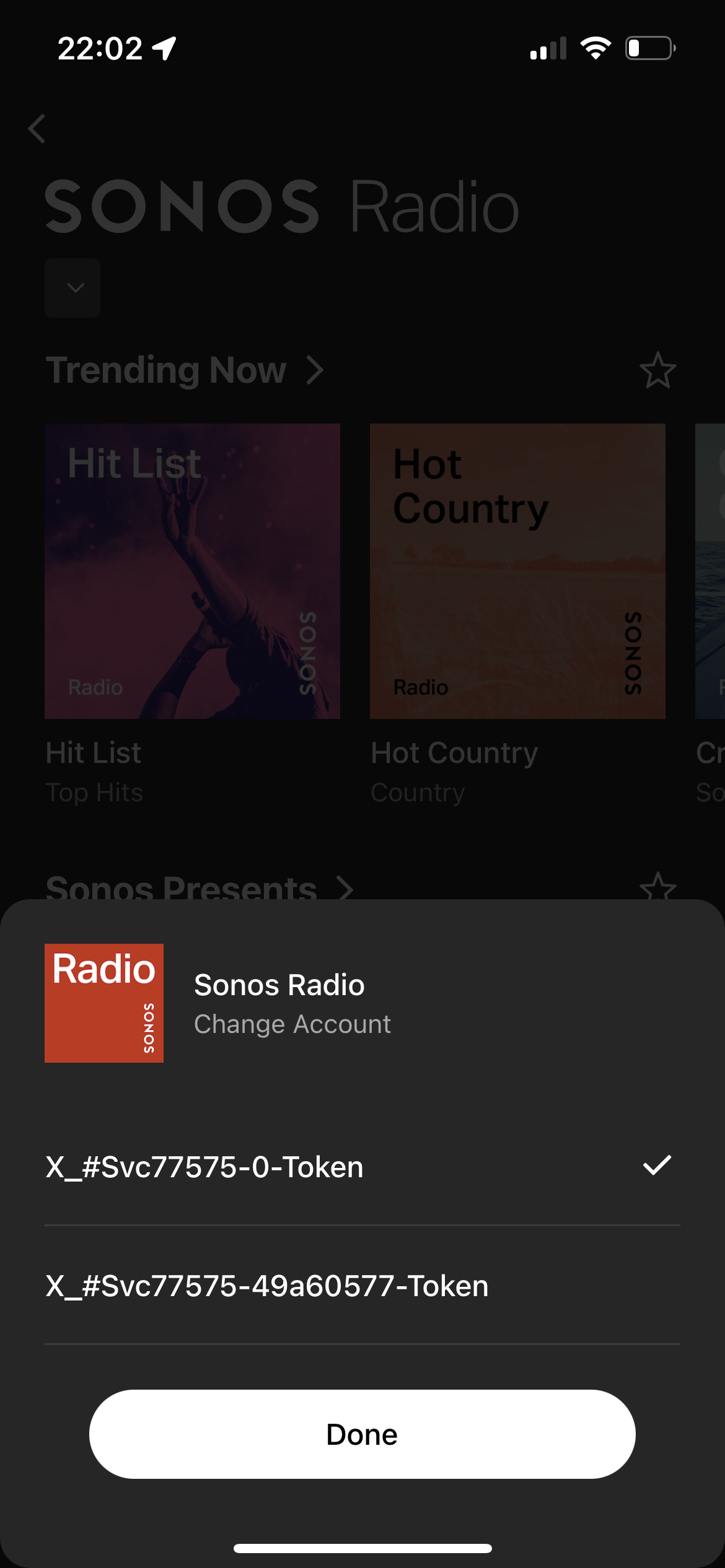
Multiple weird SONOS radio accounts.

How do I get rid of these things? There is no “remove account” like other services.
 

    This topic has been closed for further comments. You can use the search bar to find a similar topic, or create a new one by clicking Create Topic at the top of the page.
    Sotiris C.
    Sonos Staff
    February 3, 2022

    Hello @WJKramer, thank you for reaching out to our Community. Our engineers are aware of this issue and currently working on a fix. Unfortunately we do not have an ETA to share.

    Leaving a like and marking Best Answer might make someone's day. Who knows, that someone might be you.

    7 replies

    Lead Maestro
    February 3, 2022

    Have you tried reauthorizing the account or deleting and reinstalling the Sonos app?

    "Receive with simplicity everything that happens to you." - Rashi
    WJKramerAuthor
    Contributor I
    February 3, 2022

    Have you tried reauthorizing the account or deleting and reinstalling the Sonos app?

    Thanks for the reply. Yes I have tried both. They show up on all of my controller devices with no option to delete. I will be call support today. Hopefully they can do something not the back end.

    ratty
    February 3, 2022

    Does this come up when trying to browse Sonos Radio?

    Go to Settings → Services → Sonos Radio and attempt to Reauthorize Account. 

    WJKramerAuthor
    Contributor I
    February 3, 2022

    Does this come up when trying to browse Sonos Radio?

    Go to Settings → Services → Sonos Radio and attempt to Reauthorize Account. 

    No, I can browse and play Sonos Radio as normal. It allows me to choose between those accounts.

    ratty
    February 3, 2022

    Something’s a bit bent. What happens if you do the Reauthorize Account procedure? 

    WJKramerAuthor
    Contributor I
    February 3, 2022

    Something’s a bit bent. What happens if you do the Reauthorize Account procedure? 

    Absolutely nothing.

    Sotiris C.
    Sonos Staff
    February 3, 2022

    Hello @WJKramer, thank you for reaching out to our Community. Our engineers are aware of this issue and currently working on a fix. Unfortunately we do not have an ETA to share.

    Leaving a like and marking Best Answer might make someone's day. Who knows, that someone might be you.

