This topic has been closed for further comments. You can use the search bar to find a similar topic, or create a new one by clicking Create Topic at the top of the page.

25 replies

jgatie
May 30, 2024

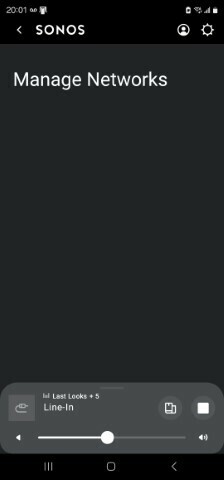
No network. No devices.

How can this be??????

https://support.sonos.com/en-us/article/the-new-sonos-app-and-future-feature-updates

Coming soon

  • Continued improvements to navigation for visually-impaired customers: mid-June
  • Adding to queue and playing next: early June
  • Sleep timer: mid-June
  • Local music library search and playback: mid-June
  • Update WiFi settings: mid-June
  • Snooze alarms: TBD
Lyricist III
May 30, 2024

What did the developers do? Observations to date:

  • networks not shown
  • speakers no longer using Sonosnet and now back on wifi
  • unable to change the balance setting between a pair of speakers
  • Always prompted to use Bluetooth when opening the app

why? If it’s not broken, don’t try and fix it.


any 3rd party apps, people recommend?

Lyricist I
June 3, 2024

It’s hard to believe the ability to connect existing devices to a new wireless network hasn’t been addressed as a priority. I worried when Sonos thought it was ok to have multiple apps, but this is on another level of silliness.

Their focus is clearly on churning out new products, as opposed to supporting (or dare I say ‘improving’) existing products. 

If any one has experience with other ecosystems, please provide recommendations. Thanks in advance!


Lyricist I
June 5, 2024

Has anyone had any luck with the latest update? Can see the manage networks button is back but after going through the steps to add my WiFi (supposedly successfully), it doesn't appear in the list and when I try and run needed updates on new products I'm trying to add I get right to the end and it says it can't connect to the WiFi. About to throw the new speakers off the balcony soon 

Lyricist I
June 6, 2024

If you’re adding your very first Sonos device you never get far enough to have a manage networks button. The speaker shows on my router under the 5Ghz WiFi but the app will not connect to it once I’ve supplied the password. Obviously that part works or it wouldn’t be connected to my wifi but then the app can never find it? Seriously????