This topic has been closed for further comments. You can use the search bar to find a similar topic, or create a new one by clicking Create Topic at the top of the page.

25 replies

Lyricist I
May 23, 2024

Again same issue, two Play:1’s that will not register! Half a system working and no amount of factory resets or wired connections will get them back. 

Lyricist III
May 23, 2024

Rolled back on Android and left Post-It notes everywhere the missus might look reminding her not to update her iPhone.

We’re moving soon; hopefully I will find a way to run speaker wires unobtrusively and can go back to a real stereo system.

Yeah planning to do the same. These ‘smart’ speakers are way too much hassle to simply listen to music. 

Lyricist I
May 24, 2024

Have just received two sonos one speakers and they're just useless paper weights for now as stuck in a loop of hell getting to the "update your speakers" then "no network" error. Cannot understand why they'd release an app update with integral functionality missing and no date to add them back. If I didn't already own sonos products I'd immediately be off their brand. 

Lyricist I
May 24, 2024

It’s surprising that Sonos hasn't addressed this issue. Releasing an unfinished app without informing users why some pages are empty is quite frustrating. At the very least, there should be a clear explanation for these gaps in functionality.

jgatie
May 24, 2024

It’s surprising that Sonos hasn't addressed this issue. Releasing an unfinished app without informing users why some pages are empty is quite frustrating. At the very least, there should be a clear explanation for these gaps in functionality.


They have explained (sort of) and have given estimates for the release of fixes here:


Lyricist I
May 27, 2024

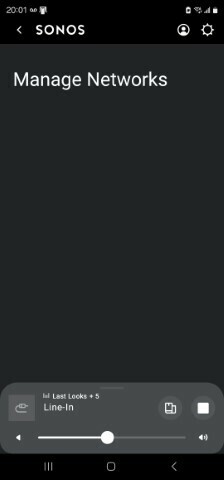
Yep, I’m having same issue.  If only I could roll back app.  Now trying all the reboot reset options.  Changed network, finding it hard to delete old network, keeps reappearing. Manage Networks blank.  Very poor support. No option to update system


Lyricist III
May 28, 2024

Same problem here, plus prompted to switch on Bluetooth when opening the app

I deleted the app restarted the phone reinstalled the app and still these problems exist.

Bumper
May 28, 2024

Same problem here, plus prompted to switch on Bluetooth when opening the app

I deleted the app restarted the phone reinstalled the app and still these problems exist.

IIRC they are using Bluetooth for device set up and discovery. But you don’t need to enable this, the app will still work. 
 

No amount of reinstalling the app or rebooting will bring this setting back. It’s gone for now. 

Lyricist III
May 28, 2024

System has been installed for a number of years and has been working as expected and I’ve never been prompted to activate BlueTooth, for as long as I can remember.

Then the app is upgraded and suddenly I’m asked to activate BlueTooth and there is no way to avoid this, unless I leave Bluetooth active/on.

This complaint is mentioned by several other community users.

Contributor I
May 30, 2024

No network. No devices.

How can this be??????