
Contributor I
October 9, 2019
Answered

Mac OSX Catalina has wrecked my SONOS music library link

Just upgraded to Catalina, and SONOS is now useless.
Despite being able to see and link to the USB drive with my music library, SONOS insists there's nothing there. I'm guessing it's some sort of paranoid OSX security setting - but would appreciate any help from you guys......
This topic has been closed for further comments. You can use the search bar to find a similar topic, or create a new one by clicking Create Topic at the top of the page.
Contributor I
October 9, 2019
AjTrek1: Sorry if I was unclear.
No, Sonos opens fine but shows there's nothing in the music library.

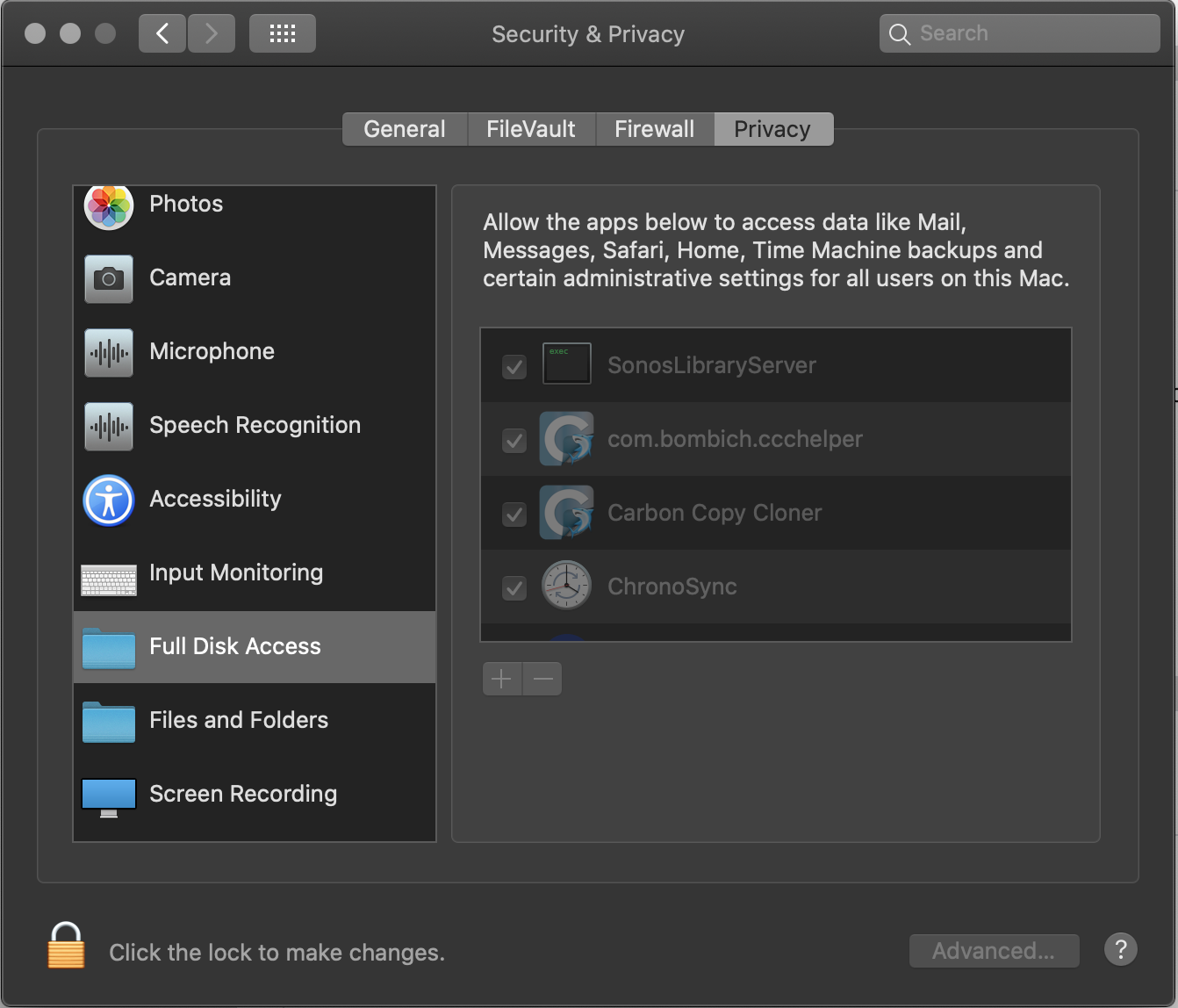
EDIT - I've just found a new setting in Preferences/Security called "Full Disk Access" & "Files and Folders". See below. Seems the default is to deny apps access until given permission. I changed mine, and it seems to have worked. Might be an idea to keep this in mind for other updaters!


33 replies

Contributor I
February 6, 2020

I have found what solved the CATALINA issue for me… It was my Eset Security. In its logs I found entries that there was “no rule found for Sonos app.” What I finally did was: Open ESET, Setup, Firewall, Network traffic filtering, Setup, and Add a new rule for Sonos to allow all network connections, Entire internet and All directions. I’m back up fine!

Jon
Lyricist I
May 30, 2020


I can't find an app on my Mac called SonosLibraryServer

Go to System Preferences - Security & Privacy - Privacy tab (on right) - scroll down to Full Disk Access, you should see a list of apps granted disk access. Enable the SonosLibraryServer and you should be sorted. You will probably need to re-link your music folder, though.


This a golden nugget of information. Under OS 10.15.5 and Sonos 11.1, never mind disappearing Apple playlists (which I can just about live without in Sonos), the entire music library disappears. Not only is it essential to grant Sonos Full Disk Access, but the existing path must be deleted in the Sonos app and then added again.

Contributor I
December 15, 2020

Any mac IT admins searching this the web and need to set up a PPPC MDM profile.


Bundle Identifier

/Applications/Sonos.app/Contents/MacOS/SonosLibraryServer


Code Requirement

identifier SonosLibraryServer and anchor apple generic and certificate 1[field.1.2.840.113635.100.6.2.6] /* exists */ and certificate leaf[field.1.2.840.113635.100.6.1.13] /* exists */ and certificate leaf[subject.OU] = "2G4LW83Q3E"