
Contributor I
October 9, 2019
Answered

Mac OSX Catalina has wrecked my SONOS music library link

Just upgraded to Catalina, and SONOS is now useless.
Despite being able to see and link to the USB drive with my music library, SONOS insists there's nothing there. I'm guessing it's some sort of paranoid OSX security setting - but would appreciate any help from you guys......
This topic has been closed for further comments. You can use the search bar to find a similar topic, or create a new one by clicking Create Topic at the top of the page.
Contributor I
October 9, 2019
AjTrek1: Sorry if I was unclear.
No, Sonos opens fine but shows there's nothing in the music library.

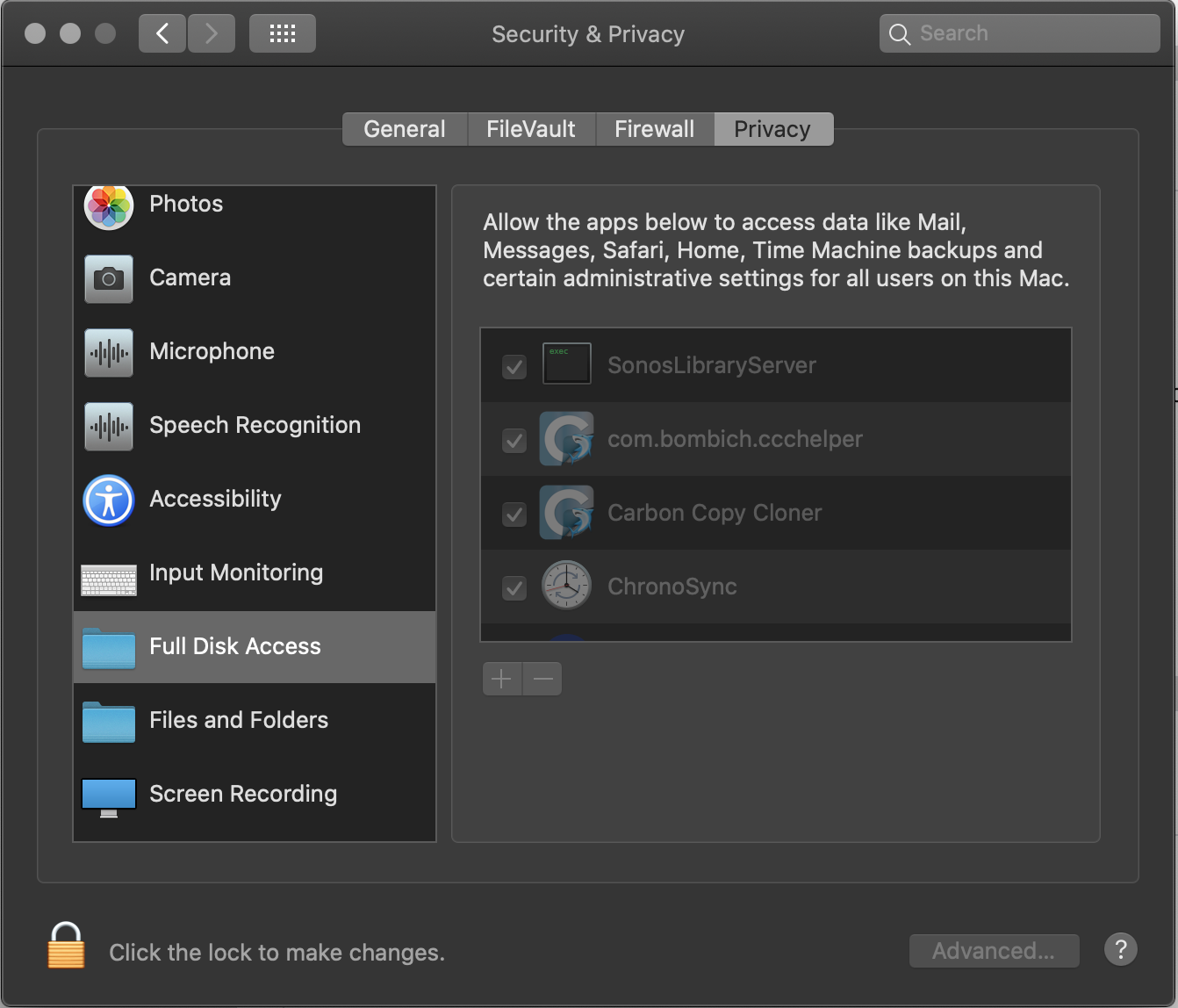
EDIT - I've just found a new setting in Preferences/Security called "Full Disk Access" & "Files and Folders". See below. Seems the default is to deny apps access until given permission. I changed mine, and it seems to have worked. Might be an idea to keep this in mind for other updaters!


33 replies

Contributor I
November 14, 2019

lets go SONOS, fix the USB drive issue!

What USB Drive issue?  That is resolved by reading the above posts!

seriously, don't you think I tried it?


Contributor I
November 17, 2019

lets go SONOS, fix the USB drive issue!

What USB Drive issue?  That is resolved by reading the above posts!

seriously, don't you think I tried it?


tried again successfully!  Deleted the Controller and REBOOTED the computer seemed to help...

Avid Contributor I
November 28, 2019

Is this fixed now on current releases??  I’ve been holding off upgrading my Mac at home.

Airgetlam
November 28, 2019

Not yet, apparently.

Bruce
Avid Contributor I
December 1, 2019

Well, I don't know--most of these posts are older.

Airgetlam
December 1, 2019

Trust me, it has not yet been fixed. Ryan would, I’m sure, call that out in release notes/the announcement thread when it occurs. 

Bruce
Lyricist I
December 24, 2019

David MF’s message was most helpful. The extra step I had to take after following David’s advice was to add the same path as appeared already to be in existence in Music Library Settings. This successfully overwrote the old (identical) path and repopulated the previously blank library. System now working. Getting used to this with Mac software upgrades :( Good luck everyone and thank you David.

meneal
Lyricist III
January 2, 2020

I have not been able to access any playlist on Sonos that I’ve created in iTunes since installing Catalina. Has anyone found a way to be able to do this?  As a DJ, I’m constantly creating new playlists that I’d like to play on Sonos, and I’m very frustrated that I don’t have direct access to this via my Music Library in Sonos.  Suggestions?  Thank you!

el rubio
January 2, 2020

I have not been able to access any playlist on Sonos that I’ve created in iTunes since installing Catalina. Has anyone found a way to be able to do this?  As a DJ, I’m constantly creating new playlists that I’d like to play on Sonos, and I’m very frustrated that I don’t have direct access to this via my Music Library in Sonos.  Suggestions?  Thank you!


I found a workaround by using a tool “export for iTunes” - you can find more about it in this thread. Hope this helps.

salu2.eu
Lyricist III
February 3, 2020

This resolved my issue with the Music Library. Once I allowed “SonosLibraryServer” full access it indexed the music and it’s now available. Welcome back Sonos… I missed you. 


Now if we can just work out that 30% trade in on the ton of equipment I bought years ago…