
Contributor I
October 9, 2019
Answered

Mac OSX Catalina has wrecked my SONOS music library link

Just upgraded to Catalina, and SONOS is now useless.
Despite being able to see and link to the USB drive with my music library, SONOS insists there's nothing there. I'm guessing it's some sort of paranoid OSX security setting - but would appreciate any help from you guys......
This topic has been closed for further comments. You can use the search bar to find a similar topic, or create a new one by clicking Create Topic at the top of the page.
Contributor I
October 9, 2019
AjTrek1: Sorry if I was unclear.
No, Sonos opens fine but shows there's nothing in the music library.

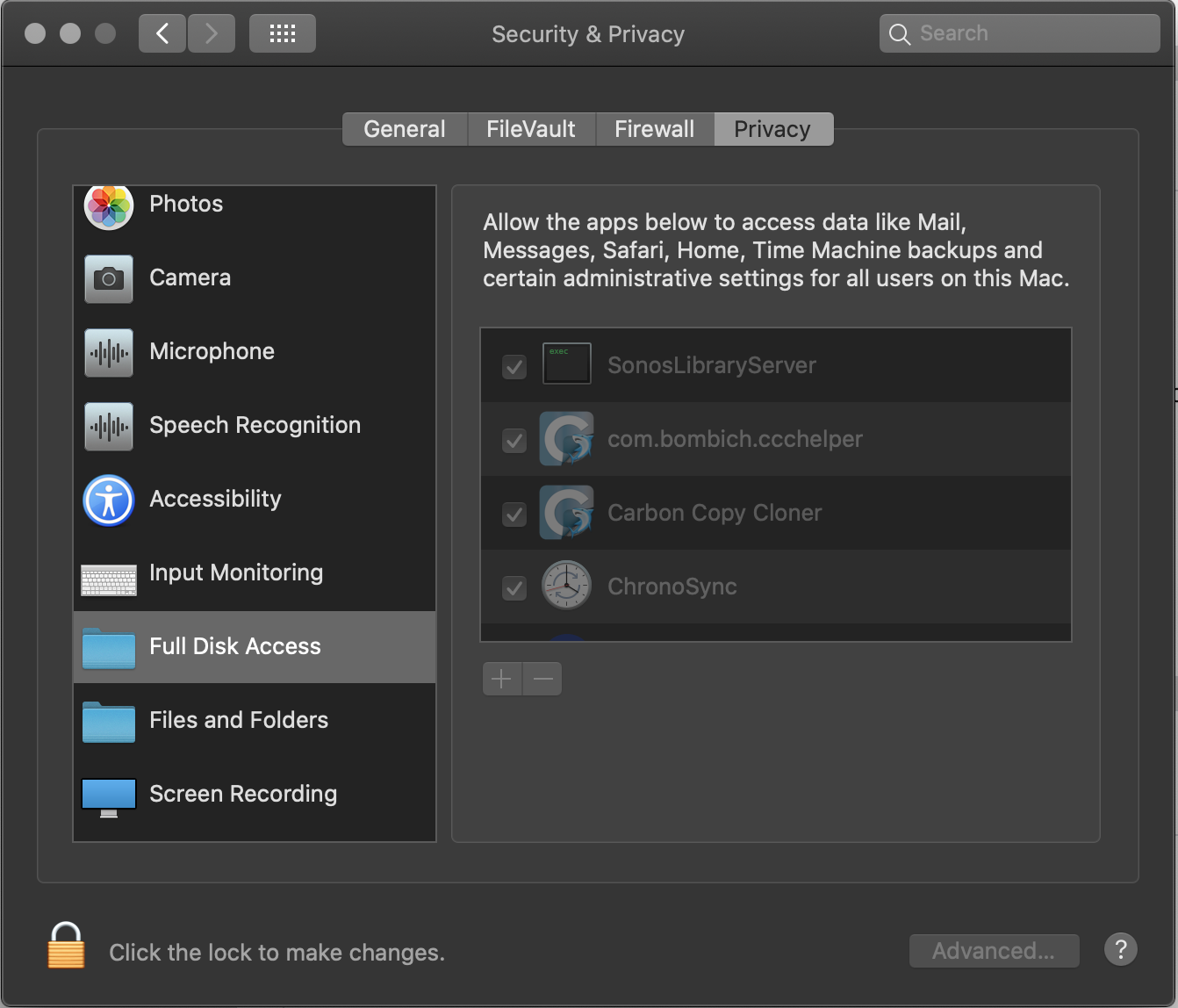
EDIT - I've just found a new setting in Preferences/Security called "Full Disk Access" & "Files and Folders". See below. Seems the default is to deny apps access until given permission. I changed mine, and it seems to have worked. Might be an idea to keep this in mind for other updaters!


33 replies

Contributor I
October 11, 2019
Bear with me, cos I'm no techie. Just tryin to help.
My SonosLibraryServer (now known as SLS) is in Library - Application Support - Sonos

I'm confused why yours doesn't appear. Have you tried making a new link to your music in Sonos? I deleted the old link, then re-added it before finding the paranoid preferences panel in Catalina.

My music is all on a permanently attached USB drive. Same for you?
Lyricist II
October 11, 2019
No, it is on A NAS through Ethernet.

There's no file named SonosLibraryServer or SLS in Library - Application Support - Sonos. There are a bunch of other files, though, apparently created when i reinstalled the sonos app this morning.
Contributor I
October 11, 2019
I tried running my music via a NAS/ethernet, but it was crazily unreliable....
We need cleverer people than me to help out here. Anyone else able to help Podsnap?
Lyricist II
October 11, 2019
Thanks. It has worked quite well with NAS and an Ethernet until I installed Catalina. It then lost most of the files in the music folder. I deleted the folder from Sonos and tried to add it back and it won't add it back, just never stops indexing the directory. I can add a directory on my computer with no problem and Sonos clearly sees the directory on the NAS but it won't finish indexing.
Contributor I
October 11, 2019
Out of interest, try copying a few music folders to your Mac HDD, index them through Sonos and see if your missing SLS files then show up in Prefs. You can replace the library later....
Lyricist II
October 11, 2019
Yes, that works if I copy files to the drive (the Mac internal drive) and then index them. This occurs only on the NAS.
Avid Contributor I
October 14, 2019

Thanks, David M Franks! The “Full Disk Access” solution worked a treat. I did have to remove/add my library’s folders, but my music is back!

Contributor I
October 15, 2019

I had same issues as above and deleted my app, reinstalled it, changed security settings in Catalina to allow full access, added music library (held on attached USB drive), updated library, and now I’m off and running again.

Contributor I
November 14, 2019

lets go SONOS, fix the USB drive issue!

bockersjv
Local Superstar
November 14, 2019

lets go SONOS, fix the USB drive issue!

What USB Drive issue?  That is resolved by reading the above posts!