
Contributor I
October 9, 2019
Answered

Mac OSX Catalina has wrecked my SONOS music library link

Just upgraded to Catalina, and SONOS is now useless.
Despite being able to see and link to the USB drive with my music library, SONOS insists there's nothing there. I'm guessing it's some sort of paranoid OSX security setting - but would appreciate any help from you guys......
This topic has been closed for further comments. You can use the search bar to find a similar topic, or create a new one by clicking Create Topic at the top of the page.
Contributor I
October 9, 2019
AjTrek1: Sorry if I was unclear.
No, Sonos opens fine but shows there's nothing in the music library.

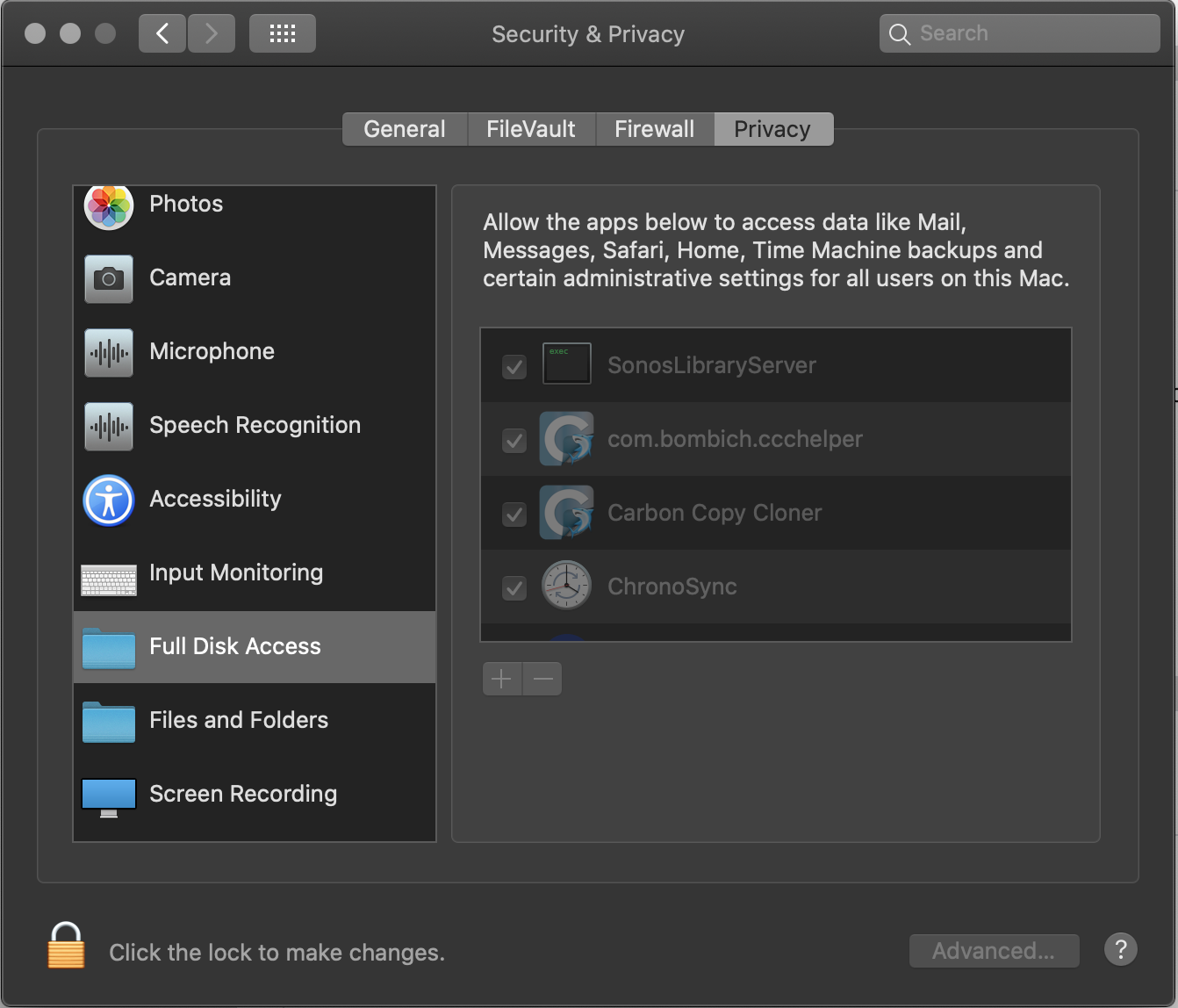
EDIT - I've just found a new setting in Preferences/Security called "Full Disk Access" & "Files and Folders". See below. Seems the default is to deny apps access until given permission. I changed mine, and it seems to have worked. Might be an idea to keep this in mind for other updaters!


33 replies

AjTrek1
October 9, 2019
Hi David M Franks

Are you saying that Catalina won't allow you to open Sonos? If so try the instructions in the YouTube video here.
Together Everyone Achieves More = T.E.A.M.
David M FranksAuthorAnswer
Contributor I
October 9, 2019
AjTrek1: Sorry if I was unclear.
No, Sonos opens fine but shows there's nothing in the music library.

EDIT - I've just found a new setting in Preferences/Security called "Full Disk Access" & "Files and Folders". See below. Seems the default is to deny apps access until given permission. I changed mine, and it seems to have worked. Might be an idea to keep this in mind for other updaters!


pwt
Virtuoso
October 9, 2019
There is a flurry of new security measures in Catalina that will trip up quite a few apps that will require confirmation of access rights in order to work. Expect lots of dialog boxes ...
4 x P:5 | Sub | 4 x P:1 | 3 x Connect | 2 x Boost | Connect:Amp | 2 x One | Amp | Move | Port | Era 300
Steve Turner
Producer I
October 10, 2019
Probably best to hold off upgrading to Catalina until Sonos has fixed the other issue, i.e. no access to playlists stored on the Mac. When you upgrade to Catalina on the Mac, the iTunes playlist xml fee will disappear as iTunes is removed and replaced with Music. From other threads I see Sonos are working o this but seem to have been caught out!
Steveee
Lyricist II
October 10, 2019
I am running Catalina now. Sonos was missing files and would not upgrade music so I deleted and re-added file server ... bad choice, it will not re-add the files.

I gave full access (as shown above) to Sonos.app.
However, I can't find an app on my Mac called SonosLibraryServer, and can't add it.

Thanks for your assistance.
Contributor I
October 11, 2019

I can't find an app on my Mac called SonosLibraryServer

Go to System Preferences - Security & Privacy - Privacy tab (on right) - scroll down to Full Disk Access, you should see a list of apps granted disk access. Enable the SonosLibraryServer and you should be sorted. You will probably need to re-link your music folder, though.
Lyricist II
October 11, 2019
Thanks, David, but as I mentioned there's nothing there (under System Preferences - Security & Privacy - Privacy tab) called the SonosLibraryServer and no file with that name on my Mac. And I have reinstalled the Sonos Mac app.
Contributor I
October 11, 2019
Weird - what apps do you have showing in the Full Disk Access tab?
Plus is anything showing in the Files and Folders tab (the next one down). I've attached a screenshot of mine in case it helps....

Lyricist II
October 11, 2019
Here are the two folders. I just did a complete uninstall and reinstall of Sonos. Same problem.