
Enthusiast II
May 12, 2025
Answered

Duplicate album names queued together

  • May 12, 2025
  • 24 replies
  • 360 views

I posted a while back about an issue with duplicate album names (https://en.community.sonos.com/topic/show?tid=6925592&fid=229131). That is still an issue, but this seems to be a new wrinkle.

Just eyeballing my album list, I see (at least) eight cases where the same album title is used on different albums by different artists. One example: ‘Greatest Hits’ by (1) Carole King and James Taylor, and (2) Steely Dan.

The most extreme case is ‘Unplugged’ by four different artists.
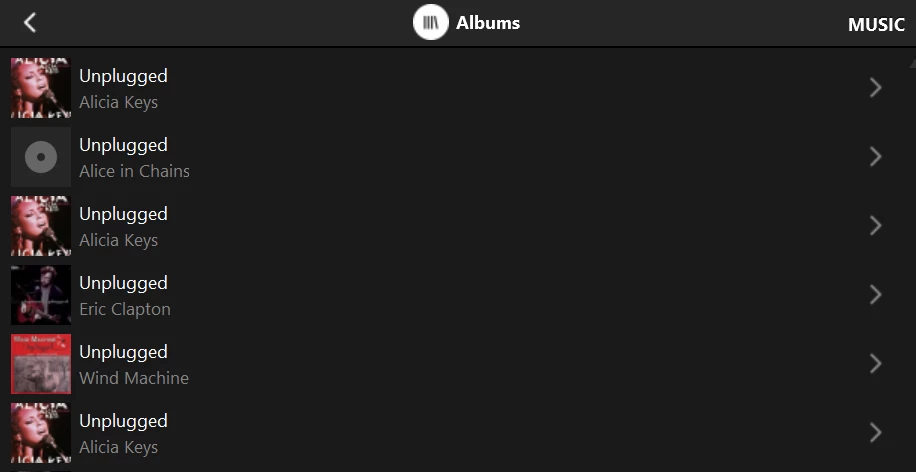
(Alicia Keys is erroneously​​​ repeated)

In all cases, if I select one of a group of duplicates and ‘Replace queue’, ALL albums of the same name get queued.

Can anyone else check for similar behavior?

Yes, I realize I could get probably around this by simply tweaking the name of one of the albums, but should I have to? Should be a simple fix for a vendor who was concerned.

Please advise. Thanks!

This topic has been closed for further comments. You can use the search bar to find a similar topic, or create a new one by clicking Create Topic at the top of the page.
Best answer by Corry P

Hi ​@RogerWF 

The Web App is a work in progress - we are concentrating on the app at present, but the Web App will be improved in time.

The Web App does work off the same base as the new app, however, and you are reporting seeing the incorrect listings there too, so I am with ​@Outburst on this - I think it may be time that we had a look at the metadata for you, and if it is all OK, we can move ahead with documenting the issue.

Please be sure to mention seeing the same indexing issue in Web App when you call in - it is an important distinction. Please get in touch with our technical support team for further investigation.

24 replies

Local Superstar
May 14, 2025

I have a few suggestions to try but don't wish to be admomished for suggesting/presuming/assuming something that you've not mentioned that may turn out not to be the case…

Enthusiast II
May 15, 2025

Do you have “Group by Album Artist” enabled in the music library settings in the Sonos controller? Also it probably might help to check the tracks in each of the duplicated albums or are they all the same?

Corry P
Sonos Staff
May 15, 2025

Hi ​@Outburst 

Thanks! I was indeed misunderstanding!

There clearly is something going wrong here. I can only recommend you and ​@RogerWF both get in touch with our technical support team in order to have these unwarranted behaviours fully documented with diagnositcs taken at relevant stages.

I will see what I can do myself to raise awareness of this, but I am currently of the opinion that the teams will need the level of evidence demonstrating what is happening that can only really be gathered and collated from support calls. It is possible that a colleague will be able to replicate this, though, so I will let you know here if further evidence is not needed, if that turns out to be the case.

"Common sense is the collection of prejudices acquired by age eighteen." - Albert Einstein
Corry P
Sonos Staff
May 15, 2025

Hi ​@RogerWF & ​@Outburst 

OK, I heard back already. Please don’t call in.

My apologies - I keep forgetting that the DCRs (Desktop Controllers) for Windows and Mac are basically at End of Life - we are keeping them accessible for now, as some people are finding them helpful when it comes to sorting out issues with updating or registering speakers, but once the mobile app reaches full parity and is more reliable in this respect, the DCRs will be ended in favour of the Web App at https://play.sonos.com. Any issues that the DCRs have will not be addressed for this reason, and will remain unaddressed past the point where the DCRs are off-lined.

If any of you see any of this unwanted behaviour either with browsing albums or adding them to the queue when using either the mobile App or the Web App, please let me know, as that would need to be investigated.

I hope this helps.

"Common sense is the collection of prejudices acquired by age eighteen." - Albert Einstein
bockersjv
Local Superstar
May 15, 2025

Also watching this with interest.  I have seen some “interesting” behaviors in this area but not had the time to investigate in detail.

Local Superstar
May 15, 2025

The news about the retiring of the Desktop controllers is really sad IMHO.

I think there will be cracks and issues in the mobile Apps for some time (that won't be apparent straight away) and the Desktop has helped thousands and thousands of users with such issues regain access to and control their systems over the past year, since the new App rollout.

I understand and respect that a level of effort has gone into the creation of the Web app but it is nowhere near good or quick enough to be considered a replacement for it.  I know I am far from the only one saying this and hope, unlike last time, such feedback won't go unheeded and ignored.  Sonos have promised to listen in future I heard..

One example, have you tried scrolling through the queue on the Web App?  I'd say it's unusable to be honest.

RogerWFAuthor
Enthusiast II
May 15, 2025

Do you have “Group by Album Artist” enabled in the music library settings in the Sonos controller? Also it probably might help to check the tracks in each of the duplicated albums or are they all the same?

(1) Yes. See attached. Have not changed anything.

(2) Yes The track listings for each duplicate entry are identical. Alicia Keys Unplugged: 16 tracks each. Crash soundtrack: 15 tracks each.


RogerWFAuthor
Enthusiast II
May 15, 2025

Hi ​@RogerWF & ​@Outburst 

OK, I heard back already. Please don’t call in.

My apologies - I keep forgetting that the DCRs (Desktop Controllers) for Windows and Mac are basically at End of Life - we are keeping them accessible for now, as some people are finding them helpful when it comes to sorting out issues with updating or registering speakers, but once the mobile app reaches full parity and is more reliable in this respect, the DCRs will be ended in favour of the Web App at https://play.sonos.com. Any issues that the DCRs have will not be addressed for this reason, and will remain unaddressed past the point where the DCRs are off-lined.

If any of you see any of this unwanted behaviour either with browsing albums or adding them to the queue when using either the mobile App or the Web App, please let me know, as that would need to be investigated.

I hope this helps.

Browsing these particular album titles via the web interface shows the same issue: one pair of duplicate ‘Crash’ entries, and one pair of duplicate ‘Unplugged’ entries, in addition to others that are not duplicated.

And this is probably just me as a dumb user and is not intended as an ‘attack’ on anyone here, but I’m finding the web interface very painful. I have the ‘album list’ up. How do I quickly find the ‘Unplugged’ album besides painfully scrolling down a few lines and then waiting for it to catch up? The ‘Search’ on the top line seems to search *all* services *except* the music library. I see all these services listed across the top row after I search, with the first few matching titles found in each one, but how do I get it to also search my library?

And then, if I select one of the albums to look at its track list, how do I get back to my place in the list I just scrolled down? Using the Back button puts me back at the top.

And again, dumb user here, but how does one add an album ‘to end of queue’ via the web interface? All I see are ‘play’ and ‘shuffle’ buttons for just the selected album.

Finally, I am happy to report that when I ‘play’ one of the Crash albums, only it goes into the queue - not all titles of that same name. This was an issue with only the desktop app (thanks again, Outburst).

Speaking of which, mine was just updated on 4/20. Ironic… ;)

Cheers!


Enthusiast II
May 16, 2025

Ok so if you see all the same tracks in both albums, I don’t think it’s metadata related. If the metadata was off, I would expect that you see different tracks in each album. Maybe you actually have a second copy of these albums in your music share? That’s the only guess I have, if that’s not the case, maybe it’s best to call support. I think they can check the file paths of the albums and can tell you more. I’m not sure if that’s possible for a user without help of support.

Corry P
Corry PAnswer
Sonos Staff
May 16, 2025

Hi ​@RogerWF 

The Web App is a work in progress - we are concentrating on the app at present, but the Web App will be improved in time.

The Web App does work off the same base as the new app, however, and you are reporting seeing the incorrect listings there too, so I am with ​@Outburst on this - I think it may be time that we had a look at the metadata for you, and if it is all OK, we can move ahead with documenting the issue.

Please be sure to mention seeing the same indexing issue in Web App when you call in - it is an important distinction. Please get in touch with our technical support team for further investigation.

"Common sense is the collection of prejudices acquired by age eighteen." - Albert Einstein