
Enthusiast II
May 12, 2025
Answered

Duplicate album names queued together

  • May 12, 2025
  • 24 replies
  • 360 views

I posted a while back about an issue with duplicate album names (https://en.community.sonos.com/topic/show?tid=6925592&fid=229131). That is still an issue, but this seems to be a new wrinkle.

Just eyeballing my album list, I see (at least) eight cases where the same album title is used on different albums by different artists. One example: ‘Greatest Hits’ by (1) Carole King and James Taylor, and (2) Steely Dan.

The most extreme case is ‘Unplugged’ by four different artists.
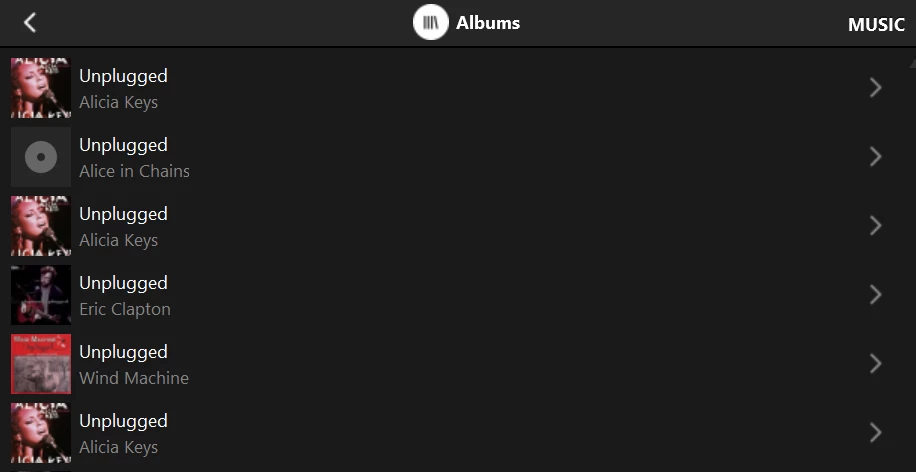
(Alicia Keys is erroneously​​​ repeated)

In all cases, if I select one of a group of duplicates and ‘Replace queue’, ALL albums of the same name get queued.

Can anyone else check for similar behavior?

Yes, I realize I could get probably around this by simply tweaking the name of one of the albums, but should I have to? Should be a simple fix for a vendor who was concerned.

Please advise. Thanks!

This topic has been closed for further comments. You can use the search bar to find a similar topic, or create a new one by clicking Create Topic at the top of the page.
Best answer by Corry P

Hi ​@RogerWF 

The Web App is a work in progress - we are concentrating on the app at present, but the Web App will be improved in time.

The Web App does work off the same base as the new app, however, and you are reporting seeing the incorrect listings there too, so I am with ​@Outburst on this - I think it may be time that we had a look at the metadata for you, and if it is all OK, we can move ahead with documenting the issue.

Please be sure to mention seeing the same indexing issue in Web App when you call in - it is an important distinction. Please get in touch with our technical support team for further investigation.

24 replies

Corry P
Sonos Staff
May 13, 2025

Hi ​@RogerWF 

Thanks for your post!

Sorry to hear of the issue you are having with your duplicate album names confusing the index.

This is the very reason why we added support for the Album Artist metadata tag - so that the albums with identical names can be distinguished from each other.

Using a tag editor of your choice (I personally use Media Monkey, but neither I nor Sonos can take any responsibility for any harm caused by the use of third party software), please alter the metadata of your compilation albums (and albums with duplicated names) to include information in the Album Artist field. I recommend you use the Alicia Keys, Wind Machine and Eric Clapton for the Unplugged albums, and Various Artists for any compilation albums consisting of tracks from multiple artists. You will be able to do so an album at a time for the Unplugged albums, and all albums for Various Artists in one step.

I hope this helps.

"Common sense is the collection of prejudices acquired by age eighteen." - Albert Einstein
RogerWFAuthor
Enthusiast II
May 13, 2025

Hi Corry,

Thanks for the quick reply. I hope you don’t mind my saying that it was pretty presumptuous on your part. I’ve always ensured that Album Artist is properly populated. I’ve attached a display of the properties of track one from each of the four ‘Unplugged’ albums, and no I haven’t changed anything.

FWIW all my music is on a Synology server. I’ve got almost 28,000 tracks in almost 2600 folders. I started with a Synology DS209 with the S1 Five and now have a Synology DS214play (209 is now a backup) with the S2 Play Five plus a Roam.

Let me know if there is any other info I can provide that might be helpful. Thank you.

Corry P
Sonos Staff
May 13, 2025

Hi ​@RogerWF 

Apologies - you do indeed have the Album Artist tags present!

In that case, I have absolutely no idea why your albums are being displayed in the way that they are - I did not think I was being presumptuous as it seemed pretty clear at the time that that was what the issue was. That it is not has me fairly stumped.

I do notice that Alicia Keys does not have the Contributing Artist tag, but I don’t think that is relevant at this stage.

I recommend you get in touch with our technical support team who have tools at their disposal that will allow them to give you advice specific to your Sonos system and what it reports - if they cannot solve this for you, they can at least document the issue and report it to our software teams as an issue to be investigated.

The screenshot in your opening post looks like it might be from the Desktop Sonos app - could you please check the mobile app to see if it displays things differently? If it does, please be sure to mention this to the agent you speak to.

I hope this helps.

"Common sense is the collection of prejudices acquired by age eighteen." - Albert Einstein
RogerWFAuthor
Enthusiast II
May 13, 2025

Same thing with the phone app; see attached (and it’s my wife who is the Grey’s Anatomy fan ;) ).

Yes, I could contact your tech support, but I thought it might be easier to first check with other users, who surely must have this same scenario in their library, and who could quickly either confirm or deny similar behavior.

I also fear being placed on hold forever. Too busy for that. But when I get a chunk of free time I will give it a try.

And, no, you ‘presumed’. ‘Assumed’ plus some evidence to support your assumption. But no facts.

Have a good day.


Enthusiast II
May 13, 2025

I think there might have been a misunderstanding on Cory’s side. The issue is not that the albums are not shown correctly, but adding them to the queue will queue all albums with the same name.

I have just reproduced this as well with two Unplugged albums, but it only happens on the desktop controller here. If I add an Unplugged album to the queue on my iOS Sonos app it works as expected, only the selected album is played.

RogerWFAuthor
Enthusiast II
May 13, 2025

Outburst, Thanks for checking this out with your system. And for shedding important light on the situation!

You are exactly right. I just queued up the Alicia Keys Unplugged using my Android app, and that’s the only thing now in the queue!

I had gotten used to using the desktop app due to other issues with the Android controller, so it didn’t occur to me that there might be different behavior in this scenario.

So, in summary, both my Android app and the desktop app erroneously show multiple Alicia Keys ‘Unplugged’ albums (separate problem; see above). But if I choose one of them using the Android app and ‘Replace queue’, only that one album gets queued. OTOH if I select the same album using the desktop app, all albums with that title are queued.

Thanks again - hope this helps in pinning this down.  Cheers!

Enthusiast II
May 14, 2025

Ok now I see that I also did not fully understand your issue 😅 I have no issues with albums being shown multiple times, just with the queueing aspect. Is the Alicia Keys album the only one that is displayed multiple times? If yes, maybe post a screenshot of the metadata of two tracks of this album here.


RogerWFAuthor
Enthusiast II
May 14, 2025

First of all, I have to give props to Corry for helping me partially resolve the Alicia Keys ’Unplugged’ issue (why it was shown three different times in my Album list).

He noted that the Contributing Artist field was blank in the metadata for the song from that album that I included.

So, I listed the info for all tracks on that album and found that Contributing Artist was blank for all tracks except two, each of which had something different and unique. I therefore added ‘Alicia Keys’ into all the blank Contributing Artist fields and reindexed.  Now I’m down to only two Alicia Keys ‘Unplugged’ albums.  And each ‘album’ contains all tracks.

Doesn’t make sense to me; still puzzled but it’s a step forward.

unplugged - sonos album list
unplugged - metadata


RogerWFAuthor
Enthusiast II
May 14, 2025

And I realized right after posting ‘There I go again with the desktop app’. So I actually initiated a re-index from the Android app, waited for it to complete, and then listed the albums.  No change.


RogerWFAuthor
Enthusiast II
May 14, 2025

Secondly, I also have an issue with the ‘Crash’ soundtrack being listed twice.  Again, all tracks are listed with each copy.

Thanks.  Let me know if I can provide any more info that might help.