Edgie70
Renowned Enthusiast I
Mar 10, 2024 8:11 PM UTC
Answered

app notification Samsung Galaxy S24+

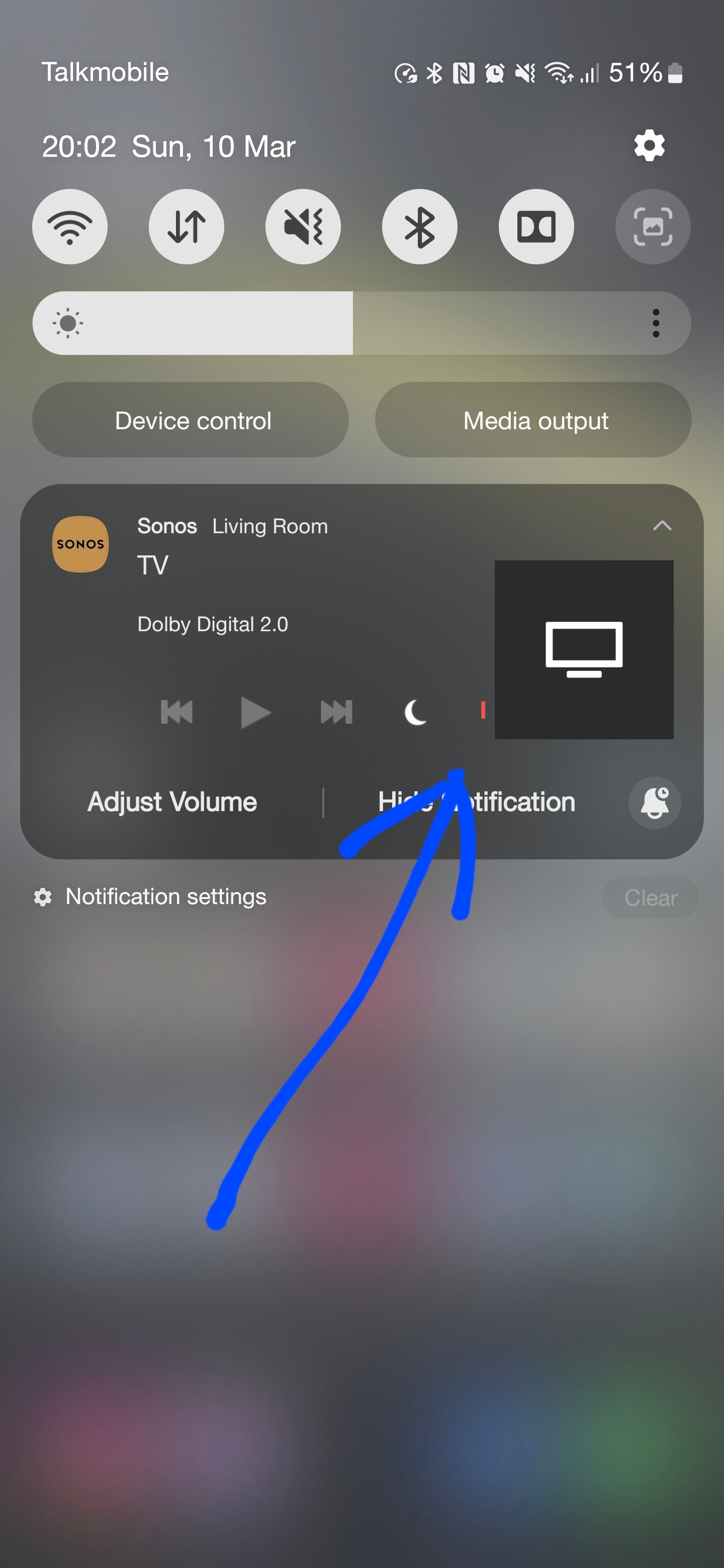
Hi all , just got a new Samsung Galaxy S24+ , the pull down notification for the Sonos seems to partly miss the speech enhancement button , anyone else have a new Samsung with this little hick up ????

 

This topic has been closed for further comments. You can use the search bar to find a similar topic, or create a new one by clicking Create Topic at the top of the page.
Sotiris C.
Sonos Staff
Mar 15, 2024 8:58 AM UTC

Hello @Edgie70 and all,

I’ve got an update from our internal team, as they were able to reproduce this now. We are currently investigating but there is no ETA available for a fix.

Thank you for bringing this to our attention.

Leaving a like and marking Best Answer might make someone's day. Who knows, that someone might be you.

11 replies

Sotiris C.
Sonos Staff
Mar 11, 2024 2:20 PM UTC

Hello @Edgie70, welcome back!

I’m sorry to hear you are experiencing this odd issue. Weirdly enough a colleague of mine could not reproduce with a slightly older (1 year) model of Samsung smartphone.

A few things you could try:

  • Make sure your Samsung phone is up to date with the latest firmware.
  • Check for any updates on the Sonos App.
  • Uninstall the Sonos app and re-download from our official website.

If the above didn’t resolve your issue, please reach out to our Support to help raise this.

With my response, your thread moved to the top of the latest activity list, giving it another chance for a user in our Community, who has the Samsung Galaxy S24+ smartphone, to reply here with their experience.

I hope this helps.

Translate
Leaving a like and marking Best Answer might make someone's day. Who knows, that someone might be you.
Edgie70
Edgie70Author
Renowned Enthusiast I
Mar 13, 2024 2:51 PM UTC

Thanks , if I uninstall the app , will it affect anything with my system like truplay ? 

Translate
Sotiris C.
Sonos Staff
Mar 13, 2024 3:33 PM UTC

All settings and configurations are saved within the speakers. Uninstalling the app will not affect your system’s behavior.

Just make sure when you re-install the Sonos App to choose “Connect to existing system".

Translate
Leaving a like and marking Best Answer might make someone's day. Who knows, that someone might be you.
Edgie70
Edgie70Author
Renowned Enthusiast I
Mar 13, 2024 9:24 PM UTC

Hi , app uninstalled and tried it again and it's still the same unfortunately 


Translate
Stanley_4
Grand Maestro
Mar 13, 2024 11:55 PM UTC

Do you have a larger than default font or zoom enabled on the phone?

Translate
Edgie70
Edgie70Author
Renowned Enthusiast I
Mar 13, 2024 11:59 PM UTC

Do you have a larger than default font or zoom enabled on the phone?

Hi , no , just as it was from new , I'll try that though tomorrow when I'm watching TV again, thanks 

Translate
Renowned Enthusiast I
Mar 14, 2024 5:20 PM UTC

Same issue in a S23 Ultra with default font and QHD+ resolution. Had this bug since I have this device.


Translate
Edgie70
Edgie70Author
Renowned Enthusiast I
Mar 14, 2024 10:51 PM UTC

Not just me then .

Translate
Sotiris C.
Sonos Staff
Mar 15, 2024 8:58 AM UTC

Hello @Edgie70 and all,

I’ve got an update from our internal team, as they were able to reproduce this now. We are currently investigating but there is no ETA available for a fix.

Thank you for bringing this to our attention.

Translate
Leaving a like and marking Best Answer might make someone's day. Who knows, that someone might be you.
Edgie70
Edgie70Author
Renowned Enthusiast I
Mar 15, 2024 10:09 AM UTC

No problem and thanks for your reply, it all works fine but just looks a bit odd , tiny bit awkward to press the speech button but not impossible, thanks again.

Translate