Enthusiast II
October 18, 2022
Answered

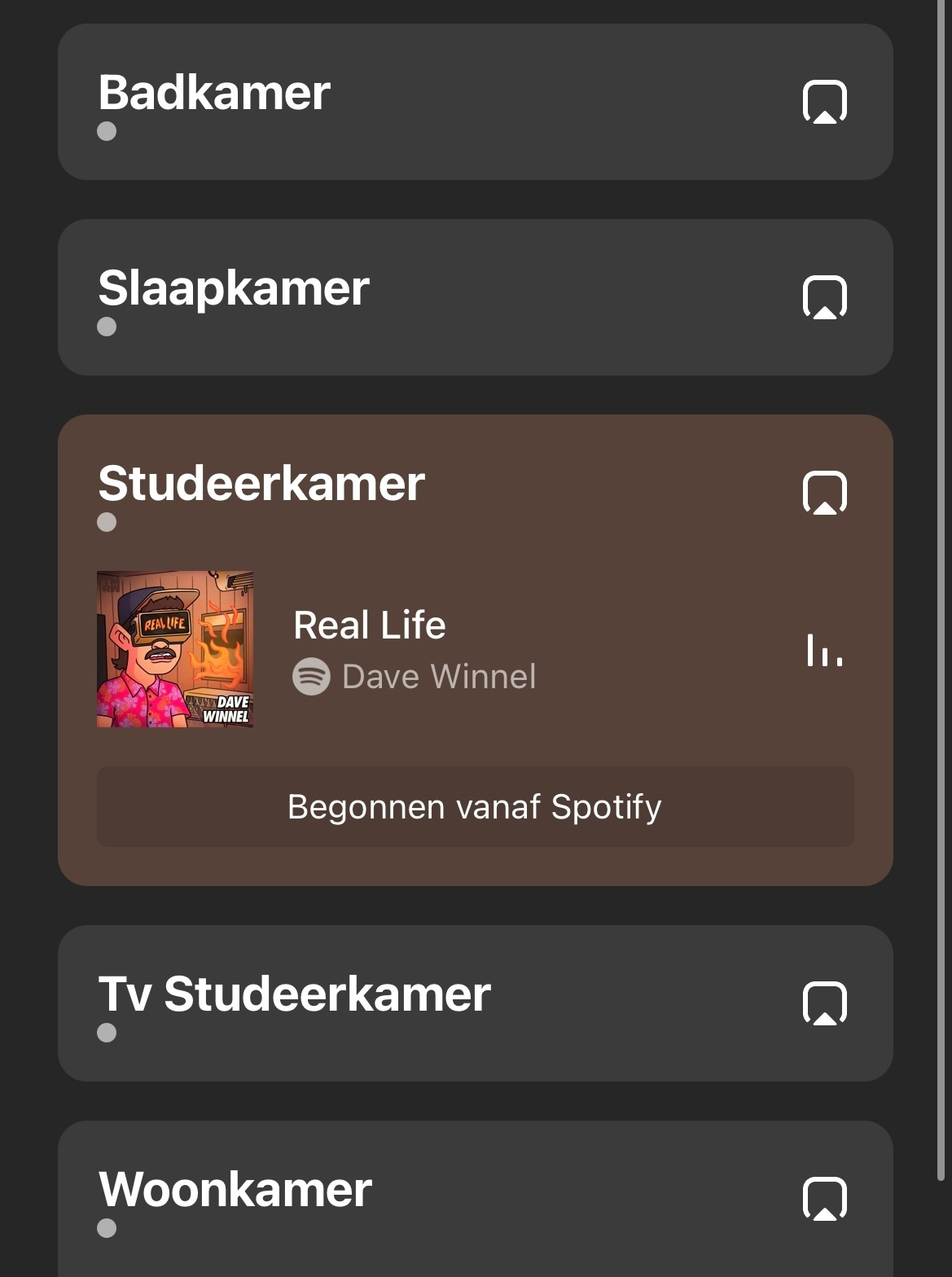
Why is there a dot next to each room?

  • October 18, 2022
  • 20 replies
  • 1955 views

Just updated to 14.18 and now I see there is a dot under each room. I don't think it was there before. At least I don't remember. What does this mean? 


This topic has been closed for further comments. You can use the search bar to find a similar topic, or create a new one by clicking Create Topic at the top of the page.
Best answer by Corry P

Hi All,

The dots have been ‘recoloured’ to match background in 14.18.1. If you put your phone close to your ear, you can still hear them. I’m sure the dots had a different sound in 14.18 😀

Just to confirm part of what @craigski says very, very slightly, this issue has been resolved with the app-only update to 14.18.1. 😏

If you can hear the dots, we are not qualified to assist. Good luck! 😁

20 replies

106rallye
October 19, 2022

I think the dot show if the speaker is updated (grey dot) or not (red dot):

I lifted the picture from the Dutch language forum. “Heeft een update nodig" translates to “Needs an update".

Trending Lyricist I
October 19, 2022

Yes appears red dot needs update, grey is ok. 


Local Superstar
October 19, 2022

I have only updated the iOS App to 14.18, and I see black (grey) dots on all speakers, that are all running 14.16. Maybe you only see red dots if at least one speaker is running 14.18 ?

Corry P
Sonos Staff
October 19, 2022

Hi @Whistler et al

Thanks for your post!

We are aware of this issue which appears to be cosmetic only. Red dot’s should appear when there is something needing addressed with that particular room, but the dot should disappear altogether when not red. This only appears to happen on iOS controllers, and will be addressed in a future update.

"Common sense is the collection of prejudices acquired by age eighteen." - Albert Einstein
bockersjv
Local Superstar
October 19, 2022

Not on iOS, no. The “System” page looks the same. 


But I don’t recall any “icons” on that page in the first place. 

Bruce, this…

Before and after update. 

Airgetlam
October 19, 2022

Hmm, thanks for that. I suspect because I don’t have any ‘needs work’ speakers, it doesn’t show up for me…much like Corry was suggesting, the grey dots on the other page appear to be a bug, and don’t show up on the system page. For me ;)
 

Bruce
Local Superstar
October 19, 2022

I think its just the dots have always been there but you couldn’t see them, as they were the same colour as background. With 14.18 iOS App the default colour of the dot is not the same as background colour so you see them.

Airgetlam
October 19, 2022

Entirely possible. I’m just happy it’s not a blocking\audio issue, only a display issue….and my eyes are already starting to ignore them. ;) 

Bruce
Local Superstar
October 20, 2022

The dots have been ‘recoloured’ to match background in 14.18.1. If you put your phone close to your ear, you can still hear them. I’m sure the dots had a different sound in 14.18 😀

Corry P
Corry PAnswer
Sonos Staff
October 21, 2022

Hi All,

The dots have been ‘recoloured’ to match background in 14.18.1. If you put your phone close to your ear, you can still hear them. I’m sure the dots had a different sound in 14.18 😀

Just to confirm part of what @craigski says very, very slightly, this issue has been resolved with the app-only update to 14.18.1. 😏

If you can hear the dots, we are not qualified to assist. Good luck! 😁

"Common sense is the collection of prejudices acquired by age eighteen." - Albert Einstein
