
Contributor I
May 13, 2024

When will "Line-In" return to the new app?

  • May 13, 2024
  • 45 replies
  • 3538 views

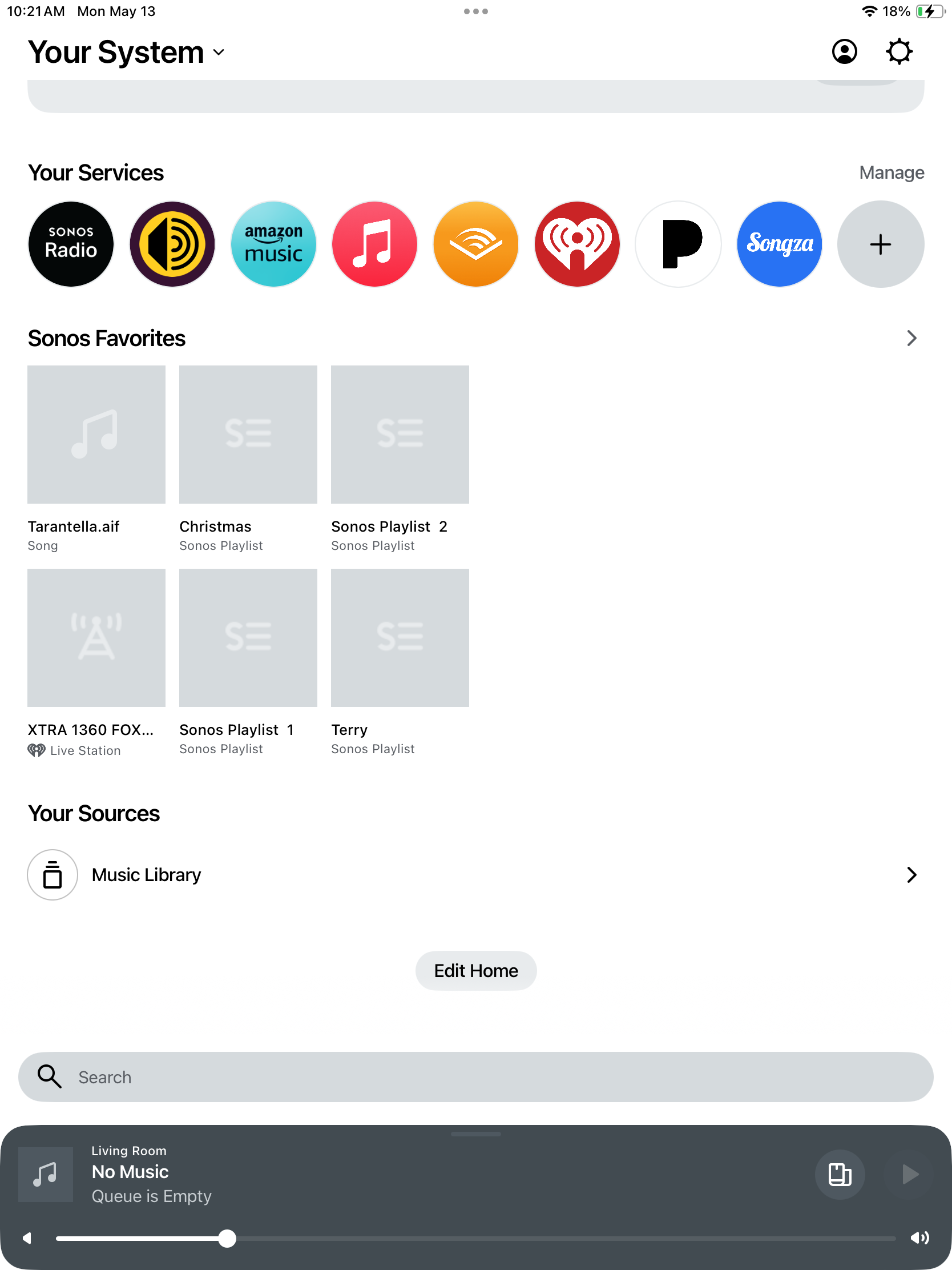
Simple question as a dealer/installer/user:  When will the ability to select and control “Line-In” return?  On the “gold” app, it was part of the “Browse” screen at the bottom of the list of services.  IT IS NOW GONE.  One may presume it should have been in the “Your System” area, but who knows?  Whereas I have reviewed many complaints and issues with the deprecation of features in the new app, the inability to control Line-In is not only a devastating loss, but a liability as many users have purchased the products specifically for their ability to support a Line-In.  I am referring to the “Keith N” response of two days ago and the bullet list of the five features/issues that there is a supposed date for them to return.  See image below and there is NO LINE-IN:
 

This topic has been closed for further comments. You can use the search bar to find a similar topic, or create a new one by clicking Create Topic at the top of the page.

45 replies

Ken_Griffiths
October 30, 2024

Line-In enumeration requires all devices to be discovered, and we know the new app still cannot do that reliably on all systems.

Use the Desktop app or third party for reliable device enumeration → reliable Line-In.

I thought Sonos were using the old and new methods of multicast device discovery - I base that on the attached comment from Sonos posted on Reddit.

But still on their “coming soon” list is improved device discovery, so they still haven’t got it back as reliable as the v79 app (or Desktop). I frankly don’t understand why this remains a problem.

I don’t see why there is an issue here either, based on what was said on the Reddit Q&A.. I just wonder if there are simply some router models (and/or switches) out there that ‘might’ possibly be at fault and in need of firmware update, or are ‘old’ and perhaps need replacing in some cases.

I know SkyQ boxes here in the UK have often been problematic with multicast device discovery and there have been some issues with BT routers too in the past, just as examples. Whilst some reported issues were resolved by switchover to SonosNet, the newer Sonos products no longer support that ‘wired’ connection method - so that is possibly adding to these issues too.

Collaborator II
October 30, 2024

Line-In enumeration requires all devices to be discovered, and we know the new app still cannot do that reliably on all systems.

Use the Desktop app or third party for reliable device enumeration → reliable Line-In.

I thought Sonos were using the old and new methods of multicast device discovery - I base that on the attached comment from Sonos posted on Reddit.

But still on their “coming soon” list is improved device discovery, so they still haven’t got it back as reliable as the v79 app (or Desktop). I frankly don’t understand why this remains a problem.

Especially since Sonos would like us to believe they have “hundreds” of Sonos Engineers working on the problem. It’s been almost six months, it’s crazy. 

Ken_Griffiths
October 30, 2024

Line-In enumeration requires all devices to be discovered, and we know the new app still cannot do that reliably on all systems.

Use the Desktop app or third party for reliable device enumeration → reliable Line-In.

I thought Sonos were using the old and new methods of multicast device discovery - I base that on the attached comment from Sonos posted on Reddit.

But still on their “coming soon” list is improved device discovery, so they still haven’t got it back as reliable as the v79 app (or Desktop). I frankly don’t understand why this remains a problem.

Especially since Sonos would like us to believe they have “hundreds” of Sonos Engineers working on the problem. It’s been almost six months, it’s crazy. 

In fairness to Sonos, this issue is likely not affecting a huge proportion of Households - I can hand-on-heart say I’ve never come across the issue, nor have I seen it occur in Homes of family members or friends. I’ve only come across a ‘friend of a friend’ who had the issue with a BT SmartHub router and that was with a non-SonosNet capable Move gen1 speaker and they resolved it by putting their router into Bridge Mode and adding a WiFi Mesh system to their Home.

I guess Sonos will continue to try to improve things, but I’m not sure they will ever achieve 100% success in this area as it can be issues with Switches, extenders and even security software running on mobile devices - (blockers/vpn etc.) that can interrupt the device discovery packets.

I guess time will tell, but I understand similar issues exists with Apple AirPlay (bonjour service) too and clearly Apple have not fully resolved their AirPlay issues too.

controlav
Lead Maestro
October 30, 2024

In fairness to Sonos, this issue is likely not affecting a huge proportion of Households - I can hand-on-heart say I’ve never come across the issue, nor have I seen it occur in Homes of family members or friends. I’ve only come across a ‘friend of a friend’ who had the issue with a BT SmartHub router and that was with a non-SonosNet capable Move gen1 speaker and they resolved it by putting their router into Bridge Mode and adding a WiFi Mesh system to their Home.

I guess Sonos will continue to try to improve things, but I’m not sure they will ever achieve 100% success in this area as it can be issues with Switches, extenders and even security software running on mobile devices - (blockers/vpn etc.) that can interrupt the device discovery packets.

I guess time will tell, but I understand similar issues exists with Apple AirPlay (bonjour service) too and clearly Apple have not fully resolved their AirPlay issues too.

Sorry but there is no excuse for failing to find devices reliably in the new app when the Desktop app on the exact same network is reliable.

Author of the leading independent Sonos apps for Android, MacOS, iOS, Windows and Xbox.
Ken_Griffiths
October 30, 2024

Sorry but there is no excuse for failing to find devices reliably in the new app when the Desktop app on the exact same network is reliable.

The S2 Desktop App didn’t work to find devices on a SkyQ network setup - just saying.

A Sonos Household was also problematic with some ‘other’ mesh networks too, like Google Nest for example and IIRC, users switched to SonosNet to resolve their issues.. but that’s not going to work these days with portable devices and new Sonos products that no longer use SonosNet.

So there might be reasons in some cases, with the new app, where it’s a perhaps a local issue too that’s causing the device discovery issue.

Taking on board what you said earlier - I assume Sonos are still fixing some issues as they encounter them being reported in the ‘real world’ and hopefully the reports will continue to dwindle, but I still think it will be difficult to achieve a 100% success rate in this area. Just too many variables to cover every eventuality and the different types of network hardware setups around the various Countries.. I know SkyQ mesh is still an example that gives rise to device discovery issues.