Contributor II
Jul 9, 2021 5:11 PM UTC
Answered

Suddenly Sonos can't access Synology DS218+ - " check the username and/or password"

RESOLVED - See first reply

My stereo pair of Sonos One has been working fairly well with the music library on my Synology DS218+ for years.

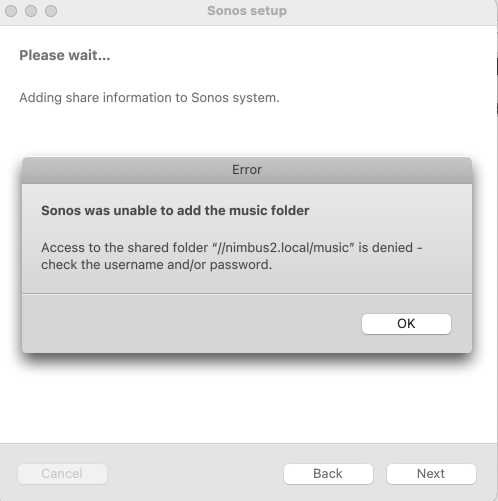
Suddenly, a couple of days ago, when I tried to play a song, the Sonos app said “Access to the shared folder is denied - check the username and/or password.” See screen shot below.

Troubleshooting steps taken:

  1. Re-enter login credentials
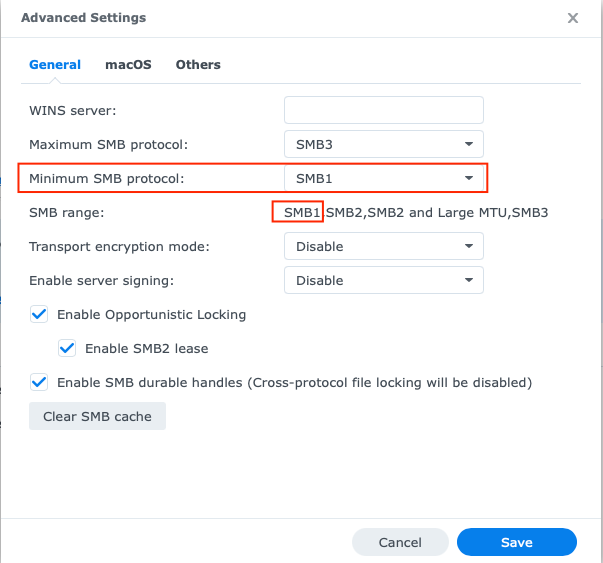
  2. Verify that smb1 is enabled on the NAS (it was, or it wouldn’t have worked previously) - see screen shot below
  3. Remove the NAS from the Sonos app and start over
  4. Re-start Sonos
  5. Re-start NAS
  6. Use IP address number instead of alphanumeric name for the NAS (even though the latter worked previously)
  7. Create new user account on NAS
  8. Try logging in via Sonos app on another device: iPad Pro running iOS 14, 2012 MacBook Pro running latest Catalina, and 2017 iMac running latest Big Sur.

I’m still able to access the music library on the NAS via Synology’s mobile apps (DS Audio, DS File) using the same login credentials which previously worked with the Sonos system.

Also, as a test, I was able to successfully add the iTunes folder on my MacBook Pro to the Sonos system.

I spent an hour on the phone with Sonos support yesterday to no avail. The agent was friendly but in over his head. He said that it’s not possible to add a NAS library to Sonos via the mobile app, which is simply incorrect.

He asked me to submit a diagnostic report and then took down the number so he could access it. After the call, he sent an email which made no reference of the diagnostics and included links to solutions that had nothing at all to do with my issue.

I responded to that email and received a reply from another agent. I answered her questions and am awaiting a reply. I’ve also contacted Synology.

There are only two things that might have changed before this problem arose:

  1. I upgraded the Synology OS from DSM 6 to DSM 7. I don’t recall the date I did this.
  2. I upgraded the Sonos app on the iPad Pro, which is what I use to control the system.

Searches show this problem popping up for at least 8 years, but I found no solutions that I hadn’t already tried.

Sonos using the obsolete and un-safe smb1 protocol is inexcusable, but I imagine that they won’t change this since the percentage of customers using a NAS is small.

As a work-around, I can use AirPlay2 to access the NAS music library.

At this point, it seems the best solution might be to sell my Sonos Ones and get something else. Too much hassle.

But if anyone has a solution I haven’t already tried, please let me know.

Thanks!

Bob


This topic has been closed for further comments. You can use the search bar to find a similar topic, or create a new one by clicking Create Topic at the top of the page.
bobk2Answer
Contributor II
Jul 9, 2021 5:25 PM UTC

Solution from Synology support:

In DSM 7, go to Control Panel > File Services > Advanced Settings under SMB > Others and enable NTLMv1 authentication

So it appears the DSM 7 update is what resulted in the issue - Synology tightened security, which is good!

Synology warns that NTLMv1 is fairly unsafe and says that Sonos should make their devices compatible with newer protocols.

I realize this has been discussed here before, and there are no signs to date that anything will be changed.

12 replies

bobk2AuthorAnswer
Contributor II
Jul 9, 2021 5:25 PM UTC

Solution from Synology support:

In DSM 7, go to Control Panel > File Services > Advanced Settings under SMB > Others and enable NTLMv1 authentication

So it appears the DSM 7 update is what resulted in the issue - Synology tightened security, which is good!

Synology warns that NTLMv1 is fairly unsafe and says that Sonos should make their devices compatible with newer protocols.

I realize this has been discussed here before, and there are no signs to date that anything will be changed.

Translate
bobk2Author
Contributor II
Jul 9, 2021 6:38 PM UTC

Here’s a screen shot:


Translate
Lyricist I
Aug 7, 2021 9:19 AM UTC

Same issue happened to my NAS after updating to DSM 7. Glad to find the workaround here. Will Sonos tighten the security aspects to their devices soon?


Greets

Nick

Translate
Lyricist I
Aug 16, 2021 9:33 AM UTC

I have had Sonos for some years and it has always worked well. The the latest Synology update was installed as well as a Sonos update, and Sonos wouldn’t access from my music library anymore, but it would play radio etc. I got the dreaded message, “access denied, check your username and/or password”. I searched for hours on the Sonos site and elsewhere, and got nowhere. Then I found the solution above, “enable NLTMv1 authentication” and instantly, everything worked again.

Translate
Enthusiast I
Aug 31, 2021 9:46 PM UTC

Top marks to you for this fix, thanks so much. No marks to Synology nor Sonos as this sort of fail just takes up time nobody has.

Translate
Lyricist I
Sep 12, 2021 10:18 AM UTC

After many days of searching/trying/resetting/installing, this solution finally worked for me.

Thank you

Translate
Lyricist III
Sep 22, 2021 6:42 AM UTC

Hi,

I found this solution by myself after reading my SMB logs.

It is a shame that Sonos only supports an outdated and unsecure SMB protocol.

Any idea of a date to add support of a more modern SMB version ?

Thanks.

Kevin

Translate
Airgetlam
Sep 22, 2021 3:41 PM UTC

Not currently. All we know is it is being worked on, and we assume it will be S2 only when it is released.

Translate
Bruce
Lyricist I
Sep 29, 2021 5:58 PM UTC

Solution from Synology support:

In DSM 7, go to Control Panel > File Services > Advanced Settings under SMB > Others and enable NTLMv1 authentication

So it appears the DSM 7 update is what resulted in the issue - Synology tightened security, which is good!

Synology warns that NTLMv1 is fairly unsafe and says that Sonos should make their devices compatible with newer protocols.

I realize this has been discussed here before, and there are no signs to date that anything will be changed.


GREAT REPLY, thank you so much, issue solved in 10 seconds thanks to you !!!!


Translate
Lyricist I
Oct 6, 2021 11:01 AM UTC

Thank you soooo much. Fixed my problem where my Sonos system lost access to my Synology NAS after a NAS update. I would never have found the problem without this post. Thanks again!

Translate