Suddenly Sonos can't access Synology DS218+ - " check the username and/or password"
RESOLVED - See first reply
My stereo pair of Sonos One has been working fairly well with the music library on my Synology DS218+ for years.
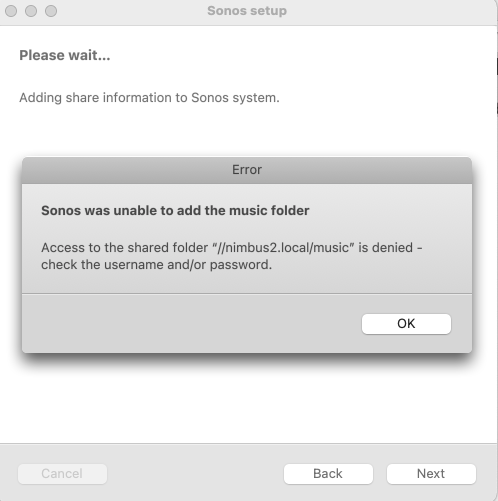
Suddenly, a couple of days ago, when I tried to play a song, the Sonos app said “Access to the shared folder is denied - check the username and/or password.” See screen shot below.
Troubleshooting steps taken:
- Re-enter login credentials
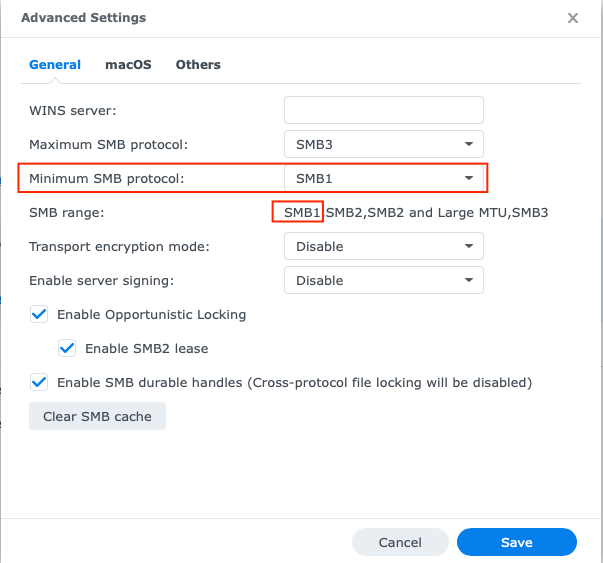
- Verify that smb1 is enabled on the NAS (it was, or it wouldn’t have worked previously) - see screen shot below
- Remove the NAS from the Sonos app and start over
- Re-start Sonos
- Re-start NAS
- Use IP address number instead of alphanumeric name for the NAS (even though the latter worked previously)
- Create new user account on NAS
- Try logging in via Sonos app on another device: iPad Pro running iOS 14, 2012 MacBook Pro running latest Catalina, and 2017 iMac running latest Big Sur.
I’m still able to access the music library on the NAS via Synology’s mobile apps (DS Audio, DS File) using the same login credentials which previously worked with the Sonos system.
Also, as a test, I was able to successfully add the iTunes folder on my MacBook Pro to the Sonos system.
I spent an hour on the phone with Sonos support yesterday to no avail. The agent was friendly but in over his head. He said that it’s not possible to add a NAS library to Sonos via the mobile app, which is simply incorrect.
He asked me to submit a diagnostic report and then took down the number so he could access it. After the call, he sent an email which made no reference of the diagnostics and included links to solutions that had nothing at all to do with my issue.
I responded to that email and received a reply from another agent. I answered her questions and am awaiting a reply. I’ve also contacted Synology.
There are only two things that might have changed before this problem arose:
- I upgraded the Synology OS from DSM 6 to DSM 7. I don’t recall the date I did this.
- I upgraded the Sonos app on the iPad Pro, which is what I use to control the system.
Searches show this problem popping up for at least 8 years, but I found no solutions that I hadn’t already tried.
Sonos using the obsolete and un-safe smb1 protocol is inexcusable, but I imagine that they won’t change this since the percentage of customers using a NAS is small.
As a work-around, I can use AirPlay2 to access the NAS music library.
At this point, it seems the best solution might be to sell my Sonos Ones and get something else. Too much hassle.
But if anyone has a solution I haven’t already tried, please let me know.
Thanks!
Bob