
Contributor I
July 22, 2021
Answered

Sonos Windows app UI issues

  • July 22, 2021
  • 19 replies
  • 675 views

Hi,

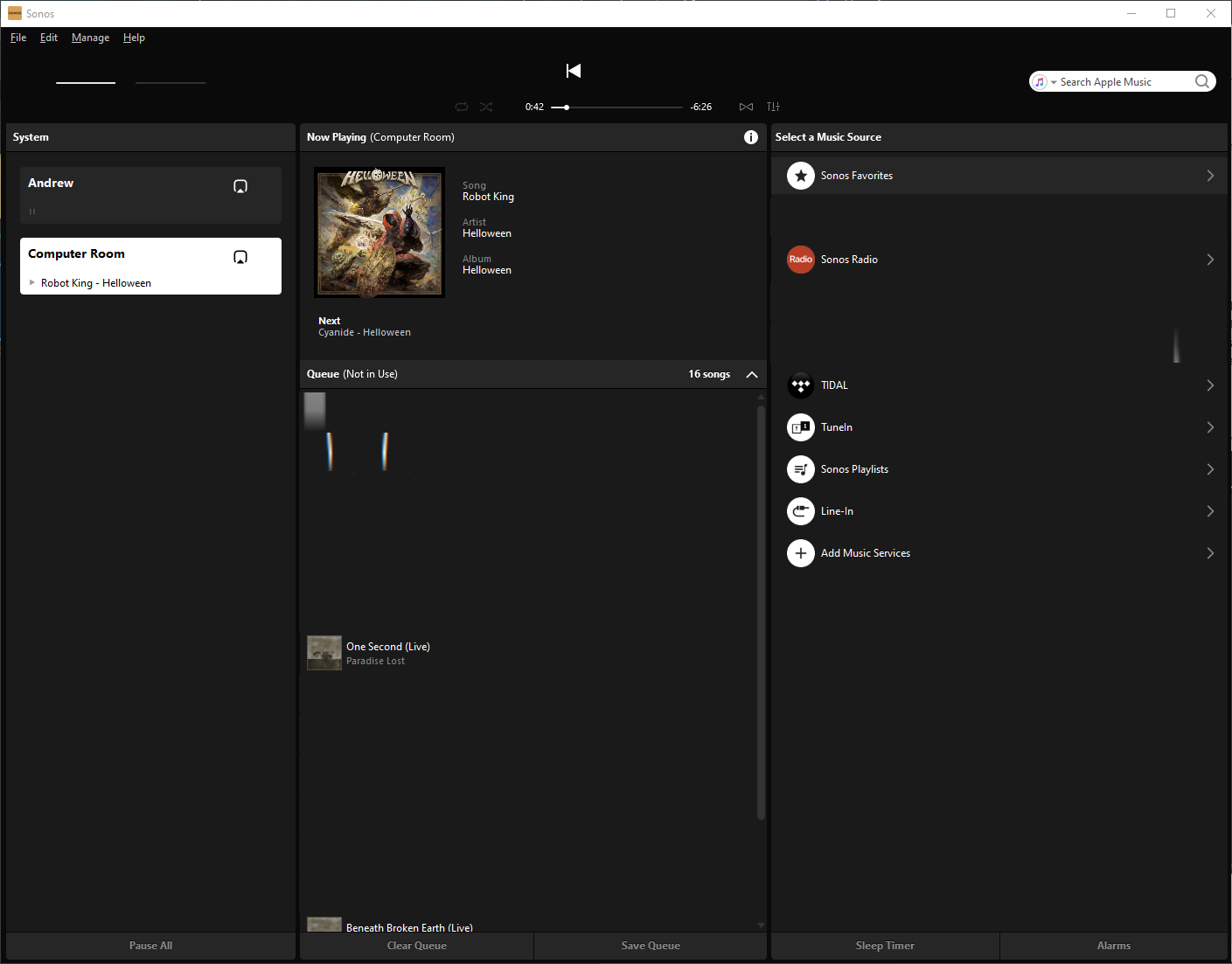
The latest update brought some significant UI bugs. When I move mouse over UI controls they disappear (see attached screenshot). It works for all controls including menu and text boxes. Items may reappear if I move mouse very slow. But it’s unpredictable. I tried to reinstall the app with no success. I must mention that I’ve been using the Windows app for quite some time and it was always working fine. I use the latest (fully updated) Windows 10. Please help.

Thanks,
Dmitry
 

This topic has been closed for further comments. You can use the search bar to find a similar topic, or create a new one by clicking Create Topic at the top of the page.
Best answer by DmitryK

I just want to inform you that I found a proper solution to this issue. Reinstalling nVidia drivers solved it only temporary. 

The solution is removing Sonic Suite applications which came as part of ASUS ROG package. After removal Sonos perfectly works.

Here is some information for whose who is interesting in details: https://github.com/dotnet/wpf/issues/707

19 replies

bockersjv
Local Superstar
July 22, 2021

Just tried this and it seems fine for me.  Windows 10 Version 21H1 and Sonos S2 Version 13.1.4

Have you checked if your Display Driver is up to date?

controlav
Lead Maestro
July 22, 2021

Sounds very much like a video driver problem, or possibly a WPF issue. Sonos aren’t changing this code at all.

Author of the leading independent Sonos apps for Android, MacOS, iOS, Windows and Xbox.
DmitryKAuthor
Contributor I
July 22, 2021

Sounds very much like a video driver problem, or possibly a WPF issue. Sonos aren’t changing this code at all.

Theoretically it can be caused by recent Windows or NVidia drivers updates, but it affects the Sonos app only. If it was a driver problem it would affect other applications too.


Just tried this and it seems fine for me.  Windows 10 Version 21H1 and Sonos S2 Version 13.1.4

Have you checked if your Display Driver is up to date?

Everything is up to date.

controlav
Lead Maestro
July 22, 2021

Sounds very much like a video driver problem, or possibly a WPF issue. Sonos aren’t changing this code at all.

Theoretically it can be caused by recent Windows or NVidia drivers updates, but it affects the Sonos app only. If it was a driver problem it would affect other applications too.


Just tried this and it seems fine for me.  Windows 10 Version 21H1 and Sonos S2 Version 13.1.4

Have you checked if your Display Driver is up to date?

Everything is up to date.


Check when the video driver was updated. I am guessing the answer was recently, and you should try rolling it back to the previous version.

That fact that you haven’t noticed other apps misbehaving means little. Sonos use WPF for the UI, and if you don’t run any other WPF apps, or if other WPFs apps use different controls then the repro may well be exclusive to Sonos.

I say again: Sonos are not going to change their UX in the Desktop apps. This is a system-level problem, somewhere.

Author of the leading independent Sonos apps for Android, MacOS, iOS, Windows and Xbox.
DmitryKAuthor
Contributor I
July 23, 2021

I say again: Sonos are not going to change their UX in the Desktop apps. This is a system-level problem, somewhere.


I am not asking to change the UX or a technology it’s based on. I’m fine with it. I still can use the app, but it’s definitely not as enjoyable as it was before. I am just reporting a problem I have and want to make sure that devs know about it and fix it in next releases. On the other hand, if I’m the only person facing it, the problem is on my PC.

bockersjv
Local Superstar
July 23, 2021

I think we all appreciate you have a problem but none of the 1000’s of other Sonos users have the same issue otherwise it would be all over this community page.  Then again maybe this is a new one about to hit others.  We’ll soon see.


DmitryKAuthor
Contributor I
July 25, 2021

Reinstall of NVidia drivers solved the problem. Thanks for helping!

Lyricist III
July 28, 2021

Well I have the same problem now. Also Nvidia driver.

I have had so many issues with this Sonos app. Crashing when searching too fast, using special characters - the list is long! Sonos is annoying me as f… Even though THIS might be driver related.

The driver was installed a week ago, and no other programs have this issue. But Sonos.

I have tried to reinstall the driver, but that didnt help for me (also clean install of GPU driver)

UPDATE: Now I uninstalled ALL Nvidia drivers and restarted windows. Issue still there...

bockersjv
Local Superstar
July 28, 2021

Try rolling back to a previous version of the nVidia driver?  I would guess this is an Nvidia issue, the Sonos Windows app itself has not been changed for some time.


As for the other issues, have you reached out for help here?

Lyricist III
July 28, 2021

Try rolling back to a previous version of the nVidia driver?  I would guess this is an Nvidia issue, the Sonos Windows app itself has not been changed for some time.


As for the other issues, have you reached out for help here?

I tried with the newest Nvidia driver: v. 471.41 and rolled back to v. 466.63 of Nvidia drivers. Still the same issue.

What worries me, is the problem is there without any GPU drivers installed.