

chicks
June 7, 2021

Sonos Touchscreen Controller

  • June 7, 2021
  • 27 replies
  • 8624 views

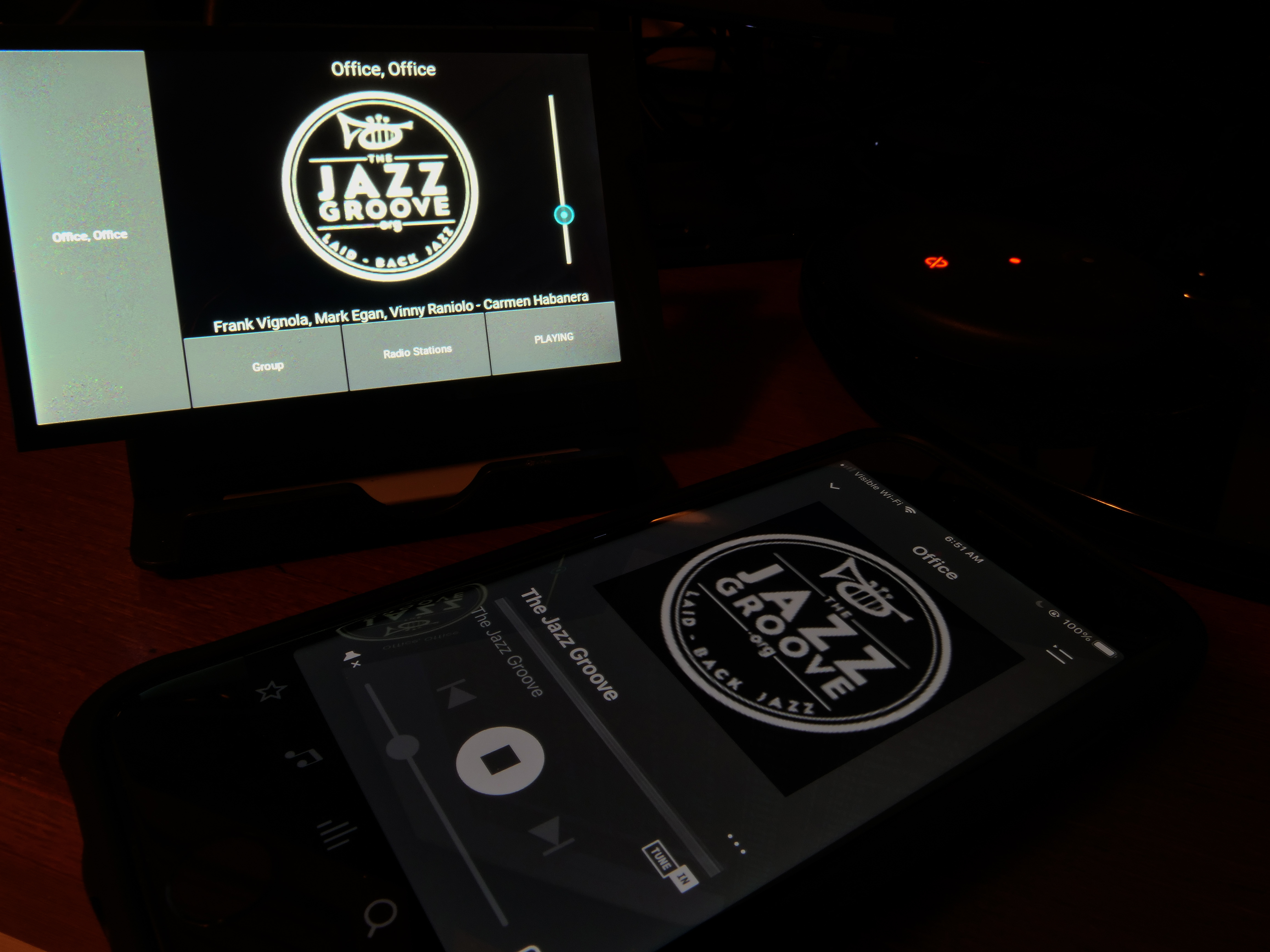
A touchscreen controller for Sonos, using a Hyperpixel 4” touch LCD display and a Raspberry Pi Zero WH.

Using https://github.com/maru-sama/sonoscontroller.  Pi configuration based on http://www.weigu.lu/sb-computer/pitoucon/index.html, with mods for touch rotation.

Provides a full-time desktop display of what’s currently playing, along with basic control.
 

This topic has been closed for further comments. You can use the search bar to find a similar topic, or create a new one by clicking Create Topic at the top of the page.

27 replies

melvimbe
July 22, 2021

@chicks  I noticed that you’re using an IP address to identify the zone it’s tied to.  Can that be done by room name?  I  don’t have my IPs reserved, and not sure I can easily identify the zone I want by IP.  If not, I can do reservations and figure out the the correct zone  with the ‘guess and check’ method, but it would be much easier to just use the room name.

Or I could just look at Soco and figure it out myself I suppose. 

edit:

It looks like you can use:

 from soco.discovery import by_name zone = by_name("Living Room")

Is that right?

Danny
chicks
chicksAuthor
July 22, 2021

@chicks  I noticed that you’re using an IP address to identify the zone it’s tied to.  Can that be done by room name?  I  don’t have my IPs reserved, and not sure I can easily identify the zone I want by IP.  If not, I can do reservations and figure out the the correct zone  with the ‘guess and check’ method, but it would be much easier to just use the room name.

Or I could just look at Soco and figure it out myself I suppose. 

edit:

It looks like you can use:

 from soco.discovery import by_name zone = by_name("Living Room")

Is that right?

I’m not super familiar with SoCo, but that looks about right.  

Tried this on my large TV screen.  Works, but starts to get jaggy above about a 24” screen, as we’re rendering at 800X480.  

Some album covers were meant to be displayed full size. ;)


chicks
chicksAuthor
July 23, 2021

Quick test at Python cmd prompt:

>>> from soco.discovery import by_name
>>> zone = by_name("Office")
>>> zone
SoCo("192.168.68.128")
>>> 


So, looks good.


melvimbe
July 23, 2021

@chicks  I noticed that you’re using an IP address to identify the zone it’s tied to.  Can that be done by room name?  I  don’t have my IPs reserved, and not sure I can easily identify the zone I want by IP.  If not, I can do reservations and figure out the the correct zone  with the ‘guess and check’ method, but it would be much easier to just use the room name.

Or I could just look at Soco and figure it out myself I suppose. 

edit:

It looks like you can use:

 from soco.discovery import by_name zone = by_name("Living Room")

Is that right?

I’m not super familiar with SoCo, but that looks about right.  

Tried this on my large TV screen.  Works, but starts to get jaggy above about a 24” screen, as we’re rendering at 800X480.  

Some album covers were meant to be displayed full size. ;)


Thanks for testing out using the room name.  

I’ll be upfront and tell you that although I love this idea, I am not 100% sure I’m going to use your code just yet.  I need to understand Pi and python a bit more, which is probably a good idea and general.  From what I understand, I’ll probably find other good uses for that knowledge.  The other issue is that my use case is primarily on an outside TV, and I’m not sure I have a good way to protect the pi from the elements,.     Although if I can’t use it outside, I may just use it inside.

Regarding the album art, I have two thoughts on that.  One, can you limit/control the size of the image?  I would assume you can’t programmatically know the display size, but perhaps add a parameter, similar to room name, for the display size intended.  Glancing at the code, it does look like ‘w’ and ‘h’ variables could be adjusted for that.  Somewhat related to that, I’m wondering if you can modify this code so that it can output what’s currently playing in multiple zones.  Perhaps a check to see what zones are playing currently, and report on those zones only.  Maybe up to 4 zones shown in 4 quadrants. Not really suggesting you make those changes, just some things I might look into at some point.


Also, if using an HDMI screen/TV, it’s probably more convenient to power the Pi via USB port on the TV. Don’t need an extra outlet available and Pi would only get power when the TV is on.  Although it looks like the Pi Zero W sellers don’t recommend something like that due to unreliable voltage. Might be something I would try anyways.


Danny
chicks
chicksAuthor
July 23, 2021

I’ve posted the HDMI version to github, with complete installation notes. I don’t plan to modify this any further, but it’s out there to do with as you wish.  https://github.com/retired-guy/Sonos-HDMI

pwt
Virtuoso
July 24, 2021

Quick test at Python cmd prompt:

>>> from soco.discovery import by_name
>>> zone = by_name("Office")
>>> zone
SoCo("192.168.68.128")
>>> 

So, looks good.

Note that there are corner cases where this form of discovery can fail -- for example, if you have multiple Sonos systems on the same network (e.g., split S1/S2) you’ll probably get failures some of the time.

If you do hit problems, use the following instead:

zone = by_name(“Office”, allow_network_scan=True, scan_timeout=1.0)

(Alternatively, one can lift it up a level of abstraction and use SoCo-CLI instead:

>>> from soco_cli.api import get_soco_object
>>> zone, err = get_soco_object("Office")
>>> zone

SoCo("192.168.68.128")

The SoCo-CLI call will use all possible discovery mechanisms. See https://github.com/avantrec/soco-cli#using-soco-cli-as-a-python-library for more details.)

4 x P:5 | Sub | 4 x P:1 | 3 x Connect | 2 x Boost | Connect:Amp | 2 x One | Amp | Move | Port | Era 300
chicks
chicksAuthor
August 12, 2021

A custom 3D printed case for the Hyperpixel display makes it a polished product.  Rubber bumper feet added to bottom to keep it stable when touching screen controls.

3D model here.  Ordered through Shapeways.