
rosswells127
Prodigy I
June 8, 2020
Answered

Sonos S2

  • June 8, 2020
  • 180 replies
  • 12434 views

So it is 4pm on the 8th June here and still no Sonos S2 update. Hmmmmm.

    This topic has been closed for further comments. You can use the search bar to find a similar topic, or create a new one by clicking Create Topic at the top of the page.
    Best answer by larsvdberg

    Steps:

    • Update Sonos App to S1 App
    • In the S1 App go to settings → system → update
    • Update the Sonos system
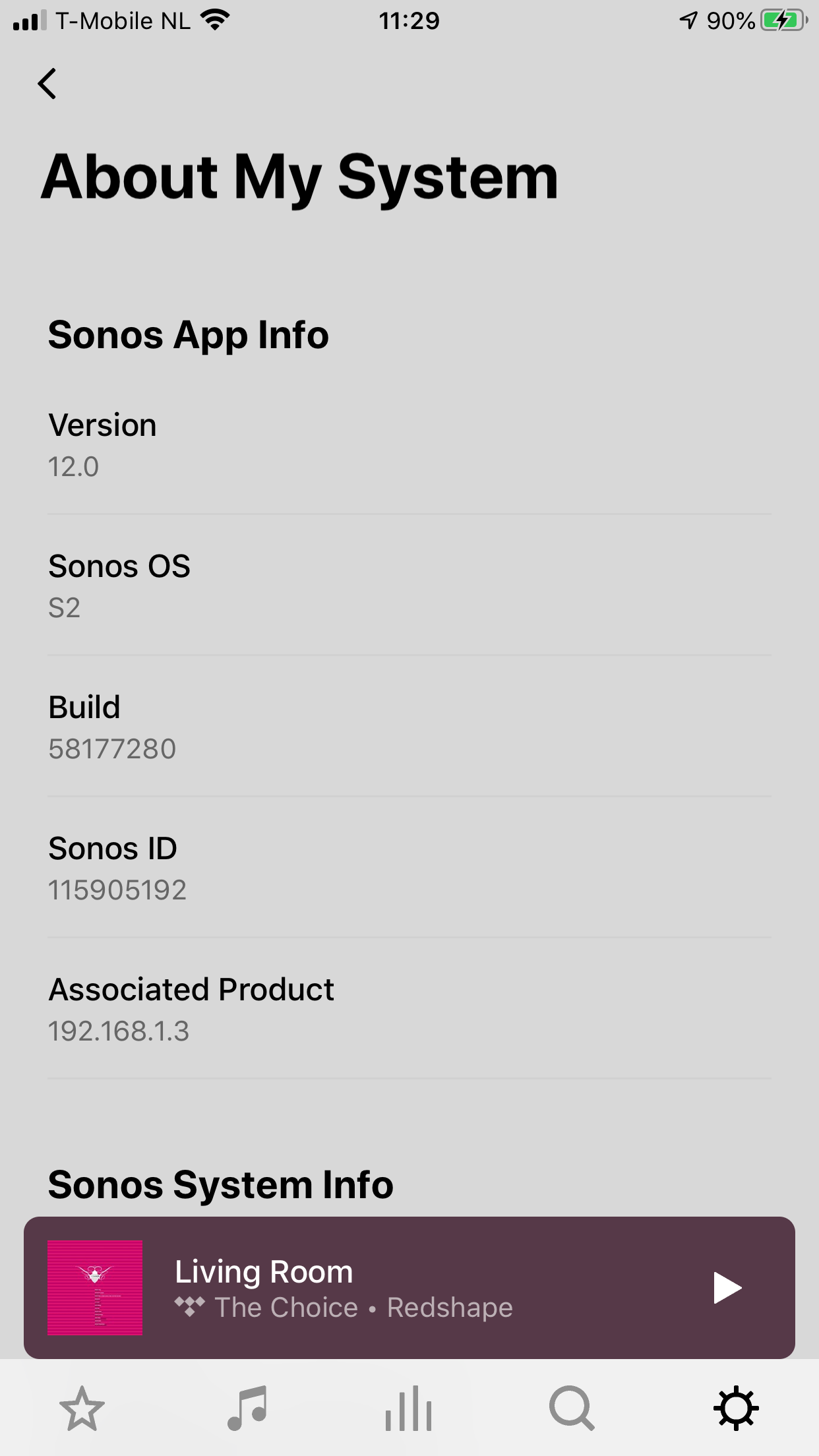
    • Enter S1 again and go to settings → system → (option below, something with S2 App)
    • Download and install S2 App
    • Open S2 App, it states stat you need to update your system (again)
    • Perform system update (unplug your AMP / Active Speakers. I have my Port via COAX connected to my active speakers and it had a nasty glitchy sound during update)
    • This should be it!

    Sonos S2 App link for iOS: https://www.sonos.com/icr2_appstore (I would follow the steps above instead of downloading the S2 App to be sure that the update goes according to the process Sonos has in mind by the way)
     

    180 replies

    KenS
    Enthusiast II
    June 8, 2020

    I keep getting this error on my Mac. Extremely frustrating!


    baardog
    Avid Contributor III
    June 8, 2020

    I can play Hi-Res now! But no support for SMB higher than v1


    Didn’t it do that before? Only truncating it to work?

    Read something about that earlier on the forum...

    You know, I think you are right. The only Hi-res files that plays for me is 24 bit 44-48.
    Not 24/96 or 24/196

    Lyricist III
    June 8, 2020

    It appears that Sonos’ definition of “hi res” is 24 bit - I can now play 24 bit files as long as the sample rate is no higher than 48Khz.  .

    I’m not seeing that on my system. Still converting to 16-bit, although I guess I could need a roon update before it works....


    All I know is that the native apps (Desktop and Android) both refuse to play anything higher than 24/48.  For all I know the 24/48 is being converted to 14/44.1 within the speaker, but I’d doubt it, on the basis that it would be equally straightforward to convert 24/96.

    Prodigy I
    June 8, 2020

    I can play Hi-Res now! And it seems it supports SMB higher than v1


    Any details what and how?

    I play local Hi-Res [24 bit] files fine now, which was not possible earlier. But NO support for SMB higher than v1.

    Hmmm my 96 kHz/24 bit FLAC files still don’t play :grimacing:

    Ken_Griffiths
    June 8, 2020

    I keep getting this error on my Mac. Extremely frustrating!


    I think the thing to try next is… uninstall the existing App and then install the new one and choose the option to connect to the ‘existing' sonos system. See if that does the trick.

    ratty
    June 8, 2020

    I keep getting this error on my Mac. Extremely frustrating!


    I think the thing to try next is… uninstall the existing App and then install the new one and choose the option to connect to the ‘existing' sonos system. See if that does the trick.

    The correct DCR links aren’t up yet at support.sonos.com.

    KenS
    Enthusiast II
    June 8, 2020

    I keep getting this error on my Mac. Extremely frustrating!


    I think the thing to try next is… uninstall the existing App and then install the new one and choose the option to connect to the ‘existing' sonos system. See if that does the trick.

    Thanks!  I had become frustrated (which often results in impatience).  Uninstalling and starting with a fresh download was the answer!

    Smilja
    June 8, 2020

    I am not suggesting it can run both.  Definitely not.  It wil only be visible in one of them. I just want to know if having a speaker on S2 means it can never then be used back in your S1 system.

    How Sonos dealt with this in the past is not necessarily the same - I don't see switching as an upgrade/downgrade scenario - just moving a speaker that is compatible with both OS's between them.


    It’s NOT possible to switch between S1 and S2 at will. You’ll have to make your mind up whether you want to migrate to S2 or not.

    »And the world is like an apple whirling silently in space, Like the circles that you find in the windmills of your mind.« (›Windmills Of Your Mind‹ [1967]. Music by Michel Legrand ; English lyrics written by Alan & Marilyn Bergman)
    Senior Virtuoso
    June 8, 2020

    So many very keen owners out there; I’m sure when Sonos “officially” release the versions it will come with a full Announcement and release notes! I’ve not seen that yet… (unless I missed it?)

    KenS
    Enthusiast II
    June 8, 2020

    I keep getting this error on my Mac. Extremely frustrating!


    I think the thing to try next is… uninstall the existing App and then install the new one and choose the option to connect to the ‘existing' sonos system. See if that does the trick.

    The correct DCR links aren’t up yet at support.sonos.com.

    That was indeed a big part of the problem.  Download link now seems to grab the correct one. On my Mac, this was the dmg file name I needed:  58.1-77280-1-4.dmg