
Contributor I
Sep 17, 2018 9:21 PM UTC

Sonos Controller does not show what‘s playing

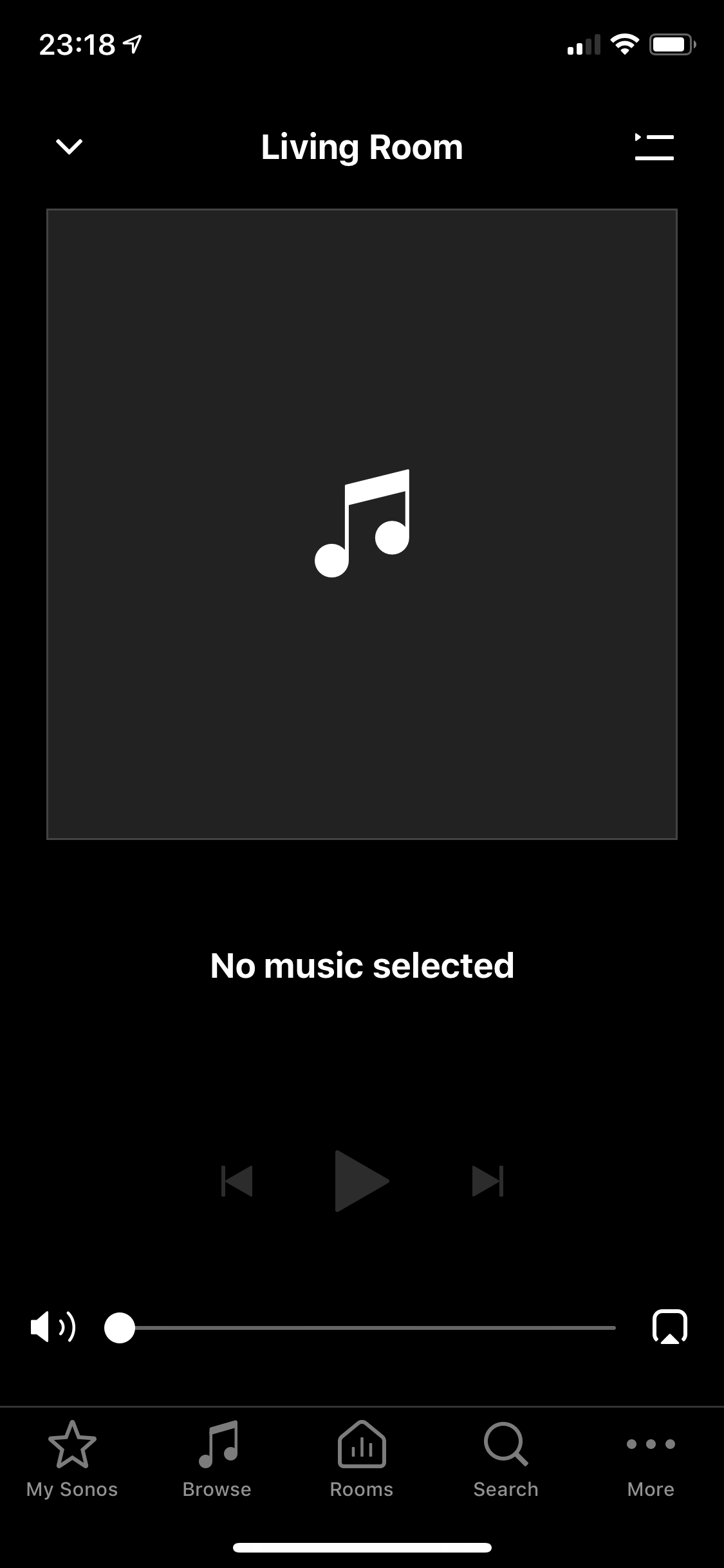
I can start playing music on my controller (iOS 12), on both Apple Music and Spotify. However, the controller does not show what music is playing, and I can't stop playback using the controller with the regular controls. I can only stop it with the buttons on the speaker, and by deselecting my room in the controller. I have submitted diagnostic report no 1127951674. I have 2 Sonos One configured as a stereo pair. I initiate playback using the controller app, search function, from Spotify, Apple Music or the phone's library, with the same result.

This is what the controller looks like (while the speakers are playing):
    This topic has been closed for further comments. You can use the search bar to find a similar topic, or create a new one by clicking Create Topic at the top of the page.

    12 replies

    Jeff S
    Retired Sonos Staff
    Sep 17, 2018 10:24 PM UTC
    I can start playing music on my controller (iOS 12), on both Apple Music and Spotify. However, the controller does not show what music is playing, and I can't stop playback using the controller with the regular controls. I can only stop it with the buttons on the speaker, and by deselecting my room in the controller. I have submitted diagnostic report no 1127951674. I have 2 Sonos One configured as a stereo pair. I initiate playback using the controller app, search function, from Spotify, Apple Music or the phone's library, with the same result.

    This is what the controller looks like (while the speakers are playing):


    Hi there,

    Thanks for sending in the diagnostic report. Your speakers are having a very hard time staying connected to your wireless network. This is likely why your controllers aren't showing the latest information on the now playing screen. I see that there is a network in close range running on the same wireless channel as your main network. This can cause interference and is probably what's causing the issue. Please try changing your router's wireless channel from 11, which is crowded, to 1 or 6, which are less crowded.
    Translate
    Help others find useful content by clicking the like button and selecting the best answer to your question.
    lau.meijer
    Lyricist III
    Sep 25, 2018 1:46 PM UTC
    I have the some issue, since a week or so on my Play-5's and om my Play:Connect's. I use iPhone, iPad and iMac ... all three controller have the same issue. Zones support ... please advice
    Translate
    O'Lau
    lau.meijer
    Lyricist III
    Sep 25, 2018 1:47 PM UTC
    Good to know is that all my SONOS devices are connected by UTP cables ... no wireless.
    Translate
    O'Lau
    Airgetlam
    Sep 25, 2018 2:58 PM UTC
    lau.meijer, you may want to provide Sonos with a diagnostic report, like the original poster did. That will provide a wealth of information for them to look at about your system, and perhaps provide you a different resolution, since your system is wired. Be sure to either post the number of the diagnostic here, or call in to talk to Sonos directly with it.
    Translate
    Bruce
    Contributor I
    Oct 10, 2018 1:33 AM UTC
    I'm having the same issue. Just started tonight. Now Playing disappeared from iPad and iPhone controllers. Should I send a diagnostic? Can I do that without calling tech support. Thank you.
    Translate
    Airgetlam
    Oct 10, 2018 1:38 AM UTC
    Yes, you can. Here is how: submit a system diagnostic. Just be sure to post the number here, so they know which one to look at, and why.
    Translate
    Bruce
    lau.meijer
    Lyricist III
    Oct 10, 2018 5:20 AM UTC
    I have just updates to latest release of the SONOS app. Issue is still the same. Now playing does still not show what is playing. Diagnostics report 85031042 submitted. Cheers, Lau
    Translate
    O'Lau
    lau.meijer
    Lyricist III
    Oct 10, 2018 8:00 AM UTC
    Submitted diagnostics report 938174184 for SONOS app 9.2 build 46357250 (latest update) on iMAC High Sierra 10.13.6. What's playing is (still) NOT shown; it says "no music selected" no matter if I play from sportily or form local disk. :? 😞
    Translate
    O'Lau
    Airgetlam
    Oct 10, 2018 3:42 PM UTC
    Lau, one quick question while we wait for Sonos to look at your diagnostic submission. Is there any chance you use an app called "Homey"? Note: I have absolutely no idea what this app does, but have seen other posts here that indicate that uninstalling the app fixes the issue, and that the developer of the app is aware, and is coming out with a new version that fixes the issue.
    Translate
    Bruce
    lau.meijer
    Lyricist III
    Oct 10, 2018 5:06 PM UTC
    Yes, I have Honey app on my IPhone. It’s for home automation. I removed Homey app and power down up my iPhone. Still the same issue. This did solve the issue 😞
    Translate
    O'Lau