
Contributor I
June 30, 2018
Answered

Sonos Controller App for Mac will not install and Procedure Suspicious

  • June 30, 2018
  • 12 replies
  • 3769 views
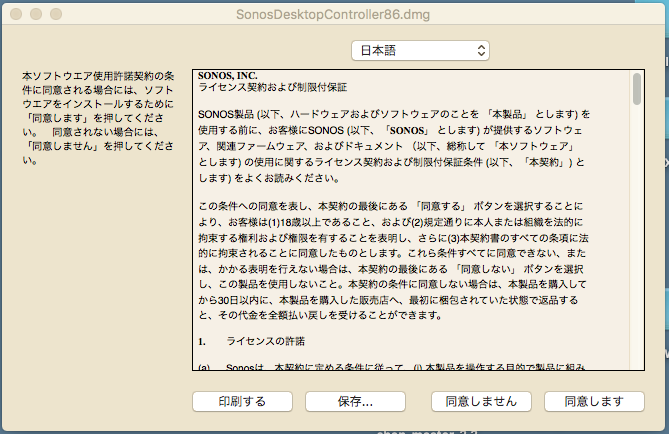
Am not able to install controller on my mac laptop (Sierra 10.12.5). When I click Sonos app link from Safari, nothing happens (I suspect file is being deemed a security risk by OS). When I click app link from Chrome, get warning of risky file. When I confirm to proceed (why wouldn't I trust Sonos??) I get a Chinese install window per image below (all settings english - I checked). Please advise on how to proceed.

For a system that is supposed to be seamless and fool-proof, I am surprised at the number of challenges I have faced at every step. Original wireless setup failed on multiple attempts and required multiple help centre conversations (eventually requiring boost device despite strong 60Mbps signal in every corner of my house), Alexa in Canada is garbage (unless you are willing to conduct major brain surgery through a 100 or so lines of instructions posted by users online) and now the Mac OS app is garbage. Please Sonos - at least try to live up to your promise!!!
This topic has been closed for further comments. You can use the search bar to find a similar topic, or create a new one by clicking Create Topic at the top of the page.
Best answer by Keith N
Am not able to install controller on my mac laptop (Sierra 10.12.5). When I click Sonos app link from Safari, nothing happens (I suspect file is being deemed a security risk by OS). When I click app link from Chrome, get warning of risky file. When I confirm to proceed (why wouldn't I trust Sonos??) I get a Chinese install window per image below (all settings english - I checked). Please advise on how to proceed.


Hi there! The top drop-down box says "Japanese" in Japanese. If you click that top drop-down, it will give you all the options of languages, regardless of what language you have selected in your system.

Select "English" and you should be good to go.

In general, diagnostic reports only give us things like connectivity from Sonos speakers to the local network or errors from an existing system. In this case, this seems to be a bit more focus on the computer itself rather than the Sonos system.

12 replies

Smilja
June 30, 2018
You have to download and install the .dmg file from here.
»And the world is like an apple whirling silently in space, Like the circles that you find in the windmills of your mind.« (›Windmills Of Your Mind‹ [1967]. Music by Michel Legrand ; English lyrics written by Alan & Marilyn Bergman)
Contributor I
June 30, 2018
Thanks for you quick response. Tried the link in both Safari and Chrome resulting in same original outcome (Safari flashes to a black screen and then returns to page linked above and Chrome will download but results in Chinese install screen as before)
Smilja
June 30, 2018
Removing the old Desktop Controller installation, rebooting the Mac, and then reinstalling the Controller may do the trick.
»And the world is like an apple whirling silently in space, Like the circles that you find in the windmills of your mind.« (›Windmills Of Your Mind‹ [1967]. Music by Michel Legrand ; English lyrics written by Alan & Marilyn Bergman)
Contributor I
June 30, 2018
Did not have existing install, but did try the reboot. Same outcome. That said, I did find a solution. Decided to proceed with the Chinese installation and took a guess that the button on the right was 'install'. This was followed up with another dialog box in Chinese with more buttons. I again clicked the button on the right. Few seconds later i have the standard english install. Perhaps time to brush up on my Chinese for future Songs updates ;)

Thanks Smilja for chiming in to help
Airgetlam
June 30, 2018
That's really bizarre. I can't think of any reason at all for anything to show up in Chinese.
Bruce
Contributor I
June 30, 2018
Agreed ... never seen anything like this before so thought my computer might be infected or perhaps was being targeted by phishing. Tested and checked and everything appeared clean and legit. Perhaps its just Apple trying to incent me to upgrade my old mac pro. Anyways, life goes on ... have a great day!
Smilja
June 30, 2018
You're welcome. I wasn't of much help.


@mvandevegte, would you mind providing a diagnostic report by following these steps for the Mac app? Could be of some interest to the production department at Sonos.
»And the world is like an apple whirling silently in space, Like the circles that you find in the windmills of your mind.« (›Windmills Of Your Mind‹ [1967]. Music by Michel Legrand ; English lyrics written by Alan & Marilyn Bergman)
Contributor I
June 30, 2018
Done ...

Your confirmation number is: 920985505.
Airgetlam
June 30, 2018
Good thought, Smilja. I can only hope that they'll come back and perhaps provide us an explanation as to what may have happened. It might be instructive.
Bruce
Keith N
Keith NAnswer
Sonos Staff
July 3, 2018
Am not able to install controller on my mac laptop (Sierra 10.12.5). When I click Sonos app link from Safari, nothing happens (I suspect file is being deemed a security risk by OS). When I click app link from Chrome, get warning of risky file. When I confirm to proceed (why wouldn't I trust Sonos??) I get a Chinese install window per image below (all settings english - I checked). Please advise on how to proceed.


Hi there! The top drop-down box says "Japanese" in Japanese. If you click that top drop-down, it will give you all the options of languages, regardless of what language you have selected in your system.

Select "English" and you should be good to go.

In general, diagnostic reports only give us things like connectivity from Sonos speakers to the local network or errors from an existing system. In this case, this seems to be a bit more focus on the computer itself rather than the Sonos system.
Building community is like building a garden. You build the frame, till the ground, plant the seeds, feed the plants & sometimes you gotta pull the weeds.