
Contributor I
October 7, 2020
Answered

Something came up. The application has cancelled the request to choose a device

  • October 7, 2020
  • 22 replies
  • 5600 views

Is anyone else getting the error message when trying to set up their Sonos One?

“Something came up. The application has cancelled the request to choose a device.”

I recently moved house and tried to connect my Sonos and this keeps popping up.

Old house had no problems and i’ve never seen this message before.

I am on a new Wifi system.

What i’ve done so far:

  1. Factory reset the Sonos.
  2. The app recognises the Sonos One
  3. Begins to try and find Wifi and shows a Wifi i’ve never seen before (See image below)
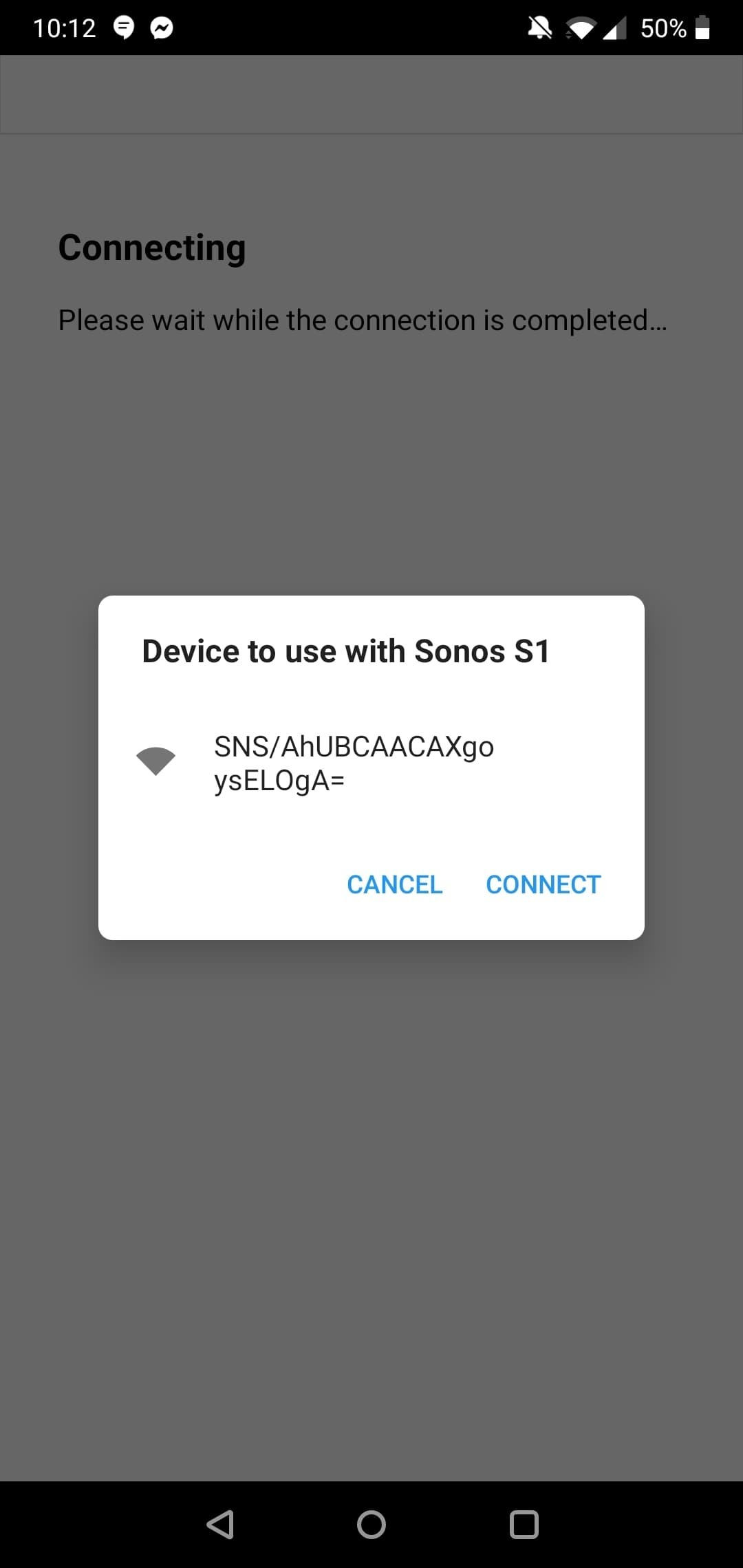

and if I click it, the error message pops up.

I have tried on both the Sonos S1 app and the Sonos S2 app.

I think it may be an issue with my phone? As I have a OnePlus. 

Typing the error message into Google comes up with a few OnePlus issues.

Any idea on how to fix this?
 

This topic has been closed for further comments. You can use the search bar to find a similar topic, or create a new one by clicking Create Topic at the top of the page.
Best answer by Reinoud84

I was able to solve it by manually selecting the sonos wifi network just before the step where the app wants to do it automatically for you.

Hope this solves it for anyone else.

Cheers,

Reinoud

22 replies

Lyricist I
April 11, 2021

Hello, I am having to same issue as above. 

Works if connected to ethernet, but that isn't plausible long term.

Sent diagnostics number is 1983267247

Trying to connect from a OnePlus phone. 

All worked fine before changed WiFi network.

The suggestion by reinouds84 hasn't worked.


Any suggestions would be appreciated

Thanks


Lyricist I
July 7, 2021

Solved!!

Okay so I ended up sort of fixing it a day later but forgot to reply on here. Whoops.

Basically, I had to ask my girlfriend who owns an iPhone to log into her Sonos account (which is linked to my speaker) and see if she could set it up. Cause I thought maybe it's OnePlus/ Android issue.

She logged in, went through the steps and set it up perfectly.

No dramas at all.

Whicht then somehow kick started my phone or something? Cause when I looked at my account, speaker was fully set up and ready to use. 

So ask a mate with an iPhone to try and set up. 


Cheers

Thanks Mate...even I did the same thing and it solved immediately...what a relief. !!! Thanks..cheers