
Contributor I
October 7, 2020
Answered

Something came up. The application has cancelled the request to choose a device

  • October 7, 2020
  • 22 replies
  • 5600 views

Is anyone else getting the error message when trying to set up their Sonos One?

“Something came up. The application has cancelled the request to choose a device.”

I recently moved house and tried to connect my Sonos and this keeps popping up.

Old house had no problems and i’ve never seen this message before.

I am on a new Wifi system.

What i’ve done so far:

  1. Factory reset the Sonos.
  2. The app recognises the Sonos One
  3. Begins to try and find Wifi and shows a Wifi i’ve never seen before (See image below)
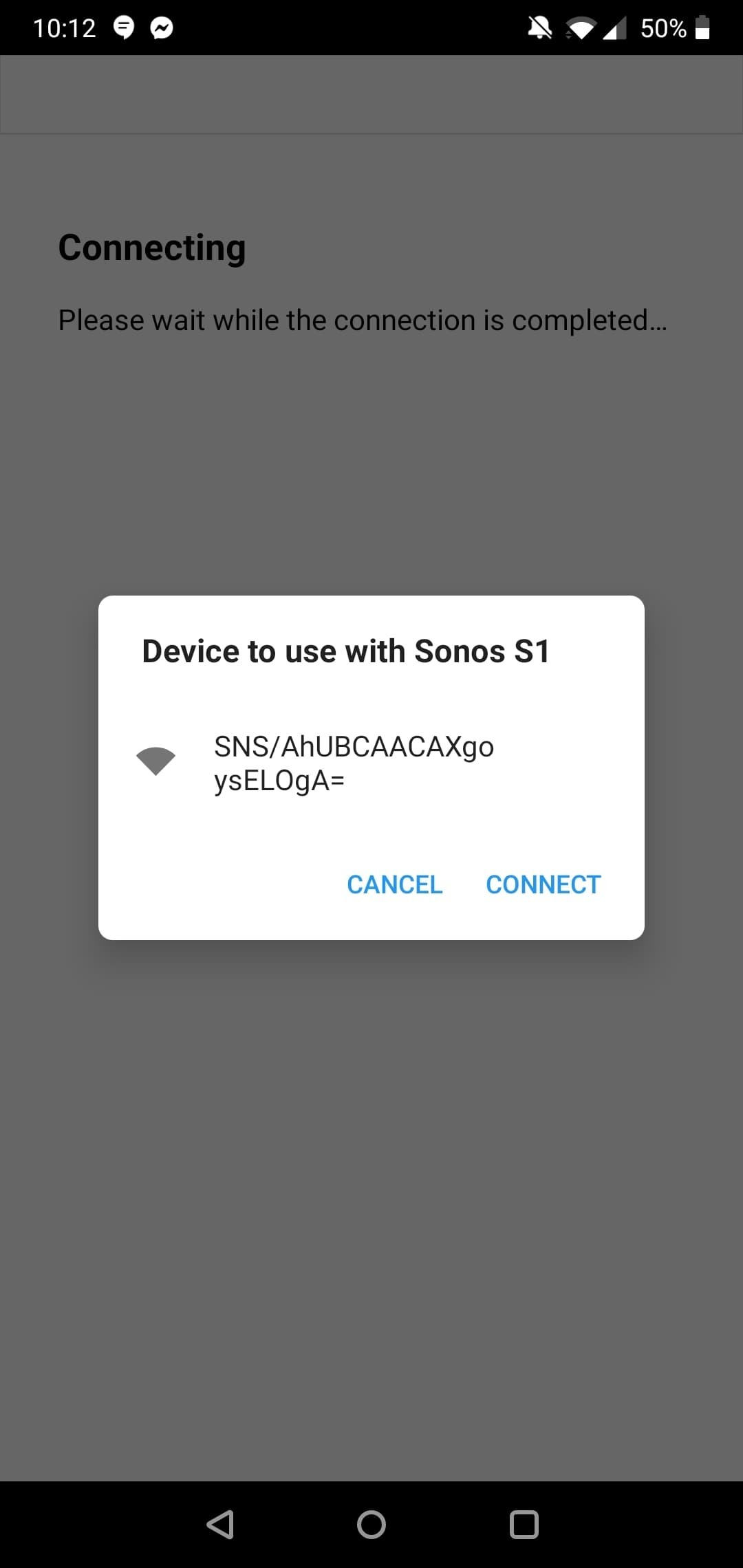

and if I click it, the error message pops up.

I have tried on both the Sonos S1 app and the Sonos S2 app.

I think it may be an issue with my phone? As I have a OnePlus. 

Typing the error message into Google comes up with a few OnePlus issues.

Any idea on how to fix this?
 

This topic has been closed for further comments. You can use the search bar to find a similar topic, or create a new one by clicking Create Topic at the top of the page.
Best answer by Reinoud84

I was able to solve it by manually selecting the sonos wifi network just before the step where the app wants to do it automatically for you.

Hope this solves it for anyone else.

Cheers,

Reinoud

22 replies

Annazel S
Retired Sonos Staff
November 17, 2020

Hi @Fertile143.

Thanks for reaching out, we’d be glad to help.

As per the above suggestion, kindly submit a diagnostic report through the Sonos app when it happens, and reply with the confirmation number. I'd start by reviewing your system,  it will help in identifying what's possibly causing the issue.


Alternatively, you may reach out to Sonos Support so we can take a closer look at this in real-time and expedite the process. I suggest phone support because they have more resources and tools available on their system for advanced troubleshooting, and the tools our agents can use would be very useful in this case, there can be an advantage if they need to remote into the computer/controller to see what's going on.


If you have any other questions, please feel free to let us know, we’re always here to help.

Help others find useful content by clicking the like button and selecting the best answer to your question
Lyricist I
November 18, 2020

Thanks for the support, Annazel.

Diagnostics CN: 1675690494

Reinoud84Answer
Lyricist I
November 20, 2020

I was able to solve it by manually selecting the sonos wifi network just before the step where the app wants to do it automatically for you.

Hope this solves it for anyone else.

Cheers,

Reinoud

Annazel S
Retired Sonos Staff
November 26, 2020

Hi @Reinoud84.

Thank you for posting and for sharing with us what you did to resolve it.

We appreciate your time and effort, this can definitely help those community members that might encounter the same situation.


If you may have any other questions or run into any issues,  please do not hesitate to reach out,  we are always here to help.

Cheers!

Help others find useful content by clicking the like button and selecting the best answer to your question
shan_nguAuthor
Contributor I
November 26, 2020

Solved!!

Okay so I ended up sort of fixing it a day later but forgot to reply on here. Whoops.

Basically, I had to ask my girlfriend who owns an iPhone to log into her Sonos account (which is linked to my speaker) and see if she could set it up. Cause I thought maybe it's OnePlus/ Android issue.

She logged in, went through the steps and set it up perfectly.

No dramas at all.

Whicht then somehow kick started my phone or something? Cause when I looked at my account, speaker was fully set up and ready to use. 

So ask a mate with an iPhone to try and set up. 


Cheers

Lyricist I
December 2, 2020

Diagnosis number : 3539540

Annazel S
Retired Sonos Staff
December 2, 2020

Hi @Nv746.

Thanks for your response.

I was not able to pull up a diagnostic report through this confirmation number (3539540). It seems that the number is incomplete for it usually consists of 9 digits. 

If the solutions suggested above were followed and the issue still persists, please submit a new diagnostic report so I can continue checking your system to see if there’s anything that might cause this issue.


Looking forward to hearing from you soon.

Help others find useful content by clicking the like button and selecting the best answer to your question
Lyricist I
December 3, 2020

Diagnostics number 94342074

Annazel S
Retired Sonos Staff
December 4, 2020

Hi @aisuehfpiwuehfp.

Thanks for reaching out and your effort in submitting the diagnostic is much appreciated. Let me check it for you.

Upon checking the diagnostic, your system was not found, quite possible that the controller is connected to a different WiFi signal for it is currently on a 5Ghz network while Sonos must be on 2.4Ghz, or else, the setup was not yet completed and you don’t have yet an existing system.

  • May I have the make and model number of any wireless router and/or Access Point that exist on the network? It’s best if we can check any known issue or if there’s an additional configuration needed on the device that is essential for Sonos.

  • Please indicate also how these devices are connected to one another (wired or wireless).


I would recommend checking the article on our support website discussing Sonos system requirements. This article describes network types, operating systems, devices, and audio formats that are required to set up and use your Sonos system.


 Let me know how it goes.

Help others find useful content by clicking the like button and selecting the best answer to your question
Lyricist I
March 24, 2021

I found the solution 

suggested worked for me.

My OnePlus 6T kept coming up with the same message in the original post: 

  • “Something came up. The application has cancelled the request to choose a device”

Having read Reinoud84’s solution, I connected to the network that my Play 1 was broadcasting manually and tried to connect the play1 again, this did not solve the issue because initially but as my phone had saved that network, the next time I tried connecting the Play 1 to my home WiFi Network it worked straight away.


I should add, I was able to solve this issue prior by connecting an ethernet cable to the play 1 but as my speakers are wall mounted it became laborious every time I needed to switch electrics off (I’m currently doing a lot of DIY in the house) and they lost the network, having to unmount them and connect them via ethernet. So I had to look for a solution to connect the wirelessly like they should.