
Contributor I
October 7, 2020
Answered

Something came up. The application has cancelled the request to choose a device

  • October 7, 2020
  • 22 replies
  • 5600 views

Is anyone else getting the error message when trying to set up their Sonos One?

“Something came up. The application has cancelled the request to choose a device.”

I recently moved house and tried to connect my Sonos and this keeps popping up.

Old house had no problems and i’ve never seen this message before.

I am on a new Wifi system.

What i’ve done so far:

  1. Factory reset the Sonos.
  2. The app recognises the Sonos One
  3. Begins to try and find Wifi and shows a Wifi i’ve never seen before (See image below)
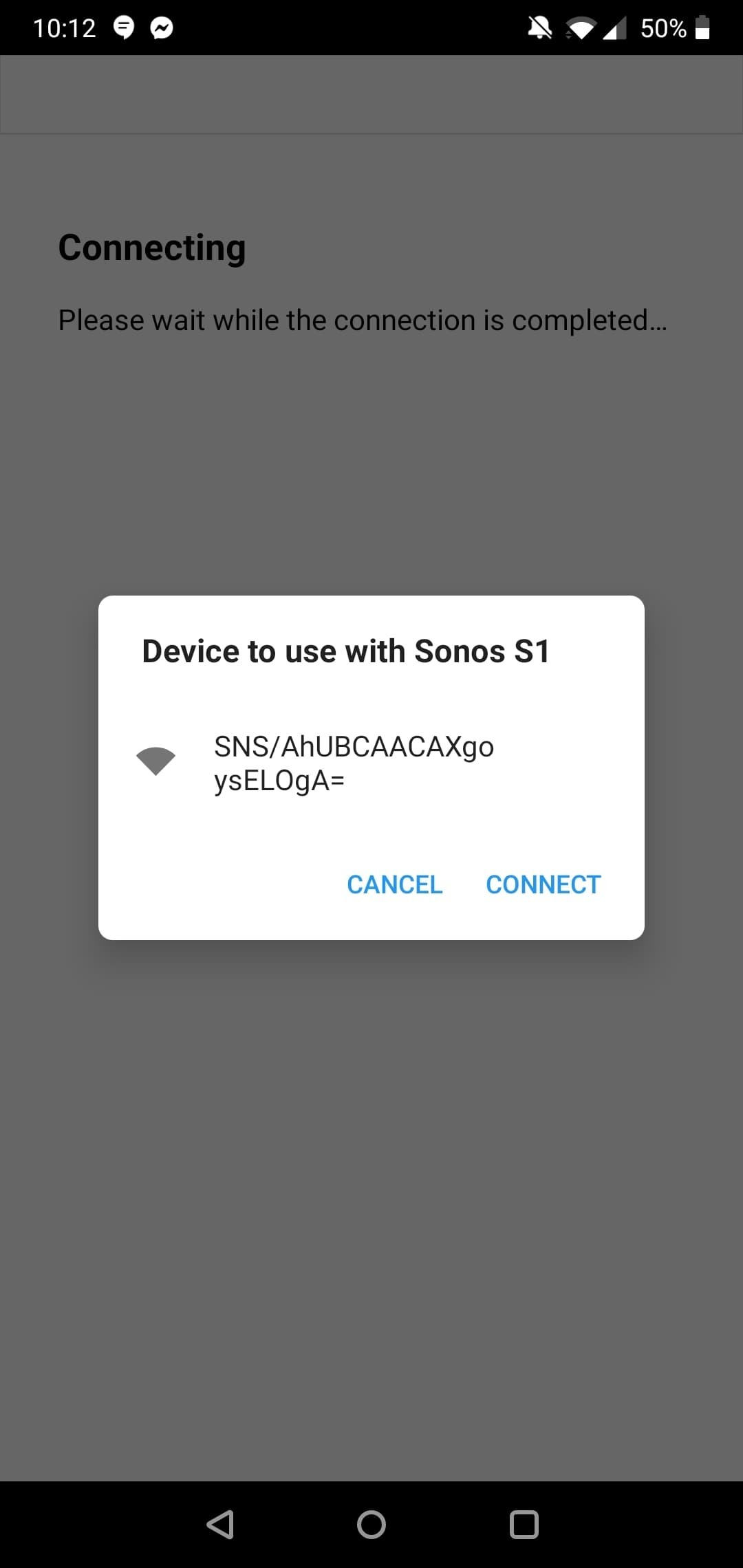

and if I click it, the error message pops up.

I have tried on both the Sonos S1 app and the Sonos S2 app.

I think it may be an issue with my phone? As I have a OnePlus. 

Typing the error message into Google comes up with a few OnePlus issues.

Any idea on how to fix this?
 

This topic has been closed for further comments. You can use the search bar to find a similar topic, or create a new one by clicking Create Topic at the top of the page.
Best answer by Reinoud84

I was able to solve it by manually selecting the sonos wifi network just before the step where the app wants to do it automatically for you.

Hope this solves it for anyone else.

Cheers,

Reinoud

22 replies

Annazel S
Retired Sonos Staff
October 8, 2020

Hi @shan_ngu.

Thanks for reaching out and welcome to the community!

I appreciate your detailed post outlining the issue as well as the troubleshooting step that you did, let me help and try to figure this out.

To verify the compatibility of your network you can check this article that provides the requirements for setting up using S1 and S2 Sonos systems. 

Kindly provide the make and model of your router and/or Access Point that exist on the network?


An iOS or Android device is required to set up your Sonos system. See our article on Sonos app requirements for information on which operating systems are supported by the Sonos app, this will verify also the compatibility of your controller (OnePlus).

Please ensure that the device is connected to the right WiFi home network.


You can try the alternative set up which is wiring the speaker directly to your router using an ethernet cable and try to set it up again.

For more information and suggestions, please refer to this article that will help you connect your Sonos system to a new router or to a new WiFi network.


Let us know how it goes and if you have any questions feel free to reach out, we’re always here to help.

Help others find useful content by clicking the like button and selecting the best answer to your question
Lyricist II
October 21, 2020

I have the same problem. It worked on my network before, nothing has changed, and now I get this horribly unhelpful error.

How to fix?

Annazel S
Retired Sonos Staff
October 22, 2020

Hi @Stuart.Williams.

Thanks for reaching out and letting us know about this, let me help you out.

Kindly tell us more about what happened? 

What are the troubleshooting steps you have done so far?

Is it also a Sonos One speaker that is experiencing exactly the same issue?

When issues like this spring up,  the more information we can gather will help us resolve the problem.

You may also see the articles I attached to the above post. 


I’m looking forward to assisting you further from here.

If you have any other questions or run into any issues,  please do not hesitate to reach out,  we are always here to help.

Help others find useful content by clicking the like button and selecting the best answer to your question
Lyricist II
October 23, 2020
  1. Sonos One
  2. Lost the plot one day
  3. Did a factory reset
  4. Made sure I had the latest Sonos software on my Android phone
  5. Tried to set it up, it gets detected, and then when it tries to connect, same problem as above

Repeat steps 3-5 on my Windows 10 PC as well, no joy.

Annazel S
Retired Sonos Staff
October 27, 2020

Hi @Stuart.Williams.

Thanks for your response and my apologies for the delayed response time.

I appreciate the steps that you did and using an Android/iOS is the recommended device in setting up Sonos speaker(s).

We don’t usually suggest doing a factory reset as part of troubleshooting, for this process will delete registration information, content saved to My Sonos, and music services from a Sonos product. 

Resetting all products within your system will permanently delete your system’s data. It cannot be restored.

Let’s try the following common fixes as advised above:

  • Please ensure that the device is connected to the right WiFi home network.
  • You can try the alternative set up which is wiring the speaker directly to your router using an ethernet cable and try to set it up again.


If it doesn't help, then knowing how and through what Sonos is connecting is the great foundation to troubleshooting this successfully.

  • To verify the compatibility of your network you can check this article that provides the requirements for setting up using S1 and S2 Sonos system.
  • May I have the make and model number of any wireless router and/or Access Point that exist on the network? It’s best if we can check any known issue or if there’s an additional configuration needed.

  • Please indicate also how these devices are connected to one another (wired or wireless).


Let us know how it goes and if you have any questions feel free to reach out, we’re always here to help.

Help others find useful content by clicking the like button and selecting the best answer to your question
Lyricist II
October 27, 2020

I did all that, it worked before, it does not work now. Works wired, does not work wireless. You apps need diagnostic logging to provide us and your team with more technical detail.

Wireless setup does not work from iOS, Android, or Windows. Error message not helpful. Neither is the above advice, which we have tried multiple times. 

Is there some sort of diagnostic utility with more details? 

Annazel S
Retired Sonos Staff
October 27, 2020

Hi @Stuart.Williams.

Thanks for your response.

Submitting a diagnostic through the Sonos app will provide us with a snapshot of your system wherein we can review some device’s information but in this case, no details will show the moment it was set to factory default.

We appreciate the time and effort you've spent troubleshooting with us, but at this point, it would be best to reach out to Sonos Support so we can take a closer look at this in real-time to expedite the process. I suggest our phone team for they have more resources available on their system for advanced troubleshooting, and the tools our agents can use would be very useful in this case, there can be an advantage if they need to remote into the computer/controller to see what's going on.


If you have any questions, please feel free to let us know, we’re always here to help.

Help others find useful content by clicking the like button and selecting the best answer to your question
Lyricist I
November 11, 2020

@Annazel S facing same issue with Sonos beam as well.

Airgetlam
November 11, 2020

Did you submit a diagnostic, as she requested? If so, please post the number here, so she can look at the potential issue in your system.

Bruce
Lyricist I
November 16, 2020

Any update on this topic? I encounter the exact same problem.