Stanley_4
Grand Maestro
August 5, 2022

Slow controller startup

  • August 5, 2022
  • 22 replies
  • 1312 views

My Sonos system suffers from the Controller being slow to start, I mostly use Android on tablets, usually three different ones, and all have the same symptom.

When waking the Sonos app from sleep or starting it if not running, it takes 20 to 30 seconds to populate the screen and before any action can be performed.

Here (diag below) I rebooted my Samsung S6 Lite and started the Sonos app. I’d left it to show the System / Rooms page where the problem is most obvious. It populates the screen with a random room, then adds the others over the next 22 seconds. They appear in what looks to be a random order and with the Room tiles initially overlapping in the display. During the population process the “active” Room bar appears on-screen but the Play button is not functional. At first appearance it isn’t even active, tapping it has no effect. If tapped a bit later it switches to show it has been tapped but still isn’t functional. Waiting a bit more it will change to Play or Pause and the selected Room will follow the command.

I see similar results from my Samsung A2 and Galaxy Tab S3.

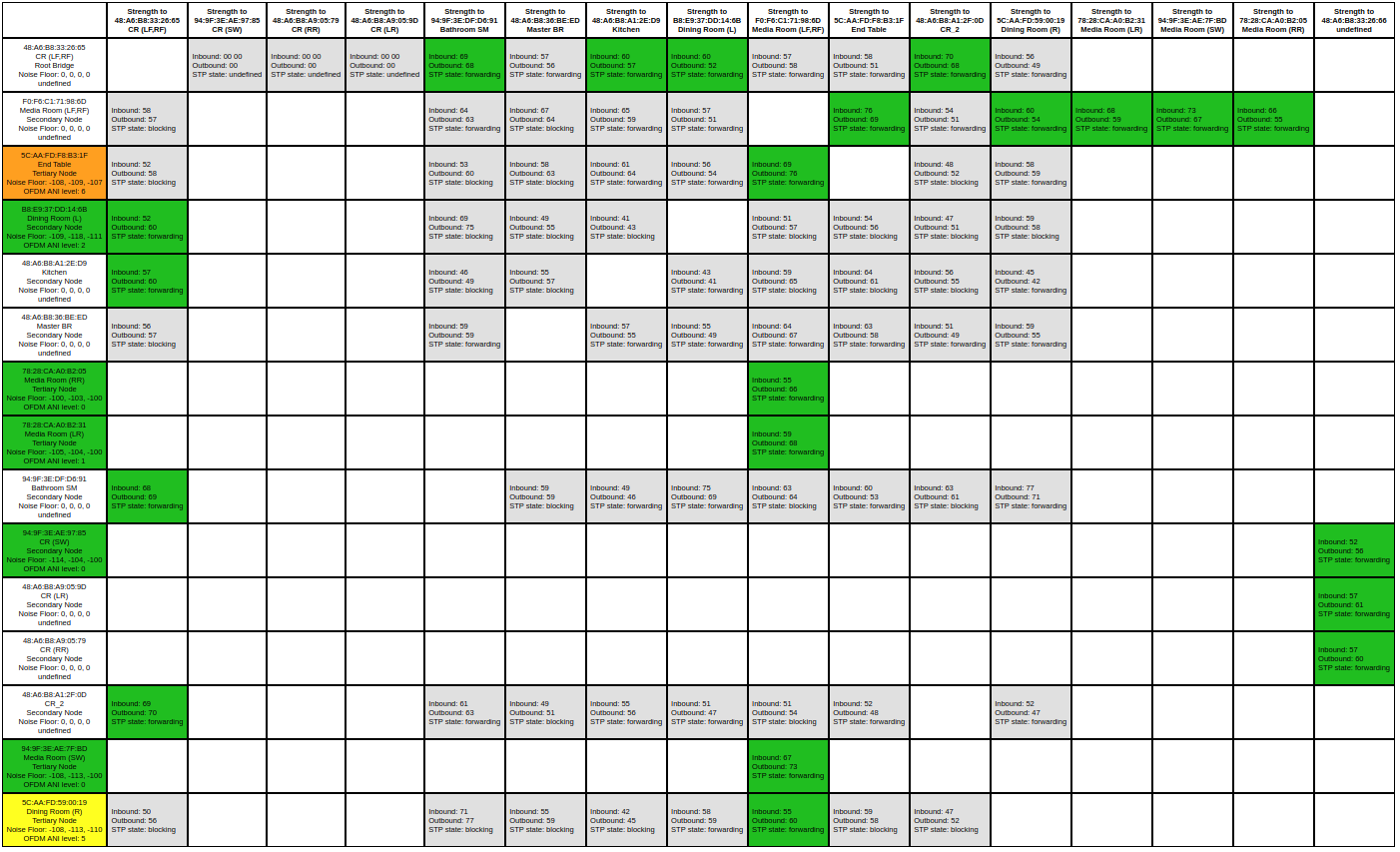
No issues playing local or remote music. Network Matrix looks good.

43 MB video

Diag number: 2112127438


This topic has been closed for further comments. You can use the search bar to find a similar topic, or create a new one by clicking Create Topic at the top of the page.

22 replies

Stanley_4
Stanley_4Author
Grand Maestro
August 7, 2022

Using WiFi isn’t a good option for me, my setup doesn’t work well with Sonos. I originally picked up a Boost but since have retired it and wired several Sonos directly.

Opening from a cold boot, starting from a tablet that has been up a while and bringing back from the background all take about the same time. I do have the notifications off and no widget running, both in search of maximum battery life. I can change that on the secondary tablets that are normally left on charge.

I’ve powered down everything and restarted multiple times in the past seeing no improvements.

I do have a Windows box around somewhere. It isn’t used except for getting updates for my Honda’s GPS maps so it will likely be a project to get it up to date enough to runn the current Sonos Controller. I put that on my to-do list.

Not a big system, Wired I have two Beams, and an Arc, SonosNet a Beam, two One SLs, and a Five. Two surround/sub rooms on the wired Arc and one Beam. Four Android tablet controllers. An iPad and Ipod that are used just for TruePlay, otherwise powered off.

That End Table Play Five is a real puzzle, it sits 10 feet from my wired Arc and 15 feet (different directions) from two wired Beams. There is nothing electrical near it except for my main tablet. The Kitchen One SL is further from all three and I have put the tablet and charger next to it but it still shows no interference. I have tried unplugging the Five to see if it made a difference and it didn’t make any noticeable change.

I have a bunch of music services loaded, left over from when I was doing Beta testing, never use anything but Amazon and my Library these days so I’ll look into disabling them. I run my Library on a dedicated Pi computer with an SSD drive so response time there shouldn’t be an issue.

The My Sonos, Stations is nearly full of Amazon links, three Playlists, two Other. I’ll have to go through them to see if any of the Amazon links have changed, that is always frustrating and seems to happen in waves. Worth testing.

I just got a USB to Ethernet connector so I’ll also be able to try using the tablet direct-wired instead of over the home WiFi. Maybe I’m still seeing Sonos / Ubiquity AP glitches and that will bypass them.

craigski - Oh how I wish I could have my CR-100s back, they were a joy to use compared to the tablet App.


Thanks to everyone for the suggestions, I’ll try to work through them after the weekend and post back anything I find.

Corry P
Sonos Staff
August 11, 2022

Hi @Stanley_4 

Thanks for your post!

The first thing I noticed was your diagnostic crashing my Chrome instance. It loaded fine the next time I tried, so, uh, whatever. 😉

Your Media Room (LR) Play:1 has the highest packet error rate that I can see, averaging at about 40%. The Sub and Surrounds there are having slightly more trouble communicating with the Arc than the other rooms connecting to it via SonosNet, and the LR surround is having significantly more trouble than the other members of the room, so I think the issue is most likely caused by 5GHz interference near the LR Play:1.

If reducing interference does not help, I’d go for a reboot of the ethernet-wired devices.

There is also this to consider, but you’ll notice they all say “minor”:

SonosNet is on channel 11, but I cannot see which channels are in use nearby as the system hasn’t done a WiFi scan recently - it might be worth using a WiFi scanning app to check what’s being transmitted near you (if you have neighbours) and move away from overlapping channels being used.

I see no signs of multicast flooding, which is something else that can slow down the connection, so that’s good. 👍🏻

I hope this helps.


Edit: I called the Arc a Beam. Corrected.

"Common sense is the collection of prejudices acquired by age eighteen." - Albert Einstein
Local Superstar
August 11, 2022


Your Media Room (LR) Play:1 has the highest packet error rate that I can see, averaging at about 40%. The Sub and Surrounds there are having slightly more trouble communicating with the Beam than the other rooms connecting to it via SonosNet, and the LR surround is having significantly more trouble than the other members of the room, so I think the issue is most likely caused by 5GHz interference near the LR Play:1.

If reducing interference does not help, I’d go for a reboot of the ethernet-wired Beams.


I’m curious why the Network Matrix does not show this? ie no red and lots of green on the Matrix?

ratty
August 11, 2022


Your Media Room (LR) Play:1 has the highest packet error rate that I can see, averaging at about 40%. The Sub and Surrounds there are having slightly more trouble communicating with the Beam than the other rooms connecting to it via SonosNet, and the LR surround is having significantly more trouble than the other members of the room, so I think the issue is most likely caused by 5GHz interference near the LR Play:1.

If reducing interference does not help, I’d go for a reboot of the ethernet-wired Beams.


I’m curious why the Network Matrix does not show this? ie no red and lots of green on the Matrix?

1/ The satellites in Media Room were on 2.4GHz when the snapshot was taken, as they were idle.

2/ The Beam doesn’t report ambient RF data in the matrix.

Corry P
Sonos Staff
August 11, 2022

Hi @Stanley_4 

1/ The satellites in Media Room were on 2.4GHz when the snapshot was taken, as they were idle.

This is a good point. Looking again, I can see the Arc hasn’t played anything for a while and the Play:1 is indeed on 2.4GHz power-saving mode, so given that the packet error rate is current, the interference is likely in the 2.4GHz range, which explains why you are not complaining that the rear speaker is cutting out (it would shift to 5GHz when playing).

Either way, there’s likely a AP or client device closer to the LR speaker than to the others.

"Common sense is the collection of prejudices acquired by age eighteen." - Albert Einstein
Local Superstar
August 11, 2022


I just got a USB to Ethernet connector so I’ll also be able to try using the tablet direct-wired instead of over the home WiFi. Maybe I’m still seeing Sonos / Ubiquity AP glitches and that will bypass them.


Not sure how your Unifi is setup, but maybe worth checking the 2.4 radio levels, if on default/auto maybe defaulting to high and the AP(s) will be SHOUTING, when they may not need to depending on your setup. Lots on ui.com, this may help:

https://community.ui.com/questions/what-does-transmit-power-means-and-what-is-the-best/cddd0320-92bf-4936-9e3d-8c4e7d44a6cb


Stanley_4
Stanley_4Author
Grand Maestro
August 11, 2022


Sorry for running a bit behind on this but I managed to twist a knee and have been hobbling about for the last couple days.

Corry, I’ll make sure to play some music on each system before sending another diagnostic so you get better data. Looking at your notes:

The Media Room setup has the Arc under the TV with no other WiFi devices nearby. The Sub is sitting on the floor, about 3 feet behind the Arc. The two Play 1 surrounds are a bit odd as I have them sitting stacked one on top of the other, rotated 90 degrees, on a bookshelf about 7 feet high and 17 feet from the Arc. There are no WiFi devices within about 10 feet. I made a bit more room there and un-stacked them but they are sitting side by side, about 3 inches apart, that may help the RF issues.

The Dining Room Play 3s are backed up to a wall that has the Bathroom Beam on the other side, it is almost directly behind the left Play 3. None are easily movable as they are on top of furniture or a cabinet.

The CR_2 One SL is sitting next to a tablet, neither can be easily relocated but I have run an Ethernet to the One SL.

The CR Beam is about four feet from my Unifi AP, I’ve moved the AP to about eight feet away. That will put it about half-way between the Bathroom Beam and the CR Beam.

The Kitchen One SL sits pretty much alone, only other device nearby is my Keurig smart coffee maker, about 8 feet away. It is about 15 feet from the CR Beam and 18 from the Media Room Arc. It sits on an outlet shelf so moving it isn’t possible. It is on a GFI outlet if that could be a source of interference?

The End Table Play 5, I’ll move the tablet near it further away for my next diagnostic.

I have my Ubiquity WiFi on channels 6 and 48. The Sonos Channel 11 RF scan looks good, low use and interference. There is a local dufus on Ch 5 that is pumping a lot of data, 58% utilization which is why I’m on 11 for the Sonos. All the 5 GHz range looks good.


ratty, I’ve enabled the Sonos Notifications and it does improve the background to active time from 20 seconds to around 5 seconds on Android. As you say it clutters things up which is why I had it off but it looks like living with the clutter is better than the delay. I’ll have to fiddle a bit more with the widget to see how it impacts things. I have the widget loaded on two of my tablets and it initially looks like it is helping too.

Ken, I think the Android is putting the Sonos App (with notifications off) to sleep if it isn’t on-screen. I’m not sure if there are settings to tweak this or not. I’ll have to go looking to see, then I’ll have to look at the battery usage as I tend to use a lot of battery on my main tablet as I can’t easily keep it plugged in as I do the others.

Mr T, craigski, the powering down to try and segment the issue sounds like a good idea, I’ll have to save that for when my knee is back closer to working.

craigski, I have going through the music services and My Sonos on the to-do list. I may just remove the ones I don’t use rather than fooling with them.

The Amazon Station issue on My Sonos seems to be an on-going problem. I list out the list of stations I have there and try to play each one every time I get aggravated enough about the number of non-working ones. The ones that don’t work get marked and deleted from My Sonos, followed by going off to Amazon and adding them back on. No good idea why they quit working but I suspect Amazon is slightly changing the name of the Station leaving the My Sonos link orphaned.

I checked the AP and saw both 2.4 and 5 GHZ radios were set to high, swapped them to Auto and I’ll see how that goes. The CloudKey shows no issues with any of the tablets or other device’s connections.

controlav, I appreciate the offer of looking at my logs, I’ll have to ask for a rain-check on that as the Windows box is a bit buried and needs crawling under my workstation to hook up. I should have spent the money for more ports on my KVM setup and avoided this aggravation.


So bottom line so far, Notifications enabled help when waking from the background.

I’ll pay attention to see if the changes I made (moving/wiring) have any impact.

Thanks to everyone again!


Corry P
Sonos Staff
August 16, 2022

Hi @Stanley_4 

Sorry for the delay - I didn’t get notified you’d replied.

The surrounds will interfere with each other - separate them by at least 1m (3 feet) please. This will help with the sound stage too - I take it this is a temporary situation?

"Common sense is the collection of prejudices acquired by age eighteen." - Albert Einstein
Stanley_4
Stanley_4Author
Grand Maestro
August 16, 2022

Corry, the surround placement is a bit iffy, the spouse isn’t happy having them at all. Worse she has put a selection of LEGO stuff up there on “her” shelf and isn’t happy about sharing. Yes, the locations are far from optimal but I’ve tried the Room with and without them and even stacked the sound was better than without.

I just rearranged things to put the Play 1s on opposite ends of the bookcase, I’ll have to do more LEGO rearranging once my knee is happier about ladder climbing but they should be able to stay where they are now. The bookcase is 3 feet wide so they are 30 inches apart, center to center.


I fiddled the location of the two Play 3s in the dining room that were close to the Beam in the Bathroom a bit and they are now as far apart as possible. The Beam is on a built-in cabinet, no other space in the room. The Play 3s are on a 6 foot long china cabinet. After rearranging a bit the Beam is just over 3 feet from each of them.

Corry P
Sonos Staff
August 16, 2022

Hi @Stanley_4 

Lego, huh? Gotta respect the Lego! You could ask her to build little concert stages for the speakers to stand on, crowds and all - might be a good way to compromise.

It sounds like they’ll be happier as you have them now, compared to on top of each other.

Has doing all this - including all the other excellent suggestions from the community - actually improved the app start-up time at all?

"Common sense is the collection of prejudices acquired by age eighteen." - Albert Einstein