Avid Contributor I
April 14, 2016
Answered

Severe battery drain with Sonos app in iOS

  • April 14, 2016
  • 125 replies
  • 19524 views
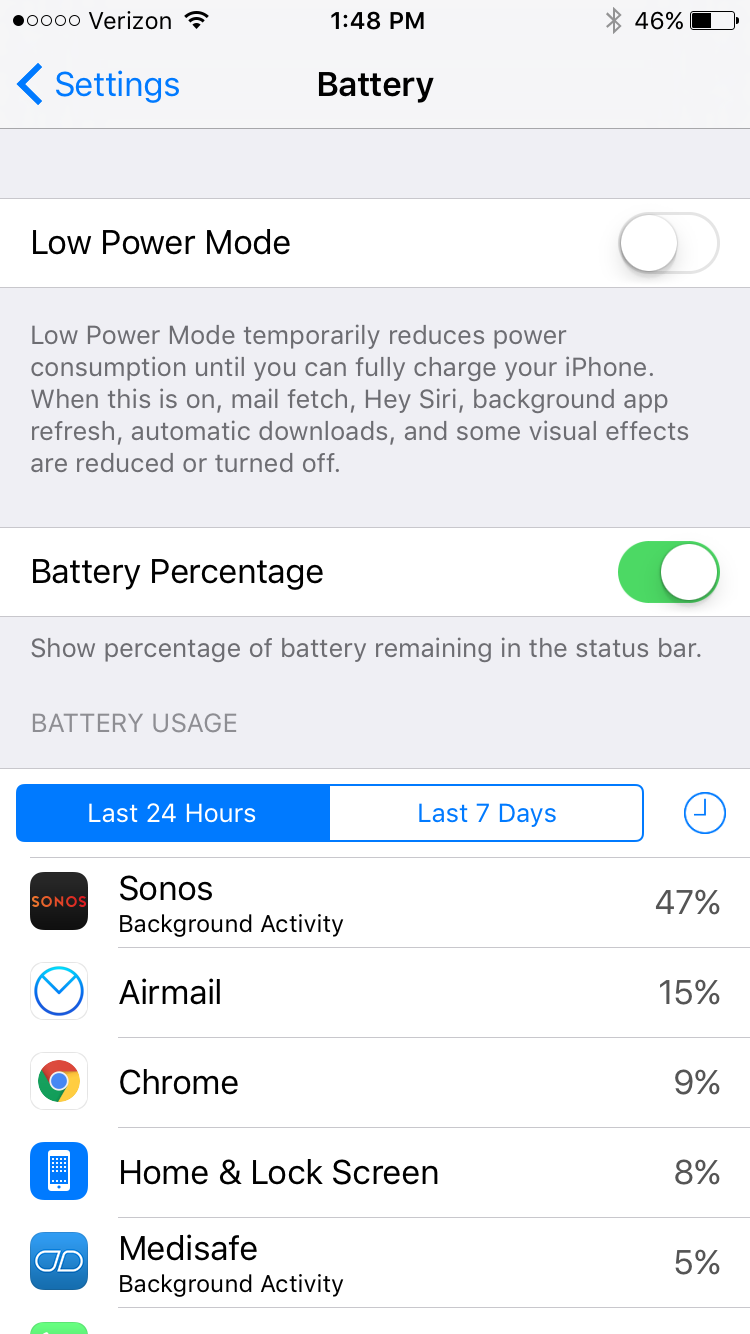
I am seeing very significant battery drain on iOS when using Sonos app. This morning I just used the app for about an hour to play music, and the battery usage report shows that Sonos has consumed 47% of the battery usage in the last 24 hours. This is a trend I've noticed a lot recently. What can I do?

This topic has been closed for further comments. You can use the search bar to find a similar topic, or create a new one by clicking Create Topic at the top of the page.
Best answer by Ryan S
Thanks for the details guys. We've been looking into iOS battery usage and so far it's all seemed pretty normal. The biggest drain on the battery that Sonos uses comes in two pieces, first off, the app is still going to try and keep alive access to your players while you're on a wireless network, which, even in background mode, will use a bit of the battery. The second piece, is that when you're using the iOS Lock Screen controls on Sonos, the app is "playing" a silent track on the phone. This is the only way to have a non-media app take control over the lock screen in iOS.

If you think your system is seeing an unusually high amount of battery usage, we're happy to take a look, and I'd encourage you to give us a call on our support line.

125 replies

Lyricist III
October 11, 2016
I switched off lock screen controls and have had no battery drain issues since. You lose the functionality of controlling from lock screen or watch, but that's best until fixed or changed.
T00LF00L
Prodigy I
October 22, 2016
unfortunately that's a limitation of Apple devices.. the only way to have lock screen controls is if a source is currently playing. ie, pandora, iheartradio, apple music, etc.. as soon as you stop playback, the lock screen controls disappear. currently the only way Sonos controls can be displayed on an iOS device with minimal battery drain is by 'streaming a silent audio track'. these limitations are the downside to having a very secure device..
I am just a worthless liar. I am just an imbecil.
Contributor I
October 22, 2016
I disabled the lock screen controls now and installed "Sonobit", an app that shows some basic controls as a widget on the lockscreen. Perhaps the Sonos app could also offer a widget in one of the next versions?! This should be possible without the "silent track" hack.
Lyricist I
October 25, 2016
Disable Sonos on the lock screen. My usage figure dropped from 69% to 24%. Which is still an unacceptably high figure.

It's just an app to select a track. What can it possibly, legitimately be doing in the background?
T00LF00L
Prodigy I
November 19, 2016
Since updating both my iPhone and iPad to iOS 10 I am noticing severe background activity from the Sonos app, and I have lock screen controls disabled on both devices. There is definitely something wrong here. It's hard to say what though, iOS 10 is a complete piece of crap..
I am just a worthless liar. I am just an imbecil.
Airgetlam
November 21, 2016
Interesting feedback, T00LF00L First response I've seen about that not working. I'd agree that there's some issue in the app causing this, but not so much on the iOS10 comment, my experience has been good.

But most of my Sonos use on iOS is from plugged in iPads, so I'm not prepared to refute your comments. But I haven't had a problem so far on mine, knock on wood. There are too many similar posts for it to be anything but a real issue.

I wonder how hard it is to reproduce....my programmers have always told me that if my QA folks couldn't reproduce the bug, then it wasn't a true bug. Oh, and "it works fine on my machine". That's a little software development humor for those of you in the business. :)

I sure hope that they can figure it out soon!
Bruce
T00LF00L
Prodigy I
November 21, 2016
Well I wouldn't go so far as to say the Sonos app is draining my battery, I don't think it necessarily is. But there is a huge amount of background activity for some reason. I don't know why there would be any background activity at all if lock screen controls are disabled?

As far as iOS goes, I absolutely despise iOS 10.. and I hated 9, 8, and 7. iOS 6 is what I originally purchased and that's what I wanted. iOS 10 is riddled with bugs and runs worse than android but as you noted, over on the apple forums some people simply say "It works for me". I have factory reset both my idevices and still have the same issues on both so there's no telling what's going on here?..
I am just a worthless liar. I am just an imbecil.
Lyricist II
November 30, 2016
Insane battery usage. Brand new iPad Pro 9.7 and sonos playing music for a few hours used 70% of the battery. Will provide screen shots and diagnostics. Also will test disabling lock screen.
Airgetlam
November 30, 2016
Fair warning, disabling lock screen seems to work only some of the time, it's not a silver bullet. I do hope it works for you. I'd also recommend a hard reboot of your iPad Pro, after disabling it, just as a cautionary measure.
Bruce
Lyricist II
November 30, 2016
The funny thing is previously I had iPad 2nd gen (aka old 5+ years) with no abnormal battery consumption and all it was used for was controlling sonos nest and hue.......