Avid Contributor I
April 14, 2016
Answered

Severe battery drain with Sonos app in iOS

  • April 14, 2016
  • 125 replies
  • 19523 views
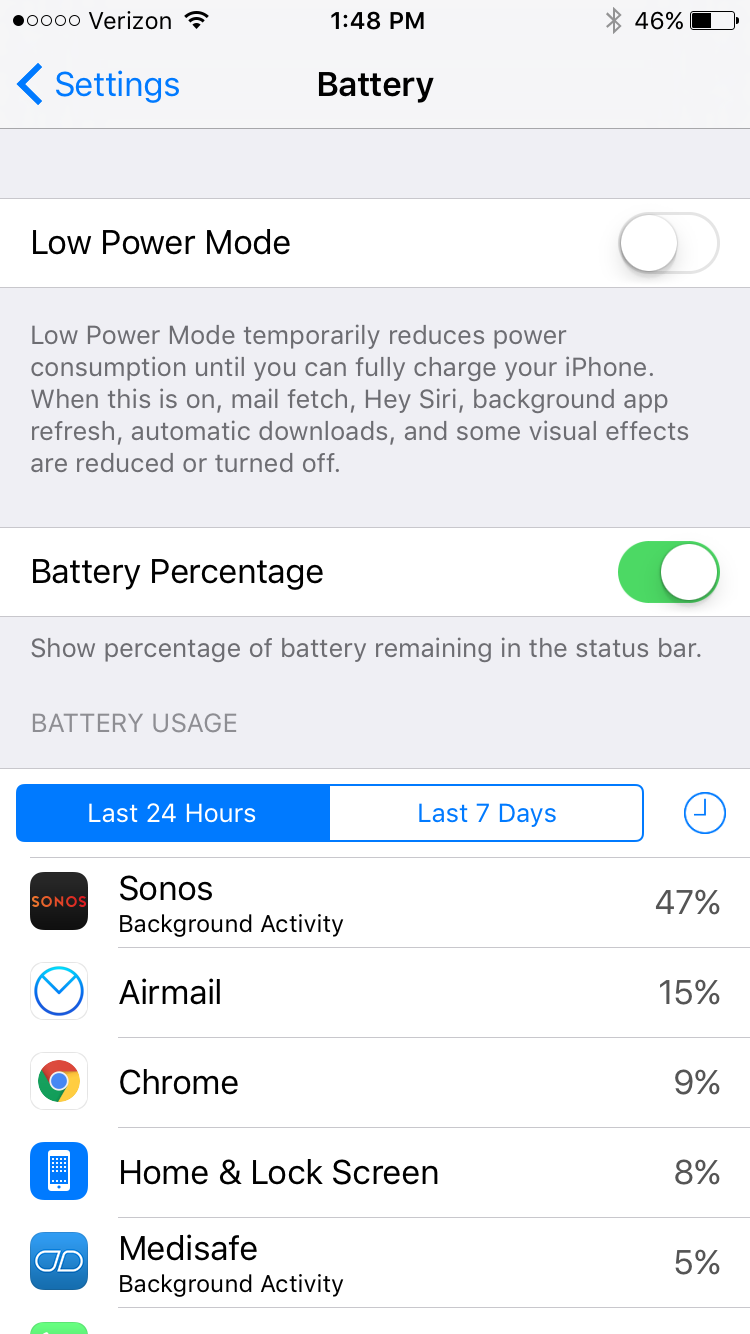
I am seeing very significant battery drain on iOS when using Sonos app. This morning I just used the app for about an hour to play music, and the battery usage report shows that Sonos has consumed 47% of the battery usage in the last 24 hours. This is a trend I've noticed a lot recently. What can I do?

This topic has been closed for further comments. You can use the search bar to find a similar topic, or create a new one by clicking Create Topic at the top of the page.
Best answer by Ryan S
Thanks for the details guys. We've been looking into iOS battery usage and so far it's all seemed pretty normal. The biggest drain on the battery that Sonos uses comes in two pieces, first off, the app is still going to try and keep alive access to your players while you're on a wireless network, which, even in background mode, will use a bit of the battery. The second piece, is that when you're using the iOS Lock Screen controls on Sonos, the app is "playing" a silent track on the phone. This is the only way to have a non-media app take control over the lock screen in iOS.

If you think your system is seeing an unusually high amount of battery usage, we're happy to take a look, and I'd encourage you to give us a call on our support line.

125 replies

Lyricist III
September 20, 2016
Guys, when you have the App. open in the background, it is constantly communicating with your system over WiFi. There is nothing unusual about this. The way to avoid it, is to close the application when not in use.

Thanks Edward.

Are you saying that the battery consumption at this order of magnitude is expected behaviour? At the weekend, Sonos was responsible for more than half my battery consumption. 13 mins on screen, 18 hours in background. It drained my phone as close to empty as it ever gets. I had Safari on screen for 1.2 hours, actively browsing the internet, and it consumed less than half the amount of battery.

Your solution of force quitting or killing the app is odd. Both Apple and Google have recently recommended against doing that to save battery life. It's only recommended where there is a problem with the app.

I cannot see any reason for Sonos to remain so active in the background. If it's relevant to lock screen control, then I would happily choose to toggle that off. You might please pass on that suggestion to the iOS development team. Thanks.

If this really is expected behaviour, then I would be interested in recommendations for other controller software on iOS. Do you or others have less battery intensive recommendations?
Lyricist II
September 20, 2016
Agree 100% with brendans.

Over the past 6 days, the Sonos controller has been on screen for 51 minutes, 22 hours in the background, and consumed 33% of battery life. That's more than 2x the next closest application.

That's not going to work for me.

The negatives just keep piling up. The comically primitive playlist management, the fact that I can't get reliable sound from my TV to my playbar/sub without an optical audio switcher.

And now this?

Very frustrating.

And Edward from Sonos' reply is "There is nothing unusual about this"? I beg to differ.

I think it is very unusual to have to charge my phone 2 times per day in order to listen to music that isn't even playing on my phone.
Ryan S
Retired Sonos Staff
September 20, 2016
Hey guys, we're always looking into better power management, so this sort of issue is constantly on our radar to investigate. One big thing to point out for anyone new to the topic is that the percentage shown is the percent of the battery that's been used so far per app. If the battery is at 90% charge and Sonos shows 64% used, that means in the last 24 hours Sonos was responsible for 64% of the total battery usage, not that Sonos used 64% of the battery. Ok, now that we got that out of the way...

One of the biggest uses of background power right now is used for the lock screen. The Sonos iOS app tricks the phone so that the app can take control over the lock screen by playing a silent track all the time. This could be causing the app to use more power than normal. Also, the software will be regularly polling the network looking for players.

To test if this is what you're seeing, try turning off the lock screen, or quitting the app when you're not using it.

We'd love to look into this further if you think there's something else going on with your device. You're welcome to give us a call on our support line and a technician will help taking a closer look the device.
Mark good posts by pressing the like button, and select the best answer on questions you've asked to help others find solutions.
Peter Mc
September 21, 2016
If a silent track is playing all the time, does this have any implications for power consumption in the players? Do any of the hardware units go into idle mode? If so, does playing a silent track inhibit this?

Cheers, Peter.
"The presence of those seeking the truth is infinitely to be preferred to those who think they've found it" - Terry Pratchett
Ryan S
Retired Sonos Staff
September 21, 2016
If a silent track is playing all the time, does this have any implications for power consumption in the players? Do any of the hardware units go into idle mode? If so, does playing a silent track inhibit this?

Cheers, Peter.


The silent track is playing on your controller only. There's nothing there that involves your players, and they'll absolutely still go into idle mode after a few minutes of the music stopping on them.
Mark good posts by pressing the like button, and select the best answer on questions you've asked to help others find solutions.
Peter Mc
September 21, 2016
Cool. Thanks.
"The presence of those seeking the truth is infinitely to be preferred to those who think they've found it" - Terry Pratchett
Contributor I
September 22, 2016
>> The Sonos iOS app tricks the phone so that the app can take control over the lock screen by playing a silent track all the time

Looks like someone learnt nothing from the Facebook app battery usage fiasco from last year. ie. https://www.macstories.net/linked/the-background-data-and-battery-usage-of-facebooks-ios-app/
Ryan S
Retired Sonos Staff
September 22, 2016
>> The Sonos iOS app tricks the phone so that the app can take control over the lock screen by playing a silent track all the time

Looks like someone learnt nothing from the Facebook app battery usage fiasco from last year. ie. https://www.macstories.net/linked/the-background-data-and-battery-usage-of-facebooks-ios-app/


That silent track trick was the only way to make an iOS device keep control over the lock screen, but if you turn off the lock screen it'll stop doing that. Even still, it shouldn't account for extreme battery drain. So if you're having trouble with the app using what seems like way more than just the lock screen, or if you turn off the lock screen and it's still using a lot of the battery it'd be great to give us a call on our support line.
There's always a chance there's something in addition to those mentioned already causing battery usage, such as another app on your phone running at the same time as Sonos competing for the network or the lock screen. The two could be passing control back and forth and draining resources. But that's just speculation.
Mark good posts by pressing the like button, and select the best answer on questions you've asked to help others find solutions.
Lyricist III
September 24, 2016
Thanks Ryan. So, today, I have two apps hogging my battery. From 100% to 16%. Sonos and Overcast. One has 3 mins on screen and 4 hours background. That's Sonos. The other has 2 mins on screen and 4.3 hours background. That's Overcast. I know what Overcast was doing. It was playing podcasts from the phone speaker for more than an hour and then playing via airplay for the rest of the time. Hard work. What was Sonos doing? Loitering on my lock screen. Who was responsible for more consumption? 30% Sonos. 24% Overcast. That's daft. Playing your silent track to loiter on lock screen is eating more battery than actually using the speaker! That smells like a bug to me. I have now turned off Lock Screen Controls in Sonos app settings. I'll report outcome.
Contributor I
October 11, 2016
I also have this issue. Hours of background activity without using the app.

Hi Danielp,

Please send in a diagnostic report from your system then reply with the confirmation number.

# 6628956 ... Problem still seems to exist, 6 hours of night lead to almost 2 hours of background activity of the app and loss of 30 % of battery.

Cheers, Daniel