Avid Contributor I
April 14, 2016
Answered

Severe battery drain with Sonos app in iOS

  • April 14, 2016
  • 125 replies
  • 19523 views
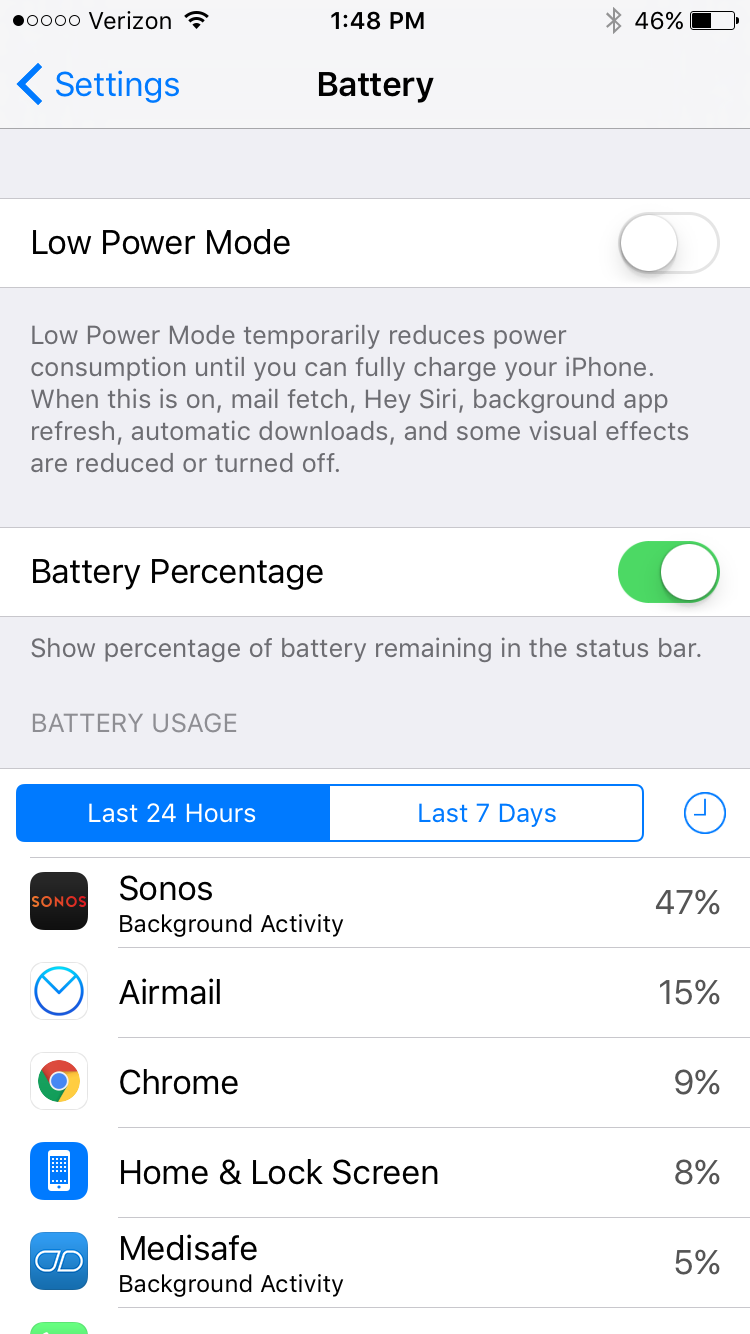
I am seeing very significant battery drain on iOS when using Sonos app. This morning I just used the app for about an hour to play music, and the battery usage report shows that Sonos has consumed 47% of the battery usage in the last 24 hours. This is a trend I've noticed a lot recently. What can I do?

This topic has been closed for further comments. You can use the search bar to find a similar topic, or create a new one by clicking Create Topic at the top of the page.
Best answer by Ryan S
Thanks for the details guys. We've been looking into iOS battery usage and so far it's all seemed pretty normal. The biggest drain on the battery that Sonos uses comes in two pieces, first off, the app is still going to try and keep alive access to your players while you're on a wireless network, which, even in background mode, will use a bit of the battery. The second piece, is that when you're using the iOS Lock Screen controls on Sonos, the app is "playing" a silent track on the phone. This is the only way to have a non-media app take control over the lock screen in iOS.

If you think your system is seeing an unusually high amount of battery usage, we're happy to take a look, and I'd encourage you to give us a call on our support line.

125 replies

Lyricist III
April 18, 2016
Just clarifying the above post: not playing any music from my iPad. All music played is from TuneIn radio.
Ken_Griffiths
April 18, 2016
I reckon it's the app running in the background on iOS that is the source of the drain. I do turn the ''Background App Refresh' feature off in Settings/General, for all apps and I also regularly 'swipe up' to close the Sonos software controller when it's not in use. Here is s screenshot (attached) of my battery usage for the last 7 days. I am posting the iPad-usage here, as I tend to use that a little more than my mobile

So looking at the Sonos App use only showing up here as 3% in the past 7 days, it seems to indicate and point towards something going on in the background.

I don't know if that helps people get to the bottom of what's going on, but perhaps try turning off the app by swiping it 'up the screen' is a short-term answer.

There is one other thing I have noticed too with the iOS implementation of the app and that is if you go into the iOS device settings (grey coloured Cog icon) and scroll down the list of settings and apps on the device, you will see the Sonos app listed there. (The list is in alphabetical order) ... In the Sonos app settings, I see that the Sonos app has access to both Location Services and the Microphone? There is also access to the mobile date service on my iPhone.

I can't see the purpose for some of those things, so personally I have turned them off manually with the usual on/off toggle switch. I don't remember authorising access to my microphone during the install of the app, but that feature was turned on? ... Perhaps I did, I can't remember. Anyhow it's worth checking that too I think and switch off what you don't use, or need on a regular basis.

Hope that helps and goes some way to resolve this issue.

Ken Griffiths
Lyricist III
April 18, 2016
Thanks, but no -- it hasn't helped at all. My background app refresh is off and has always been off. I have always had access to my microphone turned off in Sonos.

There should be no need to "regularly swipe up" to close down an app. Obviously if you swipe up and close the app it won't user battery. But you shouldn't have to do that. Imagine if we had to that with every app. Luckily we don't as most are well behaved and don't use up battery when they are meant to be doing nohting. The whole point of this thread is that when Sonos is in memory and supposedly doing nothing it is, in fact, draining the battery. It shouldn't do that. None of my other apps do as they don't have this "bug" that requires you to "swipe up" every time you turn off your iPad.
Ken_Griffiths
April 18, 2016
Thanks, but no -- it hasn't helped at all. My background app refresh is off and has always been off. I have always had access to my microphone turned off in Sonos.

There should be no need to "regularly swipe up" to close down an app. Obviously if you swipe up and close the app it won't user battery. But you shouldn't have to do that. Imagine if we had to that with every app. Luckily we don't as most are well behaved and don't use up battery when they are meant to be doing nohting. The whole point of this thread is that when Sonos is in memory and supposedly doing nothing it is, in fact, draining the battery. It shouldn't do that. None of my other apps do as they don't have this "bug" that requires you to "swipe up" every time you turn off your iPad.


No I wasn't saying that z.sonos. I was just saying the things I mentioned were to try and help fix things in the short term. Indeed the matter does need fixing properly, but clearly no one wants to keep draining the iphone/ipad until the matter is sorted and my suggestions were merely an interim suggestion to help.
Prodigy II
April 18, 2016
Len, the access to microphone was used for Trueplay. Once it's done you can switch it off.
Ken_Griffiths
April 18, 2016
Len, the access to microphone was used for Trueplay. Once it's done you can switch it off.

Yes of course... How obvious is that? ... Yet I missed it. I couldn't think why the microphone option was there and I turned it off.

It's been a while since I did any trueplay tuning... I must remember to turn the microphone on, whenever I do it next time. How stupid of me to miss the obvious.

Thanks for that, BoredifBalham, it's something I won't forget next time.
swittersAuthor
Avid Contributor I
April 18, 2016
I have background refresh off and I also turned off access to the microphone and cellular data. I still get the huge battery drain.

I appreciate the suggestion for force-quitting Sonos after using, but agree that it shouldn't be required. It's on Sonos to figure out why their app is consuming this much power in the background.
Jeff S
Retired Sonos Staff
April 18, 2016
I have background refresh off and I also turned off access to the microphone and cellular data. I still get the huge battery drain.

I appreciate the suggestion for force-quitting Sonos after using, but agree that it shouldn't be required. It's on Sonos to figure out why their app is consuming this much power in the background.


Hi Switters,

Please send us a diagnostic report from your iPhone and reply here with the confirmation number, here's how.
Help others find useful content by clicking the like button and selecting the best answer to your question.
swittersAuthor
Avid Contributor I
April 19, 2016
Jeff, I already did that further up in the thread. The confirmation # is 6096812.
Jeff S
Retired Sonos Staff
April 19, 2016
Jeff, I already did that further up in the thread. The confirmation # is 6096812.

Hi Switters,

I've created a support ticket for you: 160419-000795. Please reach out to our phone team and they'll help out. You can find our phone number and hours here.
Help others find useful content by clicking the like button and selecting the best answer to your question.