Avid Contributor I
April 14, 2016
Answered

Severe battery drain with Sonos app in iOS

  • April 14, 2016
  • 125 replies
  • 19523 views
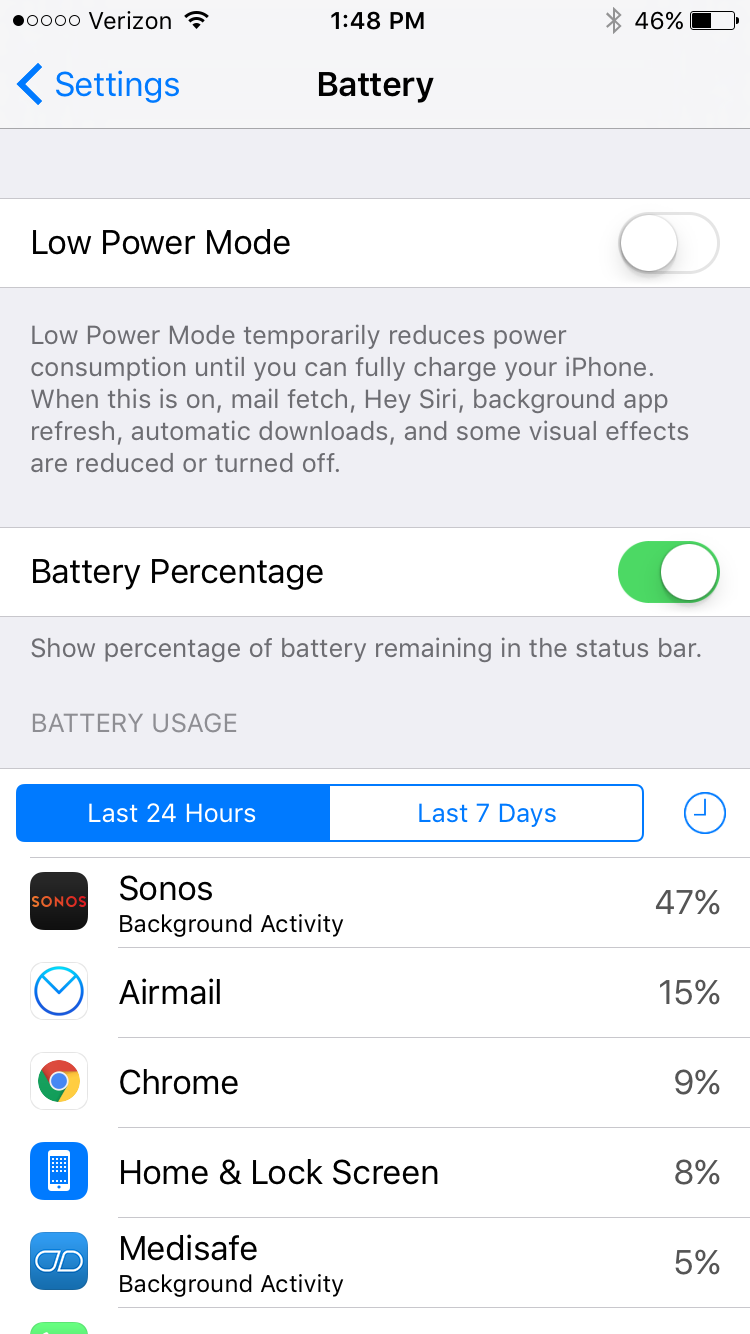
I am seeing very significant battery drain on iOS when using Sonos app. This morning I just used the app for about an hour to play music, and the battery usage report shows that Sonos has consumed 47% of the battery usage in the last 24 hours. This is a trend I've noticed a lot recently. What can I do?

This topic has been closed for further comments. You can use the search bar to find a similar topic, or create a new one by clicking Create Topic at the top of the page.
Best answer by Ryan S
Thanks for the details guys. We've been looking into iOS battery usage and so far it's all seemed pretty normal. The biggest drain on the battery that Sonos uses comes in two pieces, first off, the app is still going to try and keep alive access to your players while you're on a wireless network, which, even in background mode, will use a bit of the battery. The second piece, is that when you're using the iOS Lock Screen controls on Sonos, the app is "playing" a silent track on the phone. This is the only way to have a non-media app take control over the lock screen in iOS.

If you think your system is seeing an unusually high amount of battery usage, we're happy to take a look, and I'd encourage you to give us a call on our support line.

125 replies

Contributor I
December 5, 2017
iPhone X with awe-inspiring battery strength is no match for Sonos App! I took my iPhone X camping for 2 days and still 49% battery, but launch Sonos App and it's the first and only iOS app that took the awesome battery of my X to zero!

Mostly just pause the music from the iPhone while selecting songs from the Mac OS app...

Never had this problem with iPhone sonos app version 7.x and prior releases. This 8.x release is truly a disaster.
Sonos, time to pony up some $$ for solid iOS engineers who know their stuff and get busy winning back your loyal user base before this ship sinks. I may delete this app off my phone.
pwt
Virtuoso
December 5, 2017
I'm running the Sonos app on a variety of iOS devices including an iPhone 8 Plus, and I'm not experiencing this issue.

For diagnostic purposes, you could try disabling 'Lock Screen Controls' in Sonos settings. If that doesn't help, try also disabling "Background App Refresh' for Sonos.
4 x P:5 | Sub | 4 x P:1 | 3 x Connect | 2 x Boost | Connect:Amp | 2 x One | Amp | Move | Port | Era 300
Contributor I
December 5, 2017
Thanks for your suggestions but this is a Sonos bug they need to drill deeper into. It's clearly background task on Sonos that's draining the battery based on the battery % report I posted.
pwt
Virtuoso
December 5, 2017
Thanks for your suggestions but this is a Sonos bug they need to drill deeper into. It's clearly background task on Sonos that's draining the battery based on the battery % report I posted.
Probably, but not necessarily. This could be a bug in some part of the iOS API that Sonos is using, or an interaction with something else on your iPhone, given that the problem is evidently not seen on all iOS devices.

The suggestions I made might alleviate the issue for you in the meantime.
4 x P:5 | Sub | 4 x P:1 | 3 x Connect | 2 x Boost | Connect:Amp | 2 x One | Amp | Move | Port | Era 300
Lyricist III
January 12, 2018
This SONOS iphone battery draining BUG is still present in Iphone X and 8 plus in mid Jan 2018. We see 77% and 60% of our daily battery use from Sonos ...and neither of us changed the volume or anything ...as we weren't even home for a few days.
Airgetlam
January 12, 2018
I'll continue to repeat myself. Please submit a system diagnostic .

It seems obvious to me that Sonos hasn't been able to reproduce the issue in order to fix it yet, so the more information we can provide to them, the better. Unfortunately, it's not happening on any of my 3 iOS devices, so I can't help.

And many people have found that turning off the lock screen and physical hardware controls on the iOS app have mitigated the issue. Not for everyone, but it's worth a shot.
Bruce
Lyricist III
January 12, 2018
They can't be trying very hard to reproduce it! It has been described perfectly well a dozen times.

Mitigation of a clear power hogging bug in IOS has gone on far too long. As others have said, get some propper engineers on this Sonos!

BTW A system diagnostic hardly applies, as I am in Brighton and my system is in Northampton. The bug is in the Sonos Iphone app, not the firmware of the Sonos hardware.
Airgetlam
January 12, 2018
I've been involved with a few software products. I can say without any speculation that describing an issue does not necessarily mean that the engineer working on the issue can duplicate it on a machine on which they can see what is happening. It's the reproduction of the issue that is key for someone to fix a 'bug'.

And while I am not familiar with the contents of a diagnostic, I would hazard a guess that there's some data included from the controller device. At the very least, I'd expect a device type, OS version and software version, otherwise there'd be a multiplicity of things that they'd not be able to rectify. But just those three things probably aren't everything that they're collecting, as a guess. There's probably app settings, and perhaps other data too.

And at the end of the day, what's the cost of providing Sonos more information? As near as I can tell, it's around 15 seconds or so of button clicks, and if it helps them identify an issue, why not? Merely stating that there's a problem won't help, since they're already aware of it. There's 5 pages of this thread.

I guess it boils down to whether you want to just state that you're unhappy, or if you want to help them resolve this. Entirely up to you.
Bruce
Lyricist I
January 22, 2018
I am seeing very significant battery drain on iOS when using Sonos app. This morning I just used the app for about an hour to play music, and the battery usage report shows that Sonos has consumed 47% of the battery usage in the last 24 hours. This is a trend I've noticed a lot recently. What can I do?

Lyricist I
January 22, 2018
Has anyone received a reply that actually fixes the problem? Turning off the lockscreen for the benefit of one app doesn't make much sense to me. thanks all.