Avid Contributor I
April 14, 2016
Answered

Severe battery drain with Sonos app in iOS

  • April 14, 2016
  • 125 replies
  • 19523 views
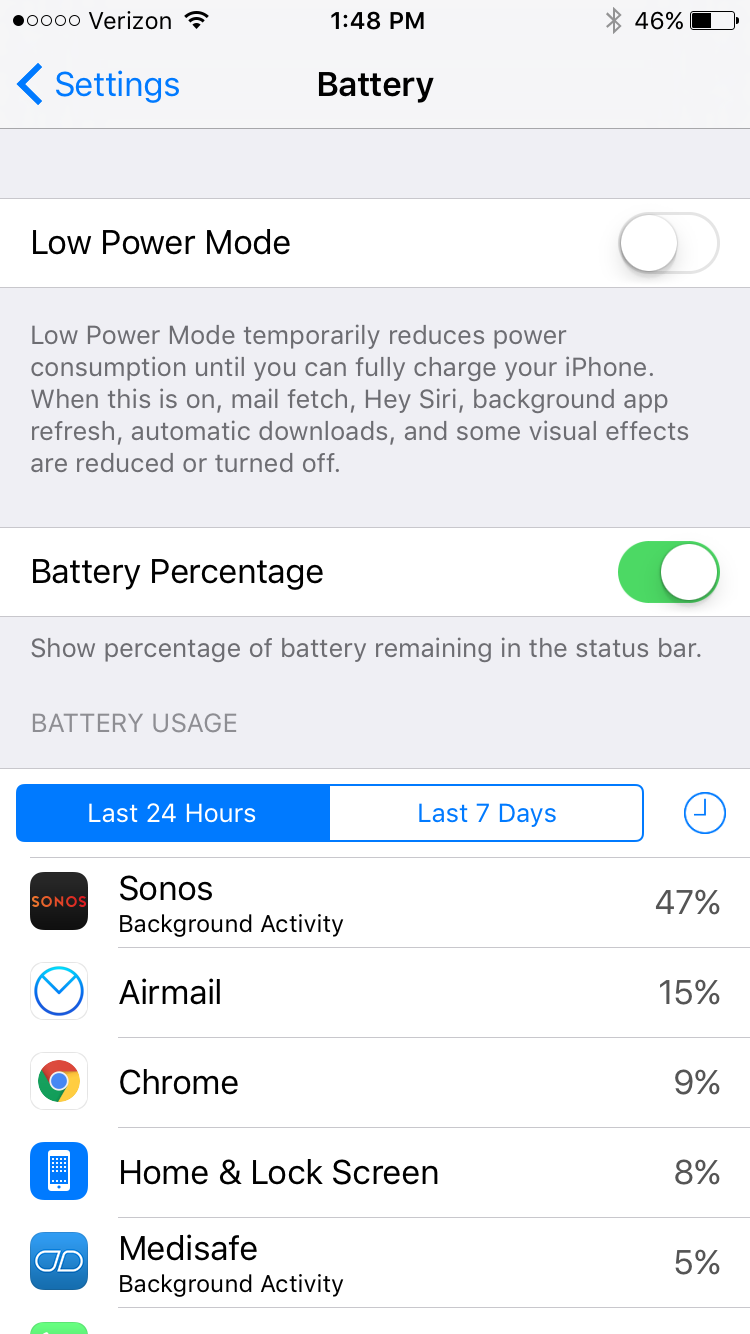
I am seeing very significant battery drain on iOS when using Sonos app. This morning I just used the app for about an hour to play music, and the battery usage report shows that Sonos has consumed 47% of the battery usage in the last 24 hours. This is a trend I've noticed a lot recently. What can I do?

This topic has been closed for further comments. You can use the search bar to find a similar topic, or create a new one by clicking Create Topic at the top of the page.
Best answer by Ryan S
Thanks for the details guys. We've been looking into iOS battery usage and so far it's all seemed pretty normal. The biggest drain on the battery that Sonos uses comes in two pieces, first off, the app is still going to try and keep alive access to your players while you're on a wireless network, which, even in background mode, will use a bit of the battery. The second piece, is that when you're using the iOS Lock Screen controls on Sonos, the app is "playing" a silent track on the phone. This is the only way to have a non-media app take control over the lock screen in iOS.

If you think your system is seeing an unusually high amount of battery usage, we're happy to take a look, and I'd encourage you to give us a call on our support line.

125 replies

Lyricist I
May 16, 2017
I have the same problem with the battery drain with the app running in the background. I tried to re install the app which didn't help but now I got the lock screen settings which weren't available before. But still Sonos is No. 1 app using most of my battery power and I don't use this app frequently. My phone dies after 10 hours of lying around with 9.4 hours Sonos running in background and 5 minutes on screen!? From the screenshots you can see that your app is going through the roof, far off other common apps in power consumption! Any suggestions?

Sonos app V7.2, iOS 10.3.1


Omar H
Sonos Staff
May 17, 2017
Hi tafneo,

If you are concerned with the battery usage on your iPhone, I would recommend disabling the Lock Screen Controls and force quitting the Sonos app when you are not using it so that nothing is running in the background.

To disable Lock Screen Control, please go to your iPhone Settings > Sonos and you will see the Lock screen control on/off button there.
Nico R
Retired Sonos Staff
May 17, 2017
Hello tafneo, welcome to the Community and thank you for the screen captures.

The surefire but inconvenient workaround is to force quit the app when you're not using it. I updated my iPad to 10.x and even without the Sonos app opened, I could see that any sort of network activity would wear the battery charge down pretty quickly.
Help others find useful content by clicking the like button and selecting the best answer to your question.
Trending Lyricist I
May 20, 2017


Same issue here on my iPhone 7. Battery usage in background is high and has killed my battery life. I have now turned off the lock screen controls and quit the app after use but that really does question the usefulness of the Sonos app.
Tom B
Retired Sonos Staff
May 22, 2017
Hi idparkinson, welcome to the community. Please do note that the 66% you see is the percentage of battery used so far, compared to other apps, and not of the whole battery. If you look at how much Sonos has been on (7.4 hours) compared to other apps (mostly a small number of minutes) it's not surprising that Sonos has the majority of the usage here.

If you are concerned about your phone's battery, have a look at this article I found online, which has quite a few good tips for improving the life.
Help others find useful content by clicking the like button and selecting the best answer to your question
Lyricist I
October 19, 2017
This is still a big issue in the current version of the app. I can use Sonos for just an hour, on my iPad Pro 10.5 or iPhone 8 Plus, and if I don't remember to force quit the app, it will just eat through my battery in the background, while I'm not even playing music anymore.

Here's an example of my iPad. I had about 80% battery life when I last finished using Sonos and the iPad. The Sonos app ran in the background for over 24 hours and it was at 26% battery when I came back to the iPad this morning. Based on the iOS battery stats, Sonos has contributed to 74% of an approximate 64% decrease (it started at around 90% charge yesterday) in charge level in 24 hours. That's ~47% of the sizable iPad Pro battery used by Sonos in 24 hours. My iPad battery was dead the other day for seemingly no apparent reason. Now I know the reason.

This is not normal battery usage. There is no reasonable explanation for this level of battery drain. Especially if Sonos is not in use. It's highly inconvenient to pick up a device after a day or two and have the battery be dead, because I chose to listen to Sonos for a bit and forgot I need to force quit the app or disable the lock screen control. I have not encountered another music app with a lock screen control and anywhere near this level of drain when it should be idle. Please fix this!

Enthusiast I
October 19, 2017
I always force quit after setting the music, not great.
Lyricist I
October 20, 2017
Same problem. This is very bad. A deal-breaker level problem. SONOS please take this seriously.
Airgetlam
October 20, 2017
Would highly recommend submitting a diagnostic if you're experiencing this issue. It might help Sonos figure out what the issue is, since it's only affecting a few people. It might be hard for them to reproduce. For instance, I'm not experiencing it on any of the three iOS devices I use. But that doesn't negate the experience you're having. Giving them additional data to base their testing on would likely be a good thing.
Bruce
Lyricist I
December 3, 2017
This is a terrible problem which is already haunting me for weeks without improvement. The only thing that "works" is force quitting the sonos app after each time you need it, which defeats its purpose and is totally not what Apple recommends. Besides that it is easily forgotten which leads to an empty battery when you need it the most.

See screenshot below: the sonos controller has been used ONCE to start an internet radio stream on the sonos player via tunein radio. Afterwards it hasn't been opened. But apparently it used up 45% of my battery whilst doing nothing in the background. Thats more then 3 apps (a game, tweetbot and safari) which have been used for over 70min on screen but only used 32% battery whilst doing so in the same 24 hours interval.

Please FIX this.

Edit: Latest iOS version, Latest Sonos App version, iPhone 7.