Contributor I
June 24, 2020
Question

S2 app upgrade stuck at Terms of Service

  • June 24, 2020
  • 29 replies
  • 6186 views

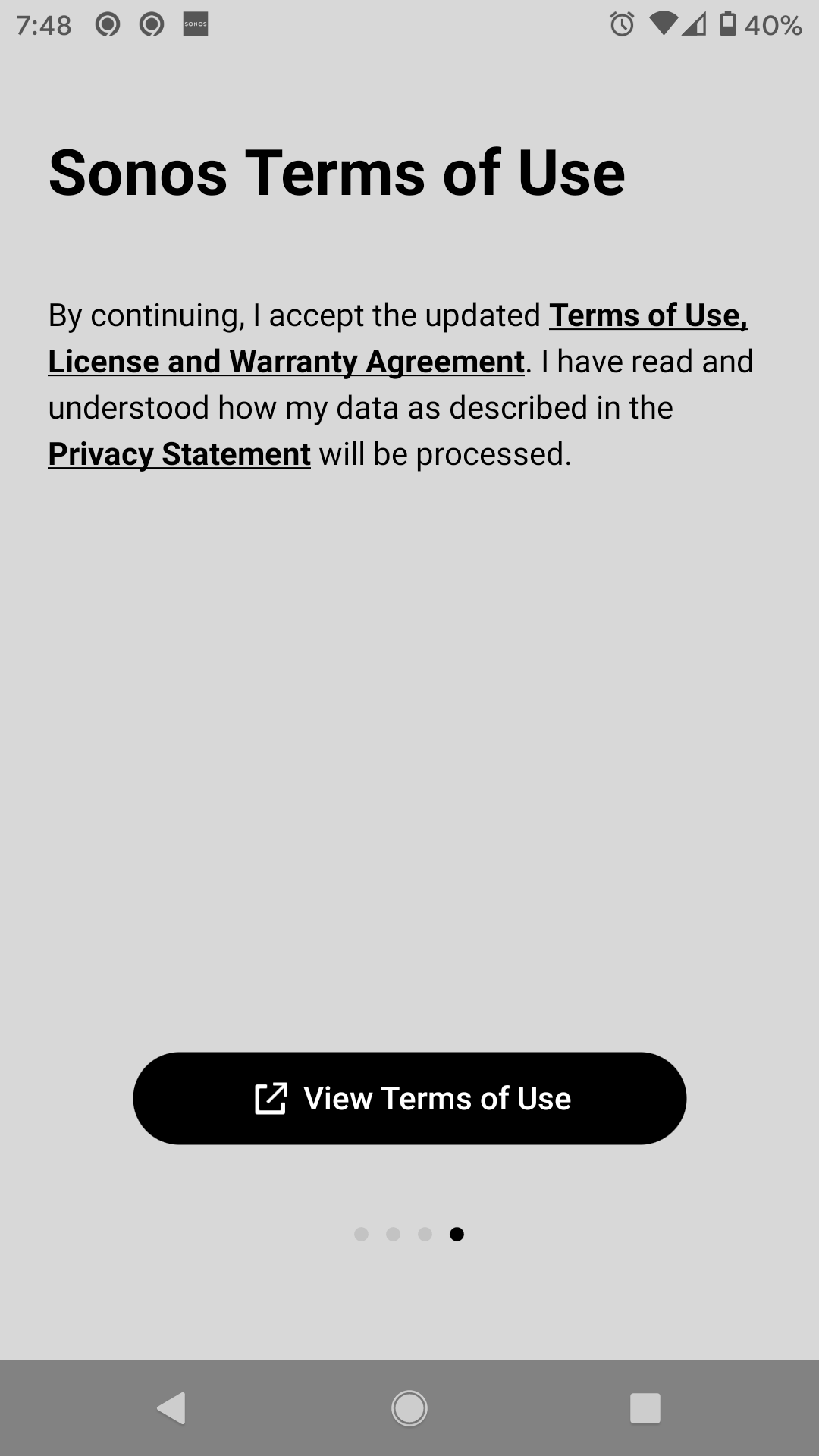
I am trying to upgrade to the S2 app and cannot get past the terms of use. I view and scroll all the way down but there is not accept or way to acknowledge I agree with them.

 

This topic has been closed for further comments. You can use the search bar to find a similar topic, or create a new one by clicking Create Topic at the top of the page.

29 replies

Simon B
Retired Sonos Staff
July 7, 2020

Hi everyone, Regarding this issue, here are some steps for troubleshooting in resolving this issue.


Part of the S2 update requires users to accept a new EULA. On Android controllers, this can cause an app crash if the user has Chrome disabled or is running a 3rd party default web browser.

In other instances, the user cannot accept the EULA when the Android Developer Options are turned on. In this case, the button to accept will not appear, but the app will not crash.

  • Navigate to app settings for Chrome
  • Disable the Chrome app
  • Uninstall or reset Sonos app
  • Launch the Sonos app and progress through the first-run carousel
  • Select "view terms of use" button
  • Sonos app will crash or close

(App crashes)

  • If the app crashes,  re-enable Chrome as the default web browse temporarily.
  • Go through the S2 update and accept the EULA
  • You will be able to disable Chrome again as desired

(No accept button)

  1. If you cannot accept the EULA due to a missing accept button, disable the developer options.
  2. Go through the S2 update and accept the EULA
  3. You will be able to enable the developer options again if desired
Help others find useful content by clicking the like button and selecting the best answer to your question
Lyricist I
July 18, 2020

I am trying to upgrade to the S2 app and cannot get past the terms of use. I view and scroll all the way down but there is not accept or way to acknowledge I agree with them.


I just had the same issue on iPhone 7 running iOS 13.4.1 shut down the S2 app, Go back to the S1 app it will ask you to open the S2 app when the new app opens the accept button was on the first page that opened. I hope this will work for you. Thanks and good luck! 

Simon B
Retired Sonos Staff
July 18, 2020

Hi @s4mclean, Thanks for reaching out and welcome to the community. Thanks for sharing that workaround. We are still checking this with our specialists regarding this issue. 

We're here to answer any further questions you have.

Help others find useful content by clicking the like button and selecting the best answer to your question
Lyricist I
July 18, 2020

Thanks mine has been working fine although I have not deleted the S1 app as of yet

Simon B
Retired Sonos Staff
July 18, 2020

Hi @s4mclean, thanks for the update. You’re Welcome. Glad it worked for you. 

If there's any other issue you're having, feel free to reach out.

The Sonos Community is always here to help

Help others find useful content by clicking the like button and selecting the best answer to your question
Lyricist I
July 25, 2020

Sonos team this is completely unacceptable customer service.  Your app is broke and you should stop prompting people to upgrade to a broken service.  I have been struggling for days now and my sonos system is just a bunch of expensive paper weights until you fix it.

Are you one of those companies that jumped on the no QA bandwagon?  If not how did this make it through ypu testing cycle?

Smilja
July 25, 2020

@peekay21, you are confusing app and firmware which are different things.


If Developer Options are turned on, turn them off, and try again.

»And the world is like an apple whirling silently in space, Like the circles that you find in the windmills of your mind.« (›Windmills Of Your Mind‹ [1967]. Music by Michel Legrand ; English lyrics written by Alan & Marilyn Bergman)
Lyricist I
August 3, 2020

I had the same problem on my iPhone 6

To get around it:

  1. Click on the terms of use, it will open Safari (read it or not) Leave Safari open!
  2. Double tap the home button on the iPhone 
  3. Swipe back to the Sonos S2 app
  4. Tap on the Accept button while leaving Safari open.

Similiar to above, I have an Android phone, so when I opened & kept open the T & C in a Chrome window, I was able to go back to the Sonos app which now displayed the Accept button, which then allowed access to the S2 app. 

Lyricist I
August 10, 2020

Donnal, I believe you have to click on the link to view the terms, and then you’ll be able to proceed with the upgrade process.    It’s been a couple weeks since I did my upgrade, but I believe that’s how I got passed the screen.


Edit:  To clarify a bit. After viewing the T&C that pop up, go back to this screen (your screenshot) and the buttons should be enabled.


THIS is what worked for my Iphone SE 2020:

After downloading, open the app.  Swipe to Terms and Conditions screen.  Click on the link to Terms and Conditions.  Scroll up and click on the little person in the upper right.

LOG IN to your account.  

Leave Safari open

Go back to your sonos app. There should be an accept button. Click accept.

The app jumped to the Set Up page and I was able to continue setup  from there.

Good Luck!


20 minutes later…. I just discovered this is almost the same process as described below by RobSeattle.  Except I had to LOG IN to the website before returning to the Sonos app.