Contributor I
June 24, 2020
Question

S2 app upgrade stuck at Terms of Service

  • June 24, 2020
  • 29 replies
  • 6186 views

I am trying to upgrade to the S2 app and cannot get past the terms of use. I view and scroll all the way down but there is not accept or way to acknowledge I agree with them.
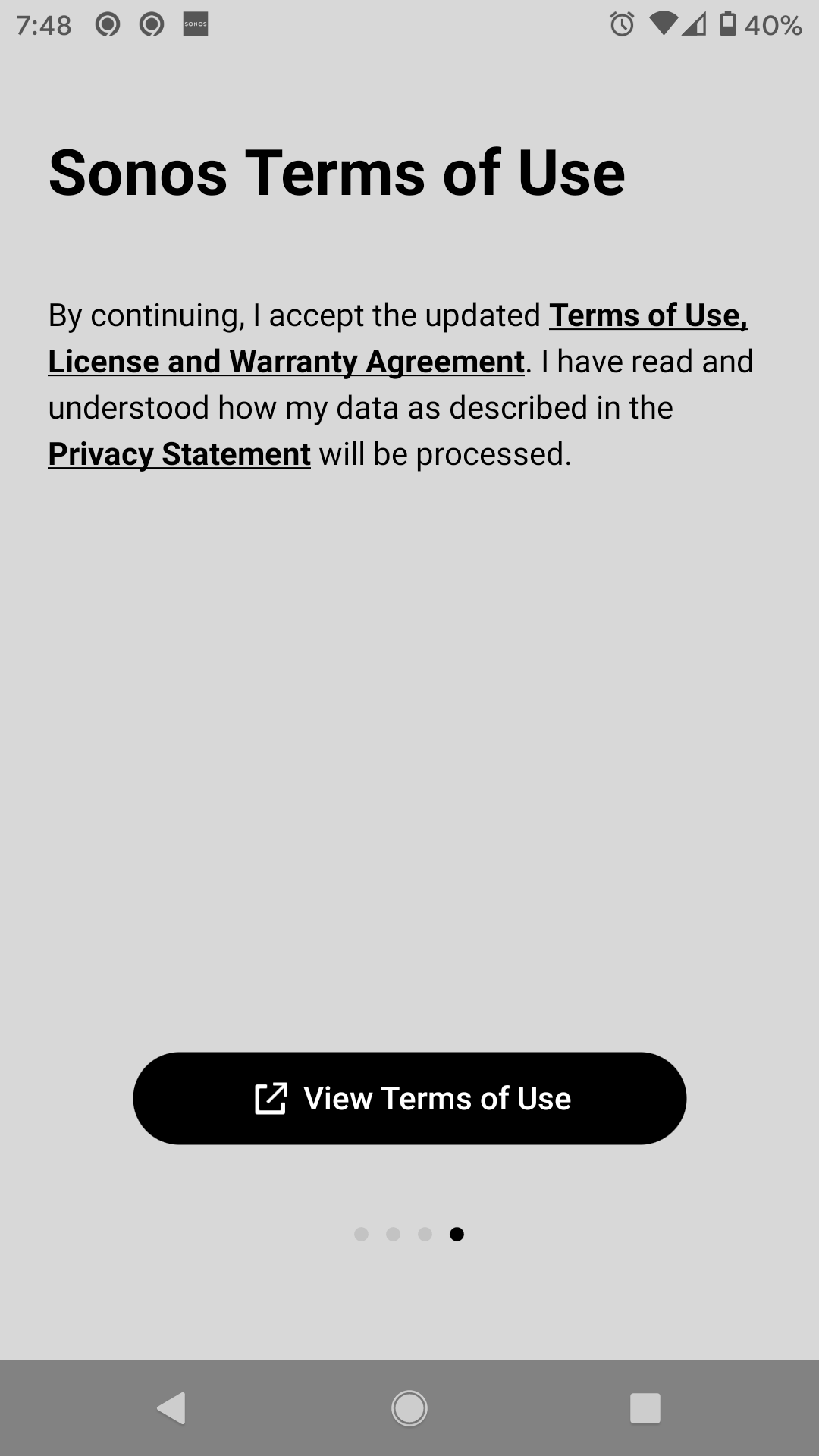

 

This topic has been closed for further comments. You can use the search bar to find a similar topic, or create a new one by clicking Create Topic at the top of the page.

29 replies

Simon B
Retired Sonos Staff
June 25, 2020

Hi @Donnal Spence. Thank you for reaching out and welcome to the community. Regarding your concern that when you're trying to upgrade to the S2 App and it is not letting you go through the Sonos terms of use page. I'd like to ask if have you tried to do it on another controller or uninstalling and reinstalling the Sonos S2 App to check if that will work.

Let us know how you get on with the advice above.

If there's any other issue you're having, feel free to reach out.

Help others find useful content by clicking the like button and selecting the best answer to your question
melvimbe
June 25, 2020

Donnal, I believe you have to click on the link to view the terms, and then you’ll be able to proceed with the upgrade process.    It’s been a couple weeks since I did my upgrade, but I believe that’s how I got passed the screen.


Edit:  To clarify a bit. After viewing the T&C that pop up, go back to this screen (your screenshot) and the buttons should be enabled.

Danny
Lyricist II
June 26, 2020

That doesn't work for me. I go to the T&C but when I go back, there's no continue button. Android 11 beta on a pixel 2 XL.

Simon B
Retired Sonos Staff
June 26, 2020

Hi @Mickoloh. Thanks for reaching out and the update. Upon checking, since your device is currently on an Android 11 beta version on your Pixel 2. I'd like to ask if you can try another controller which is on Android 7 to 10. So we can check for compatibility issues. If you're still having issues, kindly contact our phone support team.
They’re open Monday to Friday, from 9 am to 10 pm EST. Our phone support number: 1-800-680-2345.

Let us know how you get on with the advice above.

If there's any other issue you're having, feel free to reach out.

Help others find useful content by clicking the like button and selecting the best answer to your question
Lyricist II
June 26, 2020

I have tried same and it does not work. How many times do you want me to reinstall the S2 app? Please get me in a position to move forward. Using iOS 12. on iPhone 6.


Simon B
Retired Sonos Staff
June 26, 2020

Hi @pheditor. Thank you for reaching out and welcome to the community.Thanks for bringing this up and we totally understand where you're coming from. Regarding your concern. Kindly submit a diagnostic report to check in our end to see what could be causing the issue.

Let us know how you get on with the advice above.

We're here to answer any further questions you have.

Help others find useful content by clicking the like button and selecting the best answer to your question
Lyricist II
June 27, 2020

The problem is that it won't even install to the point where you CAN submit a report. It won't even let you accept the Terms of Use. 

Lyricist II
June 27, 2020

The problem is that it won't even install to the point where you CAN submit a report. It won't even let you accept the Terms of Use. 

Like Mickoloh says, no way to enjoin settings or any options because the S2 app does not install sufficiently to allow one access to any settings or further menu options. One is left rudderless and only allowed to  read the terms and conditions. No place to click acceptance and keep moving on within the app.


Lyricist II
June 30, 2020

An additional piece of information: it appears that upon switching to the web page view of the Terms of Use, the Sonos S2 app is restarted, thus possibly losing the ability to track that you went to that page. When closing the Terms of Use page, instead of immediately seeing the Sonos app view I left, I see there Orange app start-up page for a few seconds, as though the app just restarted/relaunched.

Simon B
Retired Sonos Staff
June 30, 2020

Hi @Mickoloh and @pheditor, thanks for the update. Since you’re still having the same issue. Kindly contact our phone support team for further assistance regarding the issue. They’re open Monday to Friday, from 9 am to 10 pm EST. Our phone support number: 1-800-680-2345. 

Help others find useful content by clicking the like button and selecting the best answer to your question