

rosswells127
Prodigy I
July 16, 2024
Answered

Music Library Compilations Issue Under 16.3.

  • July 16, 2024
  • 147 replies
  • 7696 views

Today I successfully updated to the latest 16.3 Firmware and Windows Desktop Controller.
I subsequently performed an “Update Music Library Now” from the 16.3 Windows Desktop Controller.
Now any Sonos Controller (including SonoPhone, SonoPad) show multiple entries for each compilation album when viewing Albums.
Just an example shown below...
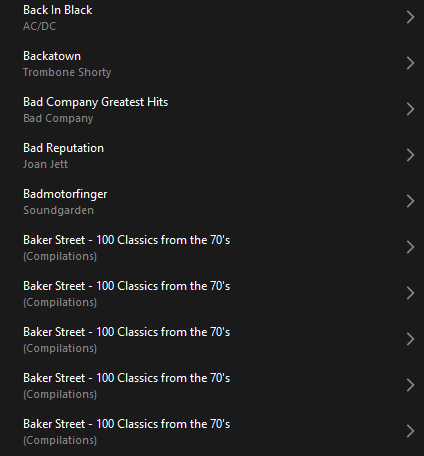
 

Does anyone else have this issue?
Ross.

This topic has been closed for further comments. You can use the search bar to find a similar topic, or create a new one by clicking Create Topic at the top of the page.
Best answer by Corry P

Hi @rosswells127 

I’m not sure why you posted this twice (please don’t), but we are aware of this issue and are now investigating. Thanks for flagging!

147 replies

MoPac
Headliner III
July 21, 2024

 I was incorrect about how my tags for Artist & Album Artist are when it comes to compilations.  That album in the above screenshot had the Album Artist tag as “Various” for all 12 artists.  Changed all 12 tracks so that Album Artist matches Artist.  After a re-index there are still 12 albums, but now each one has a single track in it.

 This is still, of course, the wrong way to display a compilation album.


sigh
Prodigy II
July 21, 2024

Your previous tagging for a compilation was correct, as mentioned a few comments above it looks like the new firmware has messed up tag extraction/referencing/searching or they have changed the tag name they use to identify album artists, so instead of being able to using the current album artist tag if it exists it is falling back to using artist.

This is then causing merry chaos in the app because it has entries using album artists for the previously correct view, but can’t reference back to the tracks anymore, so shows them as empty albums. The tracks previously shown correctly are now showing up as 1 track albums based on the artist tag of the track (assuming every artist for is different per track).

For things like OST where an artist might have appeared a few times in a movie you get multiple albums with a few tracks in them.

For albums where the artist tag on some tracks is the same as the album artist a few tracks with show, but artist tags of X featuring Y will missing and in a duplicate album under the X featuring Y artist.

It’s a case of wait for Sonos to fix. I wouldn’t start messing with your tags up to try and get it to show correctly because you’ll just end up with messed up tags

MoPac
Headliner III
July 21, 2024

 I only changed the tags for that one album just to see what would happen.  Not going to mess with the other compilations.

 I mostly listen to modern classical music whose default tags are all over the map.  So I purposely use the composer’s last name for the Artist & Album Artist tags.  That avoids seeing Boston Symphony Orchestra as the artist in an Artist search when using some servers.

 I’m more of a playlist guy.  I rarely use Artist, Album etc. searches.

Lyricist III
July 21, 2024

replaced my elderly NAS and transferred files.

Installed latest W10 controller and thought ‘at last’ only to be thwarted by sonos developer (?) yet again.


Same issue with compilation albums being listed as separate album for each track.

on the up side the few i have tested have at least played. Please don’t tell sonos or I will lose that!


Of course no library search is simple incompetent as well!

Renowned Enthusiast I
July 21, 2024

@sigh , @MoPac , @CRG66 , @anorakus and any others who are interested...

I meant to post the following here, but got lost along the way.

I’m sure you’re right about the firmware update - it appears to be the only thing you’ve changed and I haven’t.

My Android Software Test with firmware 79.1-54060

Fingers crossed for the Big One tomorrow.

Contributor I
July 21, 2024

I’m seeing the same problem on MacOS Sonoma 14.5 where my iTunes library is stored and SONOS firmware 16.3. As others have noted, re-indexing does not work, nor does removing the music library and re-adding it in the SONOS app. Until it is fixed, I’m using the Folders workaround @anorakus mentioned earlier:

A workaround, depending on how you have your music organised on your NAS (at least in the web app - haven’t tried the Android app as it’s still crashing) is to use Folder view rather than artist, album etc. I have music organised into folders according to Album Artist → Album Title, with compilations under Various Artists. This appears to be the only way to get compilations to view and play as they should.


press250
Prodigy III
July 21, 2024

@sigh , @MoPac , @CRG66 , @anorakus and any others who are interested...

I meant to post the following here, but got lost along the way.

I’m sure you’re right about the firmware update - it appears to be the only thing you’ve changed and I haven’t.

Hi @jreddaway, I’m reasonably certain you already know this … but just in case … you really do not want to perform a system update, as the v16.3 firmware will block the v16.1 Android app.

My pain, your gain.

Renowned Enthusiast I
July 22, 2024

@sigh , @MoPac , @CRG66 , @anorakus and any others who are interested...

I meant to post the following here, but got lost along the way.

I’m sure you’re right about the firmware update - it appears to be the only thing you’ve changed and I haven’t.

Hi @jreddaway, I’m reasonably certain you already know this … but just in case … you really do not want to perform a system update, as the v16.3 firmware will block the v16.1 Android app.

My pain, your gain.

Thank you, @press250 . I feel your pain and am definitely not doing any updates until further notice. 

I am increasingly convinced however that it's only a matter of time before "they" make it impossible to hold out any longer.  Maybe today's promised big update will fix everything, or am I just being naive.......?


sigh
Prodigy II
July 22, 2024

If you have a Dlna/upnp application could always have a peek at what the Sonos player is exposing as tagging data in its attributes folder. Sonos devices appear as dlna/upnp servers you can browse. Confusingly Sonos export the files artist tags as ‘Contributing Artist’ and the files album artist tags as “Artist”.

I would guess with the new firmware those attributes folders now either contain different things or maybe one is missing or named differently. The extracted library data wouldn’t need to change, but if the program in the firmware has messed up the naming it uses to expose it then the Sonos App won’t have the correct attribute to group the data by. The grouping for display will be being performed by the mobile/desktop app based on the attributes the devices expose. This allows people to choose which they prefer without needing different tag extraction code in the devices.

Maybe the firmware fixes the weird attribute naming so artist = artist tag, contributing artists is gone and a new album artist attribute exists, but the app code to support the renaming isn’t released yet 🤷

This is what my 16.1 devices expose as attributes.


Renowned Enthusiast I
July 22, 2024

Hello @sigh , as a tagging tragic I find your comment here very interesting. I would appreciate any guidance you may have re DLNA/upnp apps as I have never come across them. 

I have never understood the way Sonos has handled Contributing Artists, a mystery your comment sheds some light on. 

Yet another example of Sonos' lack of coding/testing skills. What a shame.