

rosswells127
Prodigy I
July 16, 2024
Answered

Music Library Compilations Issue Under 16.3.

  • July 16, 2024
  • 147 replies
  • 7696 views

Today I successfully updated to the latest 16.3 Firmware and Windows Desktop Controller.
I subsequently performed an “Update Music Library Now” from the 16.3 Windows Desktop Controller.
Now any Sonos Controller (including SonoPhone, SonoPad) show multiple entries for each compilation album when viewing Albums.
Just an example shown below...
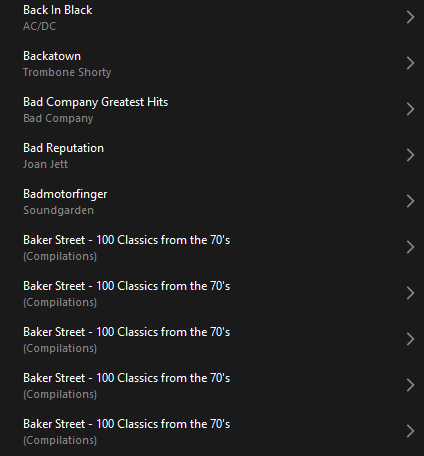
 

Does anyone else have this issue?
Ross.

This topic has been closed for further comments. You can use the search bar to find a similar topic, or create a new one by clicking Create Topic at the top of the page.
Best answer by Corry P

Hi @rosswells127 

I’m not sure why you posted this twice (please don’t), but we are aware of this issue and are now investigating. Thanks for flagging!

147 replies

Enthusiast I
October 7, 2024

Sure, it’s a pain, but entirely avoided by browsing by FOLDER. You want to play a compilation album, start it from folder view. Easy as pie. 

Lyricist III
October 7, 2024

Sure, it’s a pain, but entirely avoided by browsing by FOLDER. You want to play a compilation album, start it from folder view. Easy as pie. 

Thank you - I had no idea the albums could be played through the folder option. It’s not obvious because there are so many layers of subfolders and some albums are incorrectly in compilations (probably due to errors in labelling) but it does look like I can actually play albums this way. 

Using folders had been mentioned before, but with the impression that each album had to be manually recreated as a folder. 

Why has no-one from SONOS provided this solution through so many months? Admittedly this answer is far from perfect, but it is a temporary solution which means that albums can be found and played.

Lyricist I
October 13, 2024

THANK YOU umiami91

I was so frustrated with Sonos that it did not cross my mind… 

And if it’s not my job to think about such a simple work around, I’m sure it is Sonos engineering’s ! 
These guys must be drowning in the abyss of their Quality Assurance… appalling.


Lyricist III
October 13, 2024

I am not computer illiterate. But when I have look up playing music from folders, the articles I see refer to playing  music stored on a phone. My audio folks haven’t mentioned the folder alternative either. At any rate, it’s not my job to figure this out. If there is a work around,  why did Cory say it was best to wait for the fix?

Trending Lyricist I
October 13, 2024

I am not computer illiterate. But when I have look up playing music from folders, the articles I see refer to playing  music stored on a phone. My audio folks haven’t mentioned the folder alternative either. At any rate, it’s not my job to figure this out. If there is a work around,  why did Cory say it was best to wait for the fix?

If you go to sons/music library on the app, one of the selections is folders. The thing is that we are accepting there is a workaround for all of the screw ups that they have been making. "There is a workaround"  is not a way to support a broken product 

Lyricist III
October 13, 2024

Didn’t mean to sound like a criticism of the responders. We are all desperate for a solution that fixes the problem. I remain in awe of Sonos’s ability to stonewall their customers. Their declaration of new practices read like a satire. It’s hard to believe that a company of any size would have had management that did not establish quality benchmarks and wouldn’t only release products and updates when they were ready. 

Lyricist III
October 13, 2024

It proves sonos have no interest in fixing the problem they introduced to long standing customers