
Contributor I
October 2, 2016
Question

IOS10 Sonos controller cant connect to music services

  • October 2, 2016
  • 18 replies
  • 1845 views
When I navigate to a music service (apple music, plex, spotify, tunein, all of 'em!) I ge unable to browse music, there was a problem connecting to...

I had been able to fix this previously by removing my firewall from the first in the list of resolvers but I'm getting same issue again now.
Manually removing my IPv6 resolvers seems to fix the issue but they are last on my resolver list.

Do you have an IPv6 issue Sonos or am I doing something daft?
    This topic has been closed for further comments. You can use the search bar to find a similar topic, or create a new one by clicking Create Topic at the top of the page.

    18 replies

    ratty
    October 2, 2016
    It sounds like you're inadvertently blocking a DNS request. My iTouch 6G running iOS 10.0.2 works fine. It shows IPv4 and IPv6 addresses.
    Lyricist I
    October 2, 2016
    Known problem. Bypass: Change DNS on your i-Phone: 8.8.8.8
    Ask SONOS asap to update the iOS app to prevent Image damage!
    ratty
    October 2, 2016
    Known problem with your ISP apparently, according to that other thread. It wouldn't be the first time that a specific ISP's DNS servers had caused issues.
    fysmdAuthor
    Contributor I
    October 2, 2016
    I'm using OpenDNS severs but still had same issue.
    If I remove (HE.NET's) v6 DNS servers It works for a while, then reverts.
    If I disable my v6 WAN it continues to not work
    If I disable DHCP6 on my LAN, and shut the v6 WAN down, IOS devices start to work without manual intervention.

    I'm not using my ISPs DNS, I do run a local server though which is normally the first offered to clients. I had previously disabled my local resolver but still didn't work so re-enabled now.

    All my none IOS 10 devices are (have always been) working perfectly. Windoze, OSX (including Sierra) and Android.
    Ryan S
    Retired Sonos Staff
    October 3, 2016
    As zdzd1500 and ratty said, this is a known issue that we're working on. The investigation is still on-going, but I believe it's an issue with the way iOS 10 is operating with IPv6 through some specific ISPs and their servers.

    If the suggestion on that other thread isn't working, you can also go into the IOS device's Wifi settings, select the "I" button and change the DNS to either Google or OpenDNS. The IOS10 device will disconnect and reconnect to the Wifi network and everything works again. You can even try the IPv6 DNS servers for OpenDNS which I believe are:

    2620:0:ccc::2
    2620:0:ccd::2
    Mark good posts by pressing the like button, and select the best answer on questions you've asked to help others find solutions.
    Trending Lyricist I
    November 19, 2016
    Wish I'd found this thread sooner...

    A few days ago, all my services stopped working. In a separate thread, someone else mentioned that they started having the issue with iOS10.

    I recalled that my daughter's iPod didn't make the jump from iOS 9 to iOS10; iOS 10 wasn't supported on that gen of iPod. So I got her iPod, and guess what - happily added Apple Music using that. Also can browse TuneIn Radio and Soundcloud on her iPod, just like I can on the Mac.

    So the culprit here is definitely something about iOS10.1.1, because:

    1) I can browse / add services via Mac desktop app.

    2) Browse / add services (including Apple Music) via iOS 9

    On my phone that's running iOS10, I've tried changing the DNS servers to 8.8.8.8 and 8.8.4.4, but that hasn't worked for me. Is there anything else I can try?
    Trending Lyricist I
    November 19, 2016
    Scratch the "anything else I can do" request.

    Adding Google DNS servers alone didn't do it for me. I added OpenDNS servers (their IPv6 servers too). I added both at the same time, so I don't know which did the trick, unfortunately, and now that it's working I'm afraid to do anything else!
    Trending Lyricist I
    November 19, 2016
    Aaaaand, back to frustration. After implementing the DNS fix, it worked for a while and now has reverted to the same behaviour. Can't browse any music services again.
    Trending Lyricist I
    November 19, 2016
    I'm pretty much out of ideas as to what to do, or even if there's anything I can do to fix. I know just enough to be dangerous with this stuff; changing DNS servers, the difference between DHCP and static, etc.

    But for the moment, I have one iOS controller in the house that works - an iPod running iOS 9, and two Macs running the desktop app.

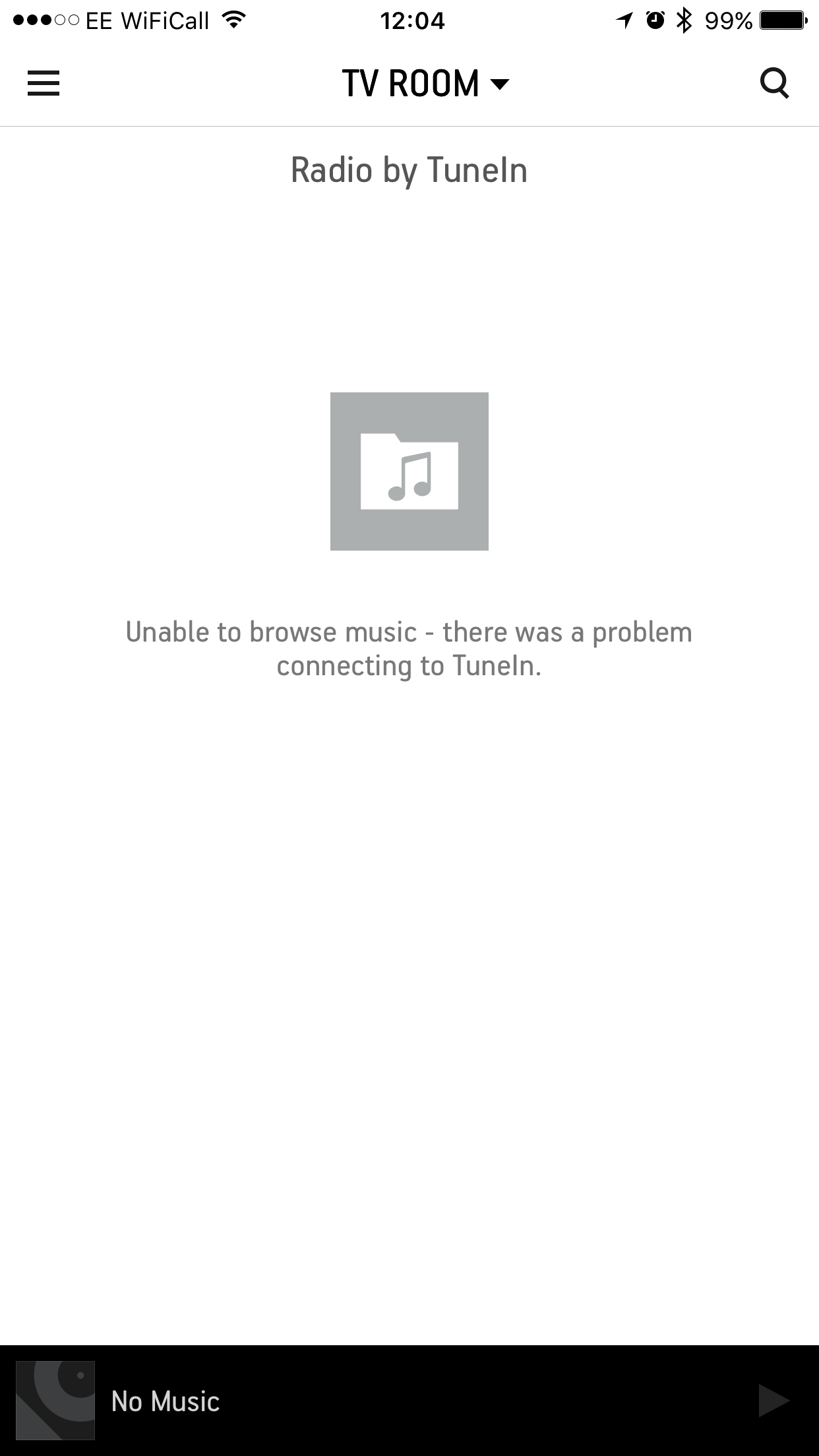
    All the other devices that had upgraded to iOS 10 are pretty much semi-functional; the only thing they can do with streaming services is access whatever I had added to my favourites. Below is all I see when I try to access them on my iOS 10 devices:


    Trending Lyricist I
    November 20, 2016
    As zdzd1500 and ratty said, this is a known issue that we're working on. The investigation is still on-going, but I believe it's an issue with the way iOS 10 is operating with IPv6 through some specific ISPs and their servers.

    If the suggestion on that other thread isn't working, you can also go into the IOS device's Wifi settings, select the "I" button and change the DNS to either Google or OpenDNS. The IOS10 device will disconnect and reconnect to the Wifi network and everything works again. You can even try the IPv6 DNS servers for OpenDNS which I believe are:

    2620:0:ccc::2
    2620:0:ccd::2


    Hi Ryan,

    Any update on progress for this? It seems that it became an issue for me, about a month or so after upgrading to iOS10.

    Let me know if there's anything I can do to help in the investigation, given that I'm impacted.