

controlav
Lead Maestro
September 20, 2018
Answered

Airplay on a Mac

  • September 20, 2018
  • 21 replies
  • 70887 views
I am an Apple ignoramus. My wife wants to use iTunes on her Mac to send to our Sonos system using Airplay. However the Sonos support page just talks about iPad/iPhone w.r.t. Airplay and when I look on her Mac, the Airplay options only show our Apple TVs as destinations. Can a Mac not use Airplay to Sonos gear?
This topic has been closed for further comments. You can use the search bar to find a similar topic, or create a new one by clicking Create Topic at the top of the page.
Best answer by pwt
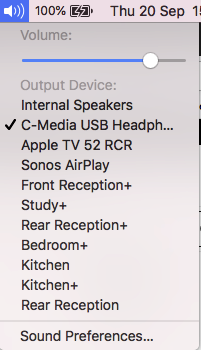
Yes, a Mac can use AirPlay to send audio to AirPlay-capable Sonos devices. You should be able to select Sonos Airplay targets by clicking on the Sound icon in the menu bar, as shown below in the example from my system.


If this does not work for you, let us know what version of OS X you are running, and which Sonos devices you want to use.

21 replies

Airgetlam
April 2, 2020

Glancing through your prodigious post, I see most of the normal troubleshooting steps I recommend. The issue is that since you’re not actually going through Sonos until the signal is received by the Sonos speaker, I’m not sure how much good a system diagnostic would do, other than identifying potential wifi interference there may be between the speakers and your router. Have you tried wiring the speakers directly to your router as a test?

I would certainly encourage you not to factory reset the speakers, unless instructed to by a Sonos rep. Effectively, all that does is erase any information stored on the speaker that might help Sonos assist you. 

Have you tried to contact Sonos Support directly to discuss it?

I usually suggest the phone folks, they have more tools available because they're on the phone with you, but they are available Monday through Friday during business hours. The Twitter support folks are available 24/7. 

Bruce