

controlav
Lead Maestro
September 20, 2018
Answered

Airplay on a Mac

  • September 20, 2018
  • 21 replies
  • 70887 views
I am an Apple ignoramus. My wife wants to use iTunes on her Mac to send to our Sonos system using Airplay. However the Sonos support page just talks about iPad/iPhone w.r.t. Airplay and when I look on her Mac, the Airplay options only show our Apple TVs as destinations. Can a Mac not use Airplay to Sonos gear?
This topic has been closed for further comments. You can use the search bar to find a similar topic, or create a new one by clicking Create Topic at the top of the page.
Best answer by pwt
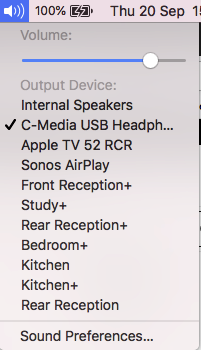
Yes, a Mac can use AirPlay to send audio to AirPlay-capable Sonos devices. You should be able to select Sonos Airplay targets by clicking on the Sound icon in the menu bar, as shown below in the example from my system.


If this does not work for you, let us know what version of OS X you are running, and which Sonos devices you want to use.

21 replies

April 9, 2019
Sonos does not support Airplay 1. The website makes no mention of it, only Airplay 2. Backwards - compatible or not, the Sonos software would have to integrate it for it to work reliably. If it somehow works, but unreliably, that is not a bug, it is unsupported, and Sonos are not going to do anything about it. I have managed myself to see my Sonos Airplay 2 compatible speakers from an iPad 2 (Airplay 1 compatible only) and stream audio very, very inconsistently. I know that is possible. It changes nothing I said.

For a comparable situation, Sonos does not support DLNA, yet it is still sometimes possible to stream using it. But if it doesn't work reliably, pointless complaining to Sonos.

FYI I only post what I believe has a strong basis in fact. I am of course wrong sometimes, but I always do my research.
pwt
Virtuoso
April 9, 2019
If you have an AirPlay 2 capable Sonos speaker it also supports AirPlay 1, for client devices that can only use the earlier form of the protocol. This is because AirPlay 2 retains backward compatibility with AirPlay 1.

As for the 'bug', I've experienced no issues with AirPlay 1 streaming to Sonos speakers. However, the only system I use for this is an old iPad '3' running iOS 9.3.5, streaming to a P:5 gen 2 stereo pair.
4 x P:5 | Sub | 4 x P:1 | 3 x Connect | 2 x Boost | Connect:Amp | 2 x One | Amp | Move | Port | Era 300
Trending Lyricist I
April 9, 2019
Sonos does not support Airplay 1. The website makes no mention of it, only Airplay 2. Backwards - compatible or not, the Sonos software would have to integrate it for it to work reliably. If it somehow works, but unreliably, that is not a bug, it is unsupported, and Sonos are not going to do anything about it. I have managed myself to see my Sonos Airplay 2 compatible speakers from an iPad 2 (Airplay 1 compatible only) and stream audio very, very inconsistently. I know that is possible. It changes nothing I said.

For a comparable situation, Sonos does not support DLNA, yet it is still sometimes possible to stream using it. But if it doesn't work reliably, pointless complaining to Sonos.

FYI I only post what I believe has a strong basis in fact. I am of course wrong sometimes, but I always do my research.


I posted in the relevant threads to set the record straight. Your statements are not accurate. I can't speak for DLNA but the other things you say, while not flat out wrong, are not quite true. Airplay 1 and 2 are backwards compatible. I have no idea nor have I ever heard of language requiring a smart speaker's S/W to "integrate" an Airplay 1 sending device. For example, I never had trouble outputting over Airplay from an iOS 10 iPhone. Sonos has never clarified it and without their clarifications, you are muddling the issue.
Keith N
Sonos Staff
April 9, 2019
Using AirPlay on Sonos hinges on specifically being able to support AirPlay 2. Based on the Apple Support article on AirPlay, it seems like Airplay 1 and 2 are two separate things with different OS and firmware requirements.

To cross check, here's a site that shows what OS devices support iOS version. Using this you should be able to deduce what Apple devices use what version of AirPlay.

When it comes to backwards compatibility between the two versions of AirPlay, you'd likely have to ask Apple for clarity on that. I know that my iMac from 2011 (on macOS 10.13) is able to use AirPlay 2 to connect to some of my Sonos speakers.
Building community is like building a garden. You build the frame, till the ground, plant the seeds, feed the plants & sometimes you gotta pull the weeds.
April 10, 2019
Thanks Keith that's helpful, but still leaves me with some uncertainty.

Let me first play back what I think is true. Historically Sonos never supported Airplay 1 (as we now call it). Airplay 2 was introduced on some speakers (those with the required hardware) and the Sonos 'promise' is that with those speakers you will be able to use Airplay 2 provided your controller device has an OS version that is Airplay 2 compatible. Sonos has no view on whether back compatibility does or should allow Airplay 1 to be used, and would not regard it as a bug if it didn't work on Sonos. Airplay 1 is just not on Sonos' radar.

My experience, and it appears that of @boris 1, is that on our systems Airplay 1 does not work reliably. @pwt, on the other hand, seems to have been able to use it without problem. My conjecture (it is only that) is that Airplay is not fully back compatible on Sonos speakers. Anyone with an Apple device that is not Airplay 2 compliant runs the risk of Airplay not working on Sonos.

The thing I am (now) most hazy about is to what extent - if any - Airplay on Sonos depends on the Sonos software. Because Sonos don't make standalone speakers, they make a whole ecosystem. One could buy a standalone Airplay-compatible speaker, connect it to home wifi, and stream to it using Airplay from a suitable Apple device. Sonos isn't quite like that. The speaker can only become operational for any purpose by being part of a Sonos system. My conjecture/speculation is that that potentially complicates things and may affect the back compatibility, especially given Sonos' 'heritage' of no Airplay compatibility before Airplay 2.

So to what extent, when being used for Airplay, is the operation 'free' of the Sonos ecosystem and behaving as a non-Sonos standalone Airplay speaker would? I would be surprised if the answer is that it is completely independent of the ecosystem, but I am open to all possibilities.
Keith N
Sonos Staff
April 11, 2019
When we introduced AirPlay 2 on Sonos via software v9.0, the update (among other things) "flipped a switch" allowing for specific Sonos devices to be discoverable to AirPlay sources (iOS, Mac & iTunes).

Personally, while I don't know about the exact "magic" between an AirPlay source and it's end point, it does seem to function fairly independent from Sonos and then "handed" over to the speaker. For instance, when I look at a diagnostic report the play log only defines airplay and the source local IP (much like Spotify Connect or commands via Alexa).
Building community is like building a garden. You build the frame, till the ground, plant the seeds, feed the plants & sometimes you gotta pull the weeds.
Lyricist I
June 28, 2019
I just wanted to add my 2 cents: I just bought a Beam and I can play music on it via my iPhone SE running iOS 9.3 which I suppose only has Airplay 1.
It works properly, except for some very sporadic breaks.
Contributor II
January 9, 2020

I must be missing something, I’m on mac os 10.15.2, have sonos 10.6 and use two play 3s, two play 5s, a soundbar, a subwoofer and a bridge.     I don’t see the options in my sound settings on my mac.  

Airgetlam
January 9, 2020

Unless those two PLAY:5s are second generation, then you don’t have any Sonos speakers that can be an AirPlay 2 receiver.

Bruce
Lyricist I
April 2, 2020

iMac
(Retina 5K, 27-inch, Late 2015)
macOS Majave Version 10.14.6
iTunes Version 12.9.5.5
Sonos Controller for Mac Version 11

2x Sonos One
purchased in June 2018
Version 11.0
Hardware Version 1.21.1.8-1
Series ID A100
Speaker A - Kitchen
Speaker B - Bathroom


My goal: Stream music from iTunes straight to both speakers

Issue:
Sometimes I can stream music straight from itunes or the sound setting to Speaker A - Kitchen
There used to be a time when I could stream to Speaker B - Bathroom straight from the mac, since early 2019 it can’t be connected anymore at all.

After I successfully connected Speaker A to iTunes, it’ll not reconnect hours later or a day later

Same for this way of connecting to the speaker:

Error messages:


What works?

Airplay from Apple Music of iPhone or iPad
Selecting my personal Playlists from the Sonos App on a mobile device.
Selecting a personal Playlist over the Sonos Controller for Mac from Apple Music (needs multiple attempts to work)


Trouble shooting I’ve done so far multiple times.

  • Reboot router/modem
  • Reboot iMac
  • Reboot Sonos One Speaker
  • Factory Reset Sonos one speakers.

Work around to get music streamed from iTunes straight to both speakers:

  1. Reboot iMac
  2. Start Sonos Controller for Mac
  3. Get any random personal Apple Music Playlist to play on speakers
  4. Open System preferences > Sound (or use menu bar) and select a Sonos Speaker (in my case Kitchen) as device for sound output (Airplay)
    » if it doesn’t connect repeat step 1-4
  5. Start iTunes
  6. Play music - it should be played on selected devise for sound output
  7. Click Airplay button in iTunes and check Computer + Sonos Speaker (in my case Kitchen)
    » if it doesn’t connect repeat step 1-7
  8. Go back to the Sonos Controller for Mac app and select all rooms to group speakers

I feel stupid already writing this but it’s the only way that I get my iTunes music to be played straight to the speaker.

What’s the benefit of it?

  • Play counts are being tracked right in my library
  • I get to stream “For You” playlists like New Music Mix or Playlists from “Browse” which are not available through the Sonos App


It used to work for months and now it doesn’t.
My assumption is that there must have been some feature releases in the past, an understaffed team on Sonos or Apples side that did not run global testing plans after the release to avoid issues like that and now nobody cares any more because of budget shortages.


My main intention of buying Sonos was to stream sound from the iMac as centralized media station.
Any suggestions how to fix this issue?


Thanks Eric