

controlav
Lead Maestro
September 20, 2018
Answered

Airplay on a Mac

  • September 20, 2018
  • 21 replies
  • 70887 views
I am an Apple ignoramus. My wife wants to use iTunes on her Mac to send to our Sonos system using Airplay. However the Sonos support page just talks about iPad/iPhone w.r.t. Airplay and when I look on her Mac, the Airplay options only show our Apple TVs as destinations. Can a Mac not use Airplay to Sonos gear?
This topic has been closed for further comments. You can use the search bar to find a similar topic, or create a new one by clicking Create Topic at the top of the page.
Best answer by pwt
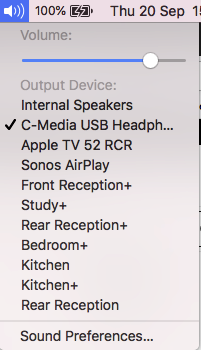
Yes, a Mac can use AirPlay to send audio to AirPlay-capable Sonos devices. You should be able to select Sonos Airplay targets by clicking on the Sound icon in the menu bar, as shown below in the example from my system.


If this does not work for you, let us know what version of OS X you are running, and which Sonos devices you want to use.

21 replies

pwt
pwtAnswer
Virtuoso
September 20, 2018
Yes, a Mac can use AirPlay to send audio to AirPlay-capable Sonos devices. You should be able to select Sonos Airplay targets by clicking on the Sound icon in the menu bar, as shown below in the example from my system.


If this does not work for you, let us know what version of OS X you are running, and which Sonos devices you want to use.
4 x P:5 | Sub | 4 x P:1 | 3 x Connect | 2 x Boost | Connect:Amp | 2 x One | Amp | Move | Port | Era 300
controlav
controlavAuthor
Lead Maestro
September 21, 2018
Thanks, that did it! Silly me for looking on the AirPlay menu (which only does video). Sonos, please update your Airplay support page for dolts like me.
Author of the leading independent Sonos apps for Android, MacOS, iOS, Windows and Xbox.
Lyricist I
December 26, 2018
I have a similar question.
I got a Sonos One and it works without any problems, but when I try to stream something from my Macbook (End 2008, OsX ElCapitan 10.11.6) there are some problems.
I can see the speaker at the SoundOutputs but there is no sound playing from the speaker.

Is there a solution to this problem?
December 26, 2018
I have a similar question.
I got a Sonos One and it works without any problems, but when I try to stream something from my Macbook (End 2008, OsX ElCapitan 10.11.6) there are some problems.
I can see the speaker at the SoundOutputs but there is no sound playing from the speaker.

Is there a solution to this problem?
Airplay 2 requires Mac OS 10.13.6 or higher, so that is the issue. If you want to play tracks from your iTunes library then it is better to set up a Sonos music library anyway, rather than use Airplay.
Trending Lyricist I
January 8, 2019
Hi John B
I'd be really interested to know why using iTunes via the Sonos library is preferable. I've been a Sonos user for 6/7 years and one of the things I've found really frustrating from the start is not being able to play direct from iTunes. I'm browsing this thread and others to decide whether investing in a One is worth it to allow me to do that. I've also been using the Audio Cast 3rd party app for a few weeks, which allows direct playback, and finding it no worse than the Sonos app in terms of stability, though it's pretty basic.

I love iTunes for organising music (smart playlists particularly), and having to update the Sonos library whenever I buy new music is a pain. Also relying on the Sonos app to keep in touch with my Mac seems to be one troublesome link that can be done away with. Genuine question.

Cheers,
Gareth

I have a similar question.
I got a Sonos One and it works without any problems, but when I try to stream something from my Macbook (End 2008, OsX ElCapitan 10.11.6) there are some problems.
I can see the speaker at the SoundOutputs but there is no sound playing from the speaker.

Is there a solution to this problem?
Airplay 2 requires Mac OS 10.13.6 or higher, so that is the issue. If you want to play tracks from your iTunes library then it is better to set up a Sonos music library anyway, rather than use Airplay.
pwt
Virtuoso
January 8, 2019
I'd be really interested to know why using iTunes via the Sonos library is preferable. I've been a Sonos user for 6/7 years and one of the things I've found really frustrating from the start is not being able to play direct from iTunes.
The benefit is that the speakers do the work, so music playback is independent of the controlling device (apart from the case where music is being pulled from a local library on the device). It means you can switch at will between controlling devices, and multiple users can control the same playback from their own controllers. You also aggregate multiple local and remote music sources into a single Sonos control point.

It sounds like your needs are simpler, and perhaps a simpler product would be better for you. Failing that, there are now multiple options for using AirPlay with Sonos -- assuming you're a macOS/iOS user.
4 x P:5 | Sub | 4 x P:1 | 3 x Connect | 2 x Boost | Connect:Amp | 2 x One | Amp | Move | Port | Era 300
Trending Lyricist I
January 8, 2019
Thanks pwt, that makes sense. Those are real advantages, undermined in my case because my collection is on a laptop that moves around a lot and tends to lose connection, requiring lots of re-starts and mucking about.

I need to weigh up whether to continue to try to make the Sonos app and my Mac get on better together, (possibly by getting another Mac that stays in one place) or go for AirPlay and iTunes, and enjoy having iTunes organising things, in the main. Or both.

Mmm.
Trending Lyricist I
April 9, 2019
I have a similar question.
I got a Sonos One and it works without any problems, but when I try to stream something from my Macbook (End 2008, OsX ElCapitan 10.11.6) there are some problems.
I can see the speaker at the SoundOutputs but there is no sound playing from the speaker.

Is there a solution to this problem?
Airplay 2 requires Mac OS 10.13.6 or higher, so that is the issue. If you want to play tracks from your iTunes library then it is better to set up a Sonos music library anyway, rather than use Airplay.


John, that doesn't explain the problem. Airplay 2 is backwards compatible to Airplay 1. You should be able to use Airplay 1 to output to Sonos airplay speakers.
April 9, 2019
I have a similar question.
I got a Sonos One and it works without any problems, but when I try to stream something from my Macbook (End 2008, OsX ElCapitan 10.11.6) there are some problems.
I can see the speaker at the SoundOutputs but there is no sound playing from the speaker.

Is there a solution to this problem?
Airplay 2 requires Mac OS 10.13.6 or higher, so that is the issue. If you want to play tracks from your iTunes library then it is better to set up a Sonos music library anyway, rather than use Airplay.


John, that doesn't explain the problem. Airplay 2 is backwards compatible to Airplay 1. You should be able to use Airplay 1 to output to Sonos airplay speakers.
Please see other thread that you posted on. Sonos does not work with Airplay 1 (like Bluetooth, because it is unreliable and not suited to multiroom). Therefore Airplay 2 is the only option on Sonos, and therefore you need an OS that works with Airplay 2. So my original answer IS correct.
Trending Lyricist I
April 9, 2019
I have a similar question.
I got a Sonos One and it works without any problems, but when I try to stream something from my Macbook (End 2008, OsX ElCapitan 10.11.6) there are some problems.
I can see the speaker at the SoundOutputs but there is no sound playing from the speaker.

Is there a solution to this problem?
Airplay 2 requires Mac OS 10.13.6 or higher, so that is the issue. If you want to play tracks from your iTunes library then it is better to set up a Sonos music library anyway, rather than use Airplay.


John, that doesn't explain the problem. Airplay 2 is backwards compatible to Airplay 1. You should be able to use Airplay 1 to output to Sonos airplay speakers.
Please see other thread that you posted on. Sonos does not work with Airplay 1 (like Bluetooth, because it is unreliable and not suited to multiroom). Therefore Airplay 2 is the only option on Sonos, and therefore you need an OS that works with Airplay 2. So my original answer IS correct.


You should research before you post.
https://forums.appleinsider.com/discussion/206273/reminder-airplay-devices-can-stream-to-airplay-2-speakers-like-the-homepod
https://en.community.sonos.com/setting-up-sonos-228990/streaming-from-macbook-to-beam-6810295/index1.html#post16262307
If you can airplay 2, then you can airplay 1. That's what backwards compatible means. It's still working intermittently from my MacBook Pro, it's more consistent with my iOS 10 iPhone. Any general advice from Sonos support on this bug?